शिक्षको और संस्था प्रधान के लिए कक्षा 5 व 8 के परीक्षा परिणाम के नवीनतम मानदंड
Latest norms for class 5 and 8 examination results for teachers and head of the institution
कार्यालय निदेशक प्रारंभिक शिक्षा राजस्थान बीकानेर क्रमांक – शिविरा / प्रारं / पंक्पि / 5वीं – 8 वीं परीक्षा / मानदण्ड / 21-22/32-34 दिनांक- 27.09.2022
परिपत्र कक्षा एवं 8 कक्षा 5 के जारी परीक्षा परिणाम से संबंधित
परिपत्र – शिविरा / प्रारं/ शैक्षिक / मानदण्ड / 2016-17 दिनांक 14.04.2016 के क्रम में नवीन प्रावधानों एवं आवयकताओं को को सम्मिलित कर अद्यतन करते हुए कक्षा 8 एवं 5 के संस्था प्रधानों एवं शिक्षकों के लिए निम्नांकित मानदण्ड जारी किए जाते हैं। यह मानदण्ड कक्षा 8 एवं कक्षा 5 परीक्षा 2022 के परिणाम से प्रभावी होंगे। इस संबंध में निम्नानुसार निर्देश जारी किए जाते हैं-
1 संस्था प्रधान
(अ) श्रेष्ठ परीक्षा परिणाम विद्यालय का कक्षा 8एवं कक्षा 5 के परीक्षा परिणाम में 90 प्रतिशत या अधिक विद्यार्थियों द्वारा ग्रेड ए प्राप्त करने पर संस्था प्रधान को विभाग द्वारा प्रमाणपत्र दिया जाएगा (कक्षा 8 एवं कक्षा 5 के परीक्षा परिणाम में किसी एक अथवा दोनों के लिए)
(ब) न्यून परीक्षा परिणाम विद्यालय कक्षा 8 एवं 5 के परीक्षा परिणाम में 50 प्रतिशत या अधिक विद्यार्थियों द्वारा ग्रेड ई प्राप्त करने पर संस्था प्रधान के विरूद्ध विभाग द्वारा सीसीए नियम 17 के तहत कार्यवाही प्रारंभ की जाएगी।
नोट- यदि विद्यालय का परीक्षा परिणाम किसी एक परीक्षा (कक्षा 8 एवं 5 में से एक) में उपर्युक्त मानदण्ड अनुरूप श्रेष्ठ परीक्षा परिणाम हो परन्तु दूसरी परीक्षा (कक्षा 8 एवं 5 में से एक) में मानदण्ड से न्यून हो, जिसके लिए उसे सीसीए 17 में नोटिस दिया जा रहा हो तो श्रेष्ठ परीक्षा परिणाम हेतु प्रमाण पत्र नहीं दिया जाएगा।
2 शिक्षक
(अ) श्रेष्ठ परीक्षा परिणाम- कक्षा 8 एवं 5 में अध्यापन किए जा रहे हे विषय परीक्षा परिणाम में 95 प्रतिशतया अधिक विद्यार्थियों द्वारा ग्रेड ए प्राप्त करने पर शिक्षक को विभाग द्वारा प्रमाणपत्र दिया जाएगा। ( विद्यालय के परीक्षा परिणाम में कक्षा 8 एवं 5 के परीक्षा परिणाम में किसी एक अथवा दोनों के लिए)
(ब) न्यून परीक्षा परिणाम कक्षा 8 एवं 5 में अध्यापक (लेवल 1 एवं लेवल ॥ जो निर्धारित हो) के कक्षा / विषय का परीक्षा परिणाम में 40 प्रतिशत या अधिक विद्यार्थियों द्वारा ग्रेड ई प्राप्त करने पर शिक्षक के विरूद्ध विभाग द्वारा सीसीए नियम 17 के तहत कार्यवाही प्रारंभ की जाएगी।
नोट- यदि शिक्षक का परीक्षा परिणाम किसी एक परीक्षा (कक्षा 8 एवं 5 में से एक) अथवा एक विषय (दो या अधिक विषय अध्यापन की स्थिति में) में उपर्युक्त मानदण्ड अनुरूप श्रेष्ठ परीक्षा परिणाम हो परन्तु अन्य परीक्षा (कक्षा 8 एवं 5 में से एक) अथवा अन्य विषय (दो या अधिक विषय अध्यापन की स्थिति में) में मानदण्ड से न्यून हो, जिसके लिए उसे सीसीए 17 में नोटिस दिया जा रहा हो तो श्रेष्ठ परीक्षा परिणाम हेतु प्रमाण पत्र नहीं दिया जाएगा।
3 क्रियान्वयन की रूपरेखा-
उपर्युक्त मानदण्डों के अनुसार संस्था प्रधान अथवा शिक्षक को परीक्षा परिणाम हेतु प्रमाण पत्र या कार्यवाही नोटिस देने से पूर्व निम्नांकित तथ्यों पर विचार किया जाना अनिवार्य होगा-
3.1 संस्था प्रधान / शिक्षक का सत्र में ( जुलाई से फरवरी) संस्था में न्यूनतम ठहराव 5 माह आवश्यक हो। शैक्षिक व्यवस्थार्थ अथवा अतिरिक्त संचालन हेतु नियुक्त अध्यापक की उक्त अवधि भी शिक्षण अवधि में सम्मिलित की जाएगी।
3.2 परीक्षा परिणाम की गणना के लिए पूरक परीक्षा परिणाम को सम्मिलित नहीं किया जाएगा।
3.3 एक ही शिक्षक द्वारा एक ही कक्षा एवं विषय का शिक्षण से एक से अधिक कक्षा वर्ग में कराया गया है तो परीक्षा परिणाम की गणना करते समय उस कक्षा के सभी वर्गों का कुल परिणाम (सभी कक्षा वर्ग के प्रविष्ठ कुल विद्यार्थियों की तुलना में कुल उत्तीर्ण विद्यार्थी) आकलित किया जाकर गणना की जाएगी।
3.4 सानुग्रह उत्तीर्ण विद्यार्थियों के परीक्षा परिणाम को विद्यालय एवं शिक्षक के परीक्षा परिणाम को उत्तीर्ण विद्यार्थियों के साथ सम्मिलित किया जाएगा।
4 सक्षम अधिकारी
4.1 संस्था प्रधान को श्रेष्ठ परीक्षा परिणाम हेतु प्रमाण पत्र संबंधित संयुक्त निदेशक द्वारा दिया जाएगा। संस्था प्रधान राउप्रावि के न्यून परीक्षा परिणाम हेतु उनके विरूद्ध अनुशासनात्मक कार्यवाही के प्रस्ताव जिला शिक्षा अधिकारी प्रारंभिक द्वारा संबंधित संयुक्त निदेशक स्कूल शिक्षा को प्रेषित करेगे जिस पर संयुक्त निदेशक द्वारा कार्यवाही की जाएगी।
4.2 शिक्षक को श्रेष्ठ परीक्षा परिणाम हेतु प्रमाण पत्र संबंधित जिला शिक्षा अधिकारी प्रारंभिक द्वारा दिया जाएगा। अध्यापक ग्रेड II (लेवला एवं लेवल 1 ) के न्यून परीक्षा परिणाम हेतु उनके विरूद्ध अनुशासनात्मक कार्यवाही संबंधित जिला शिक्षा अधिकारी प्रारंभिक द्वारा की जाएगी।
5.1 उपर्युक्त परिपत्र में उल्लेखित कक्षाओं के लिए परीक्षा परिणाम की प्रक्रिया जुलाई माह तक सम्पन्न कर ली जाती है अतः उपर्युक्त मानदण्ड अनुरूप कार्यवाही निम्नानुसार करने का दायित्व संबंधित अधिकारियों का होगा।
5.2 श्रेष्ठ परीक्षा परिणाम देने वाले संस्थाप्रधान / शिक्षकों को प्रमाण पत्र देकर सम्मानित करना ।
5.3 संस्था प्रधान द्वारा जिला शिक्षा अधिकारी प्रारंभिक को सूची मय परिणाम प्रति प्रस्तुत करना 15 नवम्बर से पूर्व।
5.4 संस्था प्रधान संबंधित जिला शिक्षा अधिकारी प्रारंभिक द्वारा संबंधित संयुक्त निदेशक, स्कूल शिक्षा को अनुशंषा सहित सूची मय परिणाम प्रति प्रस्तुत करना 15 दिसम्बर से पूर्व
5.5 संबंधित संयुक्त निदेशक, स्कूल शिक्षा एवं जिला शिक्षा अधिकारी प्रारंभिक द्वारा श्रेष्ठ परीक्षा परिणाम हेतु तैयार हस्ताक्षरित प्रमाण पत्र संस्था प्रधान को पहुंचाना 15 जनवरी से पूर्व
5.6 श्रेष्ठ परीक्षा परिणाम हेतु प्रमाण पत्र सम्मान 26 जनवरी को शाला के गणतन्त्र दिवस समारोह में जिला शिक्षा अधिकारी प्रारंभिक प्रति वर्ष श्रेष्ठतम परीक्षा परिणाम देने वाले संस्था प्रधान एवं शिक्षक का नाम राज्य एवं जिला स्तरीय राज्य समारोह में सम्मान हेतु अपनी अभिशंषा सहित पूर्ण प्रस्ताव उचित माध्यम से जिला प्रशासन एवं सामान्य प्रशासनिक सुधार विभाग राजस्थान को उनके द्वारा जारी परिपत्रों के अनुरूप निर्धारित कार्यक्रम के लिए प्रेषित करेंगे।
6 न्यून परीक्षा परिणाम हेतु निम्नानुसार कार्यवाही की जानी है-
6.1 न्यून परीक्षा परिणाम लक्ष्य प्राप्त नहीं करने वाले संस्था प्रधान एवं शिक्षक का निर्धारण- 30 जुलाई तक
6.2 सक्षम अधिकारी द्वारा कारण बताओं नोटिस जारी करना 10 अगस्त तक
6.3 कारण बताओ नोटिस का प्रत्यूतर प्राप्त करने की अंतिम तिथि 30 अगस्त तक
6.4 विश्लेषण उपरांत आरोप पत्र जारी करना 10 सितम्बर तक
6.5 व्यक्तिगत सुनवाई 10 अक्टूबर तक
निर्देशों में निर्धारित उत्तरदायित्व एवं समय सारणी अनुसार आवंटित कार्य समयबद्ध नहीं करने पर संबंधित अधिकारी के विरूद्ध विभागीय कार्यवाही की जा सकेगी।
SCIENCE FAIR FULL INFORMATION FORMS AND FORMATS QUIZ MATERIALS
विज्ञान मेला 2022-23 आयोजन दिशा-निर्देश
सर्वप्रथम सन् 1968 में राज्य विज्ञान शिक्षण संस्थान, उदयपुर द्वारा राज्य स्तरीय मेले का आयोजन प्रारम्भ किया गया । इसके पश्चात् प्रथम राष्ट्रीय विज्ञान प्रदर्शनी 1971 में एन.सी.ई.आर.टी. नई दिल्ली में आयोजित की गई। एन.सी.ई.आर.टी. नई दिल्ली द्वारा 1972 से प्रतिवर्ष राष्ट्रीय स्तर पर राष्ट्रीय विज्ञान प्रदर्शनी एवं राज्य स्तर पर “विज्ञान मेलों का आयोजन प्रारम्भ किया गया।
भारत के प्रथम प्रधानमंत्री श्री जवाहर लाल नेहरू की जन्म शताब्दी समारोह की शुरूआत के वर्ष 1988 से इस राष्ट्रीय विज्ञान प्रदर्शनी का नाम बच्चों के लिए जवाहर लाल नेहरू राष्ट्रीय विज्ञान प्रदर्शनी कर दिया गया। राजस्थान में 1968 से लगातार राज्य स्तरीय विज्ञान मेलों का आयोजन किया जा रहा है। सत्र 2022-23 से राष्ट्रीय आविष्कार अभियान के तहत जिला स्तरीय विज्ञान मेले का आयोजन समग्र शिक्षा एवं आरएससीईआरटी उदयपुर के संयुक्त तत्वाधान में आयोजित किया जा रहा है। राज्य स्तर विज्ञान मेले का आयोजन समग्र शिक्षा, आरएससीईआरटी एवंएनसीईआरटी, दिल्ली के संयुक्त तत्वाधान में आयोजित किया जा रहा है।
विज्ञान मेले के प्रमुख उद्देश्य
युवा पीढ़ी में विज्ञान और प्रौद्योगिकी के लिए रुवि जागृत कर उनमें वैज्ञानिक प्रवृत्ति उत्पन्न करना ।
विद्यार्थियों की अपनी स्वाभाविक जिज्ञासा एवं रचनात्मकता के लिए एक मंच उपलब्ध कराना, जहाँ वे अपनी ज्ञान पिपासा हेतु खोजबीन कर अपनी प्रतिभा का प्रदर्शन कर सकें।
विद्यार्थियों को अपने आस-पास हो रहे क्रियाकलापों में विज्ञान की उपस्थिति का अनुभव कराना और ज्ञान कराना कि हम भौतिक एवं सामाजिक पर्यावरण से अधिगम प्रक्रिया को जोड़कर ज्ञान प्राप्त कर सकते हैं तथा अनेक समस्याओं का समाधान भी कर सकते हैं।
विद्यार्थियों में अन्वेषण की आदत व सृजनात्मक सोच को प्रोत्साहित करना और प्रादर्शों/ मॉडलों अथवा सरल उपकरणों को स्वयं तैयार करने को प्रोत्साहित कर उनके मनचालक (psychomotor) और हस्तपरक कौशलों को प्रोन्नत करना ।
प्रतिभागियों में बौद्धिक ईमानदारी, दल-भावना और सौंदर्यपरकता उत्पन्न करना ।
समाज के उपयोग हेतु अच्छी गुणवत्ता एवं पर्यावरण अनुकूल सामग्री के उत्पादन हेतु विज्ञान एवं प्रौद्योगिकी की भूमिका पर जोर देना। विद्यार्थियों को भविष्य के प्रति दूरदर्शी बनाना तथा उन्हें संवेदनशील एवं जिम्मेदार नागरिक बनने हेतु प्रोत्साहित करना।
कृषि, उर्वरकों, खाद्य प्रसंस्करण, जैव तकनीकी, हरित ऊर्जा, सूचना एवं संचार प्रौद्योगिकी, खगोलविज्ञान, क्रीड़ा तथा खेलकूद एवं जलवायु परिवर्तन की चुनौतियों का सामना करने इत्यादि के क्षेत्रों में नए उपायों को तलाशने में विज्ञान तथा प्रौद्योगिकी की भूमिका की सराहना करना ।
दैनिक जीवन में आने वाली समस्याओं की सजीव कल्पना करने एवं उन्हें हल करने हेतु गणित को प्रयोग में लाना इत्यादि ।
SCIENCE FAIR FULL INFORMATION FORMS AND FORMATS QUIZ MATERIALS
मेले की विस्तृत जानकारी
विज्ञान सम्बंधी प्रादशों के उपविषय एवं सेमिनार के विषय प्रतिवर्ष एन.सी.ई.आर.टी. नई दिल्ली द्वारा निर्धारित किए जाते हैं। राष्ट्रीय स्तर पर केवल विज्ञान प्रदर्शनी का ही आयोजन होता है। इसके लिए प्रादर्शों का चयन राज्य स्तरीय विज्ञान मेले के श्रेष्ठ प्रादशों के आलेखों के आधार पर एन.सी.ई.आर.टी. नई दिल्ली द्वारा किया जाता है। राज्य में विज्ञान मेला इस वर्ष तीन चरण में आयोजित हैं। सर्वप्रथम विद्यालय स्तर तत्पश्चात् जिला स्तर तथा अंत में राज्य स्तर पर। राज्य स्तरीय विज्ञान मेला में जिला स्तर पर प्रथम स्थान प्राप्त करने वाले संभागी भाग लेते हैं। राज्य स्तर पर प्रथम रहे संभागी राष्ट्रीय स्तर पर सहभागिता करेंगे।
सामान्य निर्देश
विभिन्न स्तरों पर विज्ञान मेले के सफल आयोजन हेतु आपका ध्यान निम्नांकित बिन्दुओं की ओर आकर्षित किया जाता हैं। यह मेला निम्नलिखित स्तरों पर आयोजित किया जाएगा।
NOTE :वर्तमान में जिला स्तर पर नियोजित किया गये कार्यक्रम में बदलाव हुआ फ़िलहाल जिला स्तर पर आयोजन की तिथियों की घोषणा बाद में की जायेगी |
इसमें सरकारी, पब्लिक और प्राइवेट, केथोलिक, मिशनरी, सैन्य बल के विद्यालय थल सेना, वायु सेना, नौ सेना, सैनिक, सीमा सुरक्षा बल, भारत-तिब्बत सीमा पुलिस, असम राइफल्स, केन्द्रीय रिजर्व पुलिस बल, पुलिस आदि डी.ए.वी. प्रबंधन, महर्षि विद्या मंदिर, सरस्वती विद्या मंदिर, नवयुग, नगरपालिका, भारतीय विद्या भवन, आदि में पढ़ रहे बच्चे भाग लेने के पात्र हैं। इसमें केन्द्रीय विद्यालय संगठन, नवोदय विद्यालय समिति, स्वामी विवेकानन्द मोडल विद्यालय, परमाणु ऊर्जा आयोग एवं केन्द्रीय माध्यमिक शिक्षा बोर्ड से सम्बद्ध विद्यालय तथा क्षेत्रीय शिक्षा संस्थान के बहुउद्देशीय प्रदर्शन विद्यालयों के विद्यार्थी भाग नहीं ले सकेंगे क्योंकि इनके लिए अलग से विज्ञान प्रदर्शनी आयोजित होती है।
जिला / राज्य स्तरीय विज्ञान मेले का आयोजन NCERT एवम RSCERT के दिशानिर्देशों के अनुसार किया जाएगा।
एक संभागी किसी एक ही प्रतियोगिता में भाग ले सकेगा।
प्रतियोगिताओं में प्रस्तुति का माध्यम हिन्दी / अंग्रेजी होगा।
विद्यालय स्तर पर प्रथम स्थान प्राप्त करने वाले संभागी जिला स्तर पर भाग लेंगे।
मुख्य जिला शिक्षा अधिकारी एवं संस्था प्रधान यह सुनिश्चित करें कि जिले के समस्त विद्यालयों में विज्ञान मेला अनिवार्यतः आयोजित किया जाए तथा विद्यालय स्तर पर प्रथम रहे संभागी जिला स्तर पर अनिवार्यतः भाग लें।
जिला शिक्षा अधिकारी (मु) माध्यमिक एवं मुख्य ब्लॉक शिक्षा अधिकारी ब्लॉक के समस्त विद्यालय (उच्च माध्यमिक माध्यमिक विद्यालय / उच्च प्राथमिक विद्यालय) को जिला स्तरीय विज्ञान मेले में भाग लेने के लिए पाबंद करे।
जिला एवं राज्य स्तरीय विज्ञान मेले के आयोजक / संयोजक राजकीय विद्यालय / परिषद ही रहेंगे। आयोजक स्थल निजी होने की स्थिति में भी संयोजक राजकीय विद्यालय के प्रधानाचार्य ही रहेंगे।
प्रमाण पत्र सभी प्रतिभागियों एवं निर्णायकों को दिया जाएगा।
यह विज्ञान मेला, शिक्षा विभाग का महत्वपूर्ण आयोजन है, इसमें अधिकाधिक सहभागिता से शिक्षा विभाग की विज्ञान लोकप्रियता की दिशा में सफलता परिलक्षित होगी। अतः मुख्य जिला शिक्षा अधिकारी, अपने जिले के जिला शिक्षा अधिकारी (मुख्यालय), माध्यमिक व प्रारम्भिक, सभी मुख्य ब्लॉक शिक्षा अधिकारी एवं संस्था प्रधानों को निर्देशित करें कि उच्च प्राथमिक, माध्यमिक एवं उच्च माध्यमिक विद्यालय जिला स्तरीय विज्ञान मेलो में अनिवार्यतः भाग लें।
जिला स्तरीय विज्ञान मेले में भाग नहीं लेने वाले विद्यालयों के संस्था प्रधानों के विरुद्ध मुख्य जिला शिक्षा अधिकारी अपेक्षित कार्यवाही सुनिश्चित करें तथा ऐसे विद्यालयों की सूची निदेशालय, माध्यमिक शिक्षा / प्रारम्भिक शिक्षा, राज. बीकानेर एवं परिषद् को प्रेषित करें।
जिला स्तरीय विज्ञान मेले में प्रत्येक प्रतियोगिता एवं उपविषय प्रादर्श में प्रथम स्थान प्राप्त एक ही प्रतियोगी राज्य स्तरीय विज्ञान मेले में भाग ले सकेंगे।
प्रत्येक विद्यालय स्तरीय विज्ञान मेला का प्रतिवेदन जिला शिक्षा अधिकारी (मुख्यालय) माध्यमिक को अनिवार्यतः भेजा जाए। जिला स्तरीय विज्ञान मेला का प्रतिवेदन मेला समाप्ति के 7 दिवस में मुख्य जिला शिक्षा अधिकारी से प्रतिहस्ताक्षर करा परिषद् को भिजवाना सुनिश्चित करे।
जिला स्तरीय विज्ञान मेला के प्रतिवेदन के साथ मेले में प्रथम स्थान प्राप्त करने वाले संभागियों की सूची निम्नांकित फोर्मेट में भेजनी होती हैं |
SCIENCE FAIR FULL INFORMATION FORMS AND FORMATS QUIZ MATERIALS
15. कृपया यह सुनिश्चित करें कि परिषद द्वारा भेजे जा रहे समस्त निर्देश तथा प्रतियोगिता संबंधी जानकारी प्रत्येक सरकारी एवं निजी विद्यालय में अनिवार्य रूप से पहुँच जाए ताकि इन प्रतियोगिताओं में गुणवत्ता दिखाई दे, इसकी सूचना परिषद् को अवश्य भिजाएँ। 16. विज्ञान मेले में मूल्यांकन निर्णय व्यवस्था निष्पक्ष, पारदर्शी हो, यह सुनिश्चित किया जाए। मूल्यांकन में ध्यान रहे कि मेले में प्रत्येक प्रतियोगिता में प्रथम स्थान एक प्रतियोगी को ही मिले। बने बनाएँ प्रादर्शों के स्थान पर विद्यार्थियों द्वारा स्वयं बनाए गए प्रादर्शों को वरीयता दी जाए। निर्णायक एक दिन में ही मूल्यांकन कार्य सम्पन्न कर लें, ऐसी व्यवस्था की जाए। निर्णायकों एवं विद्यार्थियों का यात्रा भत्ता स्वयं के विद्यालय से देय होगा।
17. राज्य स्तर पर प्रादर्श का चयन होने पर 49वां जवाहर लाल नेहरू राष्ट्रीय विज्ञान प्रदर्शनी 2022-23 हेतु संलग्न पंजीयन प्रपत्र-स मय रेखाचित्र प्रादर्श फोटो पोस्टकार्ड साईज दो प्रतियों में तथा 5 मिनिट की एक सी.डी. / पेन ड्राईव एवं गूगल ड्राईव लिंक मय वीडियो प्रदर्शन भी संलग्न करना है, जिनमें निम्नानुसार जानकारी होना आवश्यक है- प्रादर्श का शीर्षक, प्रादर्श की कार्यप्रणाली, प्रादर्श का क्षेत्र, वैज्ञानिक सिद्धान्त एवं अनुप्रयोगा (छात्र अपना कोड नम्बर देवें) 18. प्रादर्श व अन्य प्रतियोगिता सामग्री पर संभागी का नाम व विद्यालय का नाम नहीं लिखा हो इसे सुनिश्चित किया जाए। उस पर आवंटित कोड संख्या ही लिखी जाए।
19. इस वर्ष यह विज्ञान मेला आरएससीईआरटी उदयपुर, एनसीईआरटी, नई दिल्ली एवं समग्र शिक्षा अभियान, जयपुर के संयुक्त तत्वाधान में एनसीईआरटी व समग्र शिक्षा अभियान के निर्देशानुसार आयोजित किया जायेगा। दिव्यांगों के लिये उपयोगी प्रादर्श को प्रोत्साहित किया जाना है इस हेतु सभी उपविषय के प्रादर्श का एक समूह बनाकर उनका मूल्यांकन अलग किया जाकर उन्हें प्रोत्साहित पुरुस्कृत करें। 20. जिला स्तरीय विज्ञान मेला के आयोजन हेतु प्रति जिला 85000/रु की राशि का प्रावधान है जिसका व्यय समसा (समय शिक्षा अभियान) के वित्तीय प्रावधानों के अनुसार किया जायेगा। 21. मेले से संबंधित विभिन्न प्रतियोगिताएँ एवं उनके निर्देश आगे दिए गए हैं। 22. मेला आयोजन से पूर्व जिला स्तरीय अधिकारियों की एक दिवसीय आमुखीकरण कार्यशाला का आयोजन RSCERT द्वारा किया जाएगा। 23. मेला आयोजन का पेम्पलेट, पोस्टर व स्माइल ग्रुप द्वारा व्यापक प्रचार-प्रसार किया जाए।
प्रधानाचार्य (समस्त विद्यालय) हेतु निर्देश
विद्यार्थियों को विज्ञान मेले के आयोजन की सूचना देवे एवं मेले के लिए प्रादर्श निर्माण हेतु कक्षा 6 से 12 तक के विद्यार्थियों को प्रेरित करें।
कोरोना गाइडलाईन के दिशा निर्देशो को दृष्टिगत रखते हुए दिनांक 1 अक्टूबर 2022 तक विद्यालय स्तरीय विज्ञान मेले का आयोजन करें।
उपरोक्त मुख्य विषय व उपविषयों को ध्यान में रखते हुए जूनियर व सीनियर वर्ग में श्रेष्ठ प्रादर्श का चयन करें।
विद्यालय स्तर पर चयनित विद्यार्थियों को निर्धारित गुगल फोर्म लिंक पर विद्यालय मेल आईडी से पंजीकरण दिनांक 1 अक्टूबर 2022 तक करना होगा विद्यालय स्तर पर चयनित विद्यार्थियों का विवरण मार्गदर्शक शिक्षक द्वारा स्वयं गूगल फॉर्म में भरा जावे किसी भी स्थिति में छात्रों द्वारा नहीं भरवाया जावे।
उक्त गूगल फॉर्म का लिंक जिशिअ (माध्यमिक) मुख्यालय द्वारा 29 सितम्बर 2022 तक आपको उपलब्ध कराया जाएगा।
प्रत्येक संभागी को अपने प्रादर्श के प्रस्तुतीकरण हेतु अधिकतम सात मिनिट का समय दिया जाएगा। इसमें विद्यार्थी को अपने प्रादर्श निर्माण के उद्देश्य, वैज्ञानिक सिद्धान्त, कार्यविधि व उपयोगिता बिन्दुओं को ध्यान में रखते हुए प्रस्तुतीकरण के लिए 5 मिनिट का समय दिया जाएगा एवं निर्णायकों द्वारा शेष 2 मिनिट में मॉडल से संबंधित प्रश्नोत्तर किए जाएगें। अतः संभागी इस हेतु मॉडल के प्रस्तुतीकरण के निर्धारित बिन्दुओं को दृष्टिगत रखते हुए 5 मिनिट की स्क्रिप्ट लिखित रूप में तैयार कर अभ्यास कर लेवें।
एक विद्यार्थी एक ही प्रतियोगिता में भाग ले सकता है, अन्यथा उसकी प्रविष्ठी निरस्त मानी जाएगी ।
विद्यालय स्तर पर पंजीकरण हेतु संभागी से संबंधित निम्नांकित प्रारूप में सूचनाओं की आवश्यकता रहेगी अतः समस्त सूचनाएं एकत्र कर विद्यालय स्तर पर संधारित करें।
SCIENCE FAIR FULL INFORMATION FORMS AND FORMATS QUIZ MATERIALS
मुख्य ब्लाक शिक्षा अधिकारी हेतु निर्देश:
अपने अधीनस्थ समस्त संस्था प्रधान उ.प्रा.वि./मा.वि./उ.मा.वि. में इस विज्ञान मेले का व्यापक प्रचार प्रसार करें। अधिक से अधिक विद्यालय इस विज्ञान मेले मे भाग लेना सुनिश्चित करें। विद्यालय स्तरीय विज्ञान मेले की आवश्यक मॉनिटरिंग करे तथा आवश्यक मार्गदर्शन प्रदान करे।
जिला शिक्षा अधिकारी माध्यमिक (मुख्यालय) नोडल हेतु निर्देश:
मुख्य जिला शिक्षा अधिकारी के मार्गदर्शन में जिला शिक्षा अधिकारी (मुख्यालय) माध्यमिक इसके नोडल होंगे।
समयबद्ध कार्यक्रम होने से विज्ञान मेले से सम्बन्धित आपकी मेल आई डी शीघ्र आरएससीईआरटी उदयपुर को 28 सितम्बर 2022 से पूर्व तक साझा करें।
जिले में आयोजित किये जाने वाले जिला स्तरीय विज्ञान मेले हेतु विद्यालय का चयन कर आयोजक विद्यालय की सूचना निम्न लिंक के माध्यम से उपलब्ध कराया जाना सुनिश्चित करें।
SCIENCE FAIR FULL INFORMATION FORMS AND FORMATS QUIZ MATERIALS
साथ ही जिला स्तरीय आयोजक विद्यालय की मेल आई डी भी आरएससीईआरटी उदयपुर को प्रेषित करें जिससे जिला स्तर पर भाग लेने वाले संभागियों की सूचना आप द्वारा उपलब्ध करायी गयी मेल आई डी पर ही एक्सेस दिया जा सके ।
लिंक पर दी जाने वाली सूचना
जिशिअ (माध्यमिक) मुख्यालय कार्यालय का नाम
जिशिअ (माध्यमिक) का नाम एवं मो. न.
जिशिअ (माध्यमिक ) मुख्यालय विज्ञान मेला से सम्बन्धित मेल आईडी
जिशिअ (माध्यमिक ) मुख्यालय विज्ञान मेला प्रभारी का नाम, पद नाम एवं मो.न.
जिला स्तरीय विज्ञान मेला आयोजक विद्यालय का नाम
जिला स्तरीय विज्ञान मेला आयोजक विद्यालय संस्था प्रधान का नाम एवं मो.न.
जिला स्तरीय विज्ञान मेला आयोजक विद्यालय प्रभारी का नाम एवं मो.न.
अपने अधीनस्थ समस्त संस्था प्रधान उ.प्रा.वि./ मा.वि./उ.मा.वि. में इस विज्ञान मेले का व्यापक प्रचार प्रसार करें।
विद्यार्थियों के थीमवार मूल्यांकन हेतु जिला शिक्षा अधिकारी (मुख्यालय) माध्यमिक नोडल निर्णायकों का दल गठित करें। जिला स्तर पर प्रादर्श प्रतियोगिता के मूल्यांकन हेतु 3-3 निर्णायकों की प्रतिनियुक्ति करें, जिसमें उपविषय के अनुसार जीव विज्ञान, कृषि विज्ञान, भौतिक विज्ञान, रसायन विज्ञान, गणित, दिव्यांग के लिए उपयोगी / आई.टी. के विषय विशेषज्ञ होने चाहिए। दिव्यांग के लिए उपयोगी प्रादर्श के मूल्यांकन हेतु निर्णायक दल में संबंधित विषय विशेषज्ञ एवं CWSN के संदर्भ विशेषज्ञ को भी जोड़ा जाना सुनिश्चित करें। जिला स्तरीय विज्ञान मेले हेतु निर्णायकों की पूर्व तैयारी बैठक आयोजित करें उसमें मूल्यांकन संबंधी समस्त दिशा निर्देश देवे।
प्रादर्श प्रदर्शन प्रतियोगिता में कक्षा 6 से 8 तक के विद्यार्थी जूनियर वर्ग में तथा कक्षा 9 से 12 तक के विद्यार्थी सीनियर वर्ग में भाग ले सकेंगे।
प्रादर्श प्रदर्शन प्रतियोगिता में एनसीईआरटी द्वारा निर्धारित उपविषयों में से प्रत्येक उपविषय में एक-एक विद्यार्थी भाग ले सकेगा।
विद्यार्थी स्वयं प्रादर्श का निर्माण करें। विद्यार्थी के प्रादर्शों में अपनी सृजनात्मकता, मौलिकता, वैज्ञानिकता एवं गणित के नवाचार, वैज्ञानिक सोच एवं समाज के लिए उपयोगी हो प्रतियोगिता में विद्यार्थियों के स्वयं की सृजनशील कल्पना, तकनीक कौशल, कर्म कौशल एवं शिल्प कौशल को वरीयता दी जाए। प्रादर्श मितव्ययी (कम लागत के), सुवाहा (पोर्टेबल) एवं टिकाऊ हो। ये अत्यन्त बड़े न हों कि इन्हें स्थानान्तरित करने में कठिनाई आए।
गत सत्रों के किसी भी प्रादर्श को दोहराया नहीं जाए तथा प्रादर्श इस सत्र के मुख्य विषय/ उपविषय से संबंधित हो। प्रादर्श के मूल्यांकन हेतु तीन सदस्यीय दल का गठन किया जाए। एक ही दिन में तीनों निर्णायक पृथक-पृथक मूल्यांकन करें, जिसे समेकित कर परिणाम की घोषणा की जाए।
उपविषय के बारे में विस्तृत जानकारी एनसीईआरटी की वेबसाइट www.ncert.nic.in एवं www.rscert.nic.in से डाउन लोड की जा सकती है।
गतिविधि -2 (विद्यार्थी सेमीनार )
संभागी : कक्षा 9 से 12 के विद्यार्थी समयावधि: 6 मिनिट प्रति संभागी विषय:- “सतत भविष्य के लिए वैज्ञानिक नवाचार” (Scientific Innovation for Sustainable future)
सेमिनार आयोजन के दिशा निर्देश: 1.विद्यालय स्तर पर आयोजित सेमिनार में विद्यालय के कक्षा 9 से 12 के विद्यार्थी भाग ले सकेंगे। 2. विद्यालय स्तर पर प्रथम स्थान प्राप्त करने वाले संभागी जिला स्तर पर भाग ले सकेंगे। 3. सेमिनार प्रतिवेदन की हार्ड कॉपी प्रतियोगिता आयोजन के दो दिन पूर्व आयोजक विद्यालय को पहुँचाने हेतु जिला शिक्षा अधिकारी माध्यमिक (मुख्यालय) को भिजवानी होगी । 4. जिला शिक्षा अधिकारी माध्यमिक (मुख्यालय) द्वारा प्रतियोगिता आयोजन के एक दिवस पूर्व आयोजक विद्यालय के निर्णायको, को हार्ड कॉपी उपलब्ध करायी जायेगी ताकि वे मूल्यांकन प्रपत्र में पहले कॉलम में अंकल कर सकेंगे। 5. इसमें संभागी अपने द्वारा किए गए कार्य एवं उसके प्रतिवेदन को सहायक सामग्री यथा चार्ट, पोस्टर, कम्प्यूटर/लेपटोप, मॉडल का प्रयोग कर दर्शको एवं निर्णायको के समक्ष प्रदर्शित करेगे। 6. दिए गए विषय पर अपने द्वारा किए गए कार्य का प्रतिवेदन निर्णायकों के समक्ष भी प्रस्तुत करना होगा। 7. निर्णायकों द्वारा पूछे जाने वाले प्रश्नों का उत्तर देना होगा (अधिकतम दो प्रश्न ) 8.प्रतियोगी संभागी को अपने प्रतिवेदन की प्रति तथा कुल 500 शब्दों में सारांश की प्रति प्रस्तुतीकरण के समय मूल्यांकन शीट के कॉलम संख्या-2 में अंक प्रदान करने के लिए प्रस्तुत करनी होगी। 9 प्रतिवेदन पर संभागी की पहचान संबंधित विवरण यथा- नाम, विद्यालय इत्यादि अंकित नहीं हो, यह सुनिश्चित किया जाए। प्रतिवेदन पर केवल कोड नं. ही अंकित होना चाहिए | 10. मूल्यांकन निम्नांकित प्रपत्र में तीन निर्णायकों द्वारा किया जाए। मूल्यांकन में शोध/ क्रियाकलाप आधारित प्रायोजना को महत्त्व दिया जाए। यदि संभागी शोध अध्ययन करता है तो उसे अपना शोध प्रतिवेदन निम्नांकित बिन्दुओं के तैयार करना चाहिए तथा शोध में न्यूनतम 50 न्यादर्श लिए जाए –
1. शीर्षक 2. प्रस्तावना, आवश्यकता एवं महत्व 3. उद्देश्य 4. प्रक्रिया 5. दत्त संकलन 6. दत्त विश्लेषण 7. निष्कर्ष 8, अध्ययन के संबंध में सुझाव 9. संदर्भ साहित्य
गतिविधि-3 विज्ञान क्विज प्रतियोगिता निर्देश
नियम : 1. इस प्रतियोगिता में कक्षा 6 से 8 के विद्यार्थी ही भाग लेंगे। विद्यालय स्तर पर प्रथम स्थान प्राप्त करने वाला प्रतियोगी ही जिला स्तर पर भाग ले सकेगा। राज्य स्तरीय विज्ञान मेले में जिला स्तर पर प्रथम रहे विद्यार्थी को ही भेजा जाए। चयनित विद्यार्थी का पंजीकरण कराने हेतु गूगल फार्म लिंक जिशिअ (माध्यमिक) मुख्यालय नोडल द्वारा उपलब्ध कराया जाएगा । 2. छात्र-छात्राओं के लिए विवज प्रतियोगिता सम्मिलित रूप से आयोजित की जाएगी। 3- मौखिक विवज प्रतियोगिता का पाठ्यक्रम कक्षा 6 से 8 विज्ञान विषय का होगा | 4. इस प्रतियोगिता में विवज नियंत्रक का निर्णय ही सर्वमान्य होगा। 5. यह प्रतियोगिता दो चरणों में आयोजित होगी। 6. प्रतियोगिता हिन्दी एवं अंग्रेजी माध्यम में आयोजित की जाएगी।
इसके अन्तर्गत परीक्षा होगी, जिसका मुख्य उद्देश्य प्रतियोगी छात्र-छात्राओं की विषय आधारित जानकारी का परीक्षण कर उन्हे मौखिक परीक्षा के चरण में प्रवेश देना है। क्वालिफाईंग राउन्ड सम्बन्धित प्रश्न पत्र का निर्माण हिन्दी तथा अंग्रेजी दोनों माध्यम में जिला स्तर पर जिशिअ (माध्यमिक) मुख्यालय द्वारा गठित विषय विशेषज्ञों के दल द्वारा किया जाएगा। तथा राज्य स्तर के लिए आरएससीईआरटी द्वारा गठित विषय विशेषज्ञों के दल द्वारा किया जाएगा। प्रश्नों की संख्या – 60, पूर्णांक 60 अंक, प्रश्नों के प्रकार बहुचयनात्मक, अवधि 60 मिनट, प्रतिविषय अंकभार – 10
विषय क्षेत्र : 1. भौतिक 2. रसायन 3. जीव विज्ञान 4. गणित 5. पर्यावरण एवं स्वच्छ भारत 6. विज्ञान के विविध क्षेत्र
इन विषय क्षेत्रों में से प्रत्येक से 10-10 प्रश्न पूछे जाएंगे। जिला स्तर के लिए क्वालिफाईग परीक्षा का आयोजन मेले के प्रथम दिवस में किया जाएगा। जिसके लिए चयनित विद्यार्थी को एक प्रश्न पत्र दिया जाएगा। यह परीक्षा व्यक्तिगत होगी। सभी विद्यार्थियों द्वारा प्राप्त अंकों की वरीयता सूची बनाई जाएगी। परीक्षा के जिले की वरीयता सूची में प्रथम 12 स्थान पर रहने वाले विद्यार्थियों के परिणाम की घोषणा प्रथम दिन ही की जाएगी। यदि उक्त परीक्षा में अंतिम 12 वें स्थान पर एक से अधिक विद्यार्थियों के समान अंक आए तो उन्हें 20 प्रश्नों का अतिरिक्त प्रश्न पत्र 15 मिनट में हल करने हेतु दिया जाएगा।
(ब) द्वितीय चरण (मौखिक अभिव्यक्ति)
मौखिक अभिव्यक्ति हेतु तीन समूह निम्नानुसार बनाये जाने हैं –
प्रत्येक समूह के लिए द्वितीय चरण (मौखिक अभिव्यक्ति) के आगे दिए गए चार चक्र (विशिष्ट, दीर्घ, दृश्य श्रव्य एवं त्वरित चक्र) आयोजित किए जाए। इसमें समूह में सर्वाधिक अंक प्राप्त प्रतियोगी को उस समूह का विजेता घोषित किया जाए एवं इस प्रकार तीनों समूह के विजेताके लिए चौथा व अंतिम चक्र (फाइनल राउण्ड)आयोजित करें।
विज्ञान विषय के विशेषज्ञ वरिष्ठ प्राध्यापक/ शिक्षक को क्विज नियंत्रक नियुक्त किया जाए एवं क्विज प्रतियोगिता के संचालन के लिए विज्ञान विषय के प्राध्यापक/शिक्षकों को विवज मास्टर्स के रूप में नियुक्त किया जाए जो प्रतियोगियों से प्रश्न पूछेगे। साथ ही दो शिक्षकों को टाइम कीपर तथा स्कोरर के रूप में नियुक्त किया जाए। जिला स्तर पर विवज नियंत्रक एवं विवज मास्टर्स की नियुक्ति जिशिअ (माध्यमिक ) मुख्यालय द्वारा की जाएगी जो RSCERT द्वारा प्रशिक्षित होने चाहिए।
SCIENCE FAIR FULL INFORMATION FORMS AND FORMATS QUIZ MATERIALS
विज्ञान क्विज प्रतियोगिता : सामान्य निर्देश :
मौखिक परीक्षा में प्रश्न एक ही बार बोला जाएगा। सभी प्रतियोगी प्रश्न ध्यानपूर्वक सुनेंगे। प्रश्न की पुनरावृत्ति नहीं की जाएगी। प्रत्येक चक्र में उत्तर देने की अवधि निश्चित है। उत्तर देने की अवधि प्रश्न समाप्त होने के पश्चात् प्रारम्भ होगी। अंग्रेजी माध्यम के प्रतिभागी को अंग्रेजी में प्रश्न पूछा जाएगा।
1. प्रथम चक्र (विशिष्ट चक्र)-
प्रथम चक्र (विशिष्ट चक्र) का विषय उपर्युक्तानुसार रखा गया हैं।
इस चक्र में प्रश्नों की संख्या-2 प्रति संभागी ( एक सामान्य तथा दूसरा दृश्य श्रव्य विधा पर आधारित)
प्रति प्रश्न अंक आर-10 अंक
उत्तर देने की अवधि 10 सैकण्ड प्रति प्रश्न प्रस्तुतीकरण विधा- (दृश्य श्रव्य प्रश्न हेतु)- प्रयोग प्रदर्शन, पारदर्शी, लघुनाटक, वीडियो एवं ऑडियो रिकार्डिंग
2. द्वितीय चक्र- दीर्घ चक्र
इस चक्र में प्रश्नों के वाक्यांश दीर्घ होते हैं। साथ ही उत्तर देने की अवधि भी दीर्घ होती हैं। अतः इसे दीर्घ चक्र कहा जाता है।
प्रति संभागी प्रश्नों की संख्या 5 (प्रत्येक विषय से एक-एक )
प्रति प्रश्न अंक भार 10 अंक
उत्तर देने की अवधि 20 सैकण्ड प्रति प्रश्न
प्रश्न को एक प्रतियोगी द्वारा पास किए जाने पर दूसरे प्रतियोगी को उत्तर देने के लिए दिया जाने वाला समय 5 सैकण्ड तथा सही उत्तर देने पर 5 अंक बोनस दिए जाएँगे। अंक भार विषय क्षेत्र
इस चक्र हेतु विषय क्षेत्र भौतिक, रसायन, जीव विज्ञान, गणित एवं विज्ञान के विविध क्षेत्र होंगे।
इसमें अवबोध योग्यता प्रदर्शित करने वाले एवं अनुप्रयोग आधारित (Application based) प्रश्न भी पूछे जाएंगे।
इसमें दृश्य-श्रव्य सामग्री का प्रदर्शन करके प्रश्न पूछा जाता है अतः इस चक्र को दृश्य श्रव्य चक्र कहा जाता है।
इस चक्र में प्रश्नों की संख्या 5 होती है। प्रत्येक विषय से एक-एक (जीव विज्ञान, रसायन विज्ञान, भौतिक विज्ञान, तथा विज्ञान के विविध क्षेत्र) परन्तु यह उभयनिष्ठ होती है।
प्रश्न पूछने के पश्चात जो विद्यार्थी पहले जवाब देने के लिए बजर/संकेत करेगा। वही विद्यार्थी प्रश्न का जवाब देगा। गलत जवाब होने पर नकारात्मक अंकन (-5 अंक) होगा।
प्रति प्रश्न अंक भार 15 अंक उत्तर देने की अवधि 10 सैकण्ड इस चक्र में प्रश्न हिंदी में पूछा जाए तथा तकनीकी शब्दों को अंग्रेजी माध्यम में भी बताया जाए जैसे- बल Force का मात्रक unit क्या है ?
टीम के समक्ष श्रव्य-दृश्य सामग्री यथा- प्रयोग, चार्ट, मॉडल, चित्र, यंत्र, उपकरण, स्लाइड, ओवर हेड प्रोजेक्टर आदि से प्रदर्शन किया जाए। प्रदर्शन के बाद सामग्री हटा ली जाए तथा प्रदर्शित सामग्री पर आधारित प्रश्न पूछा जाए।
4. चतुर्थ चक्र-त्वरित चक्र
इस चक्र में संभागियों से एक मिनट में 12 प्रश्न त्वरित गति से पूछे जाते हैं। अतः इसे त्वरित चक्र कहते हैं।
प्रश्नों की संख्या 12
प्रति प्रश्न अंक 5
कुल अंक 60
समय 1 मिनिट
इस चक्र में जीव विज्ञान, रसायन विज्ञान, भौतिक विज्ञान, तथा विज्ञान के विविध क्षेत्र में से तीन-तीन प्रश्न पूछे जाएंगे।
त्वरित चक्र में विवज मास्टर शीघ्रता पूर्वक प्रश्न पूछेगा ताकि 1 मिनट में 12 प्रश्न पूछे जा सके।
प्रतियोगी को शीघ्रता से उत्तर देना होता हैं अतः प्रतियोगी को हिदायत दी जाए कि जिस प्रश्न का उत्तर नहीं देना चाहता है तो क्विज मास्टर को वह पास कह दे
यदि कोई विद्यार्थी उत्तर देने में समय नष्ट करता है तो उसके हिस्से में कम प्रश्न आएँगे।
यदि मौखिक क्विज के अंतिम चक्र के पश्चात् प्रथम स्थान पर किन्ही दो या अधिक प्रतियोगियों के कुल अंक समान हो तो उनके लिए पुनः त्वरित चक्र तब तक आयोजित किया जाए जब तक कि एक प्रतियोगी विजेता नहीं बनें।
नोट : यहाँ फॉर्म के लिंक अटेच करने में टीम शाला सुगम पूर्ण सावधानी रखी फिर भी आप ऑफिशियल हेंडल से जरूर अपडेट देखें यहाँ जानकारी केवल सूचनार्थ हैं | SCIENCE FAIR FULL INFORMATION FORMS AND FORMATS QUIZ MATERIALS
शिक्षा विभाग स्थानांतरण और पदस्थापन आदेश राजस्थान Transfer order Rajasthan
स्थानांतरण और पदस्थापन आदेश राजस्थान Transfer order Rajasthan : राजस्थान सरकार द्वारा तबादलों/ स्थानांतरण से रोक हटाने के बाद सरकारी कर्मचारियों द्वारा अपने स्थानीय विधायकों को अपने इच्छित स्थान के लिए डिजायर दे दीं गई है। अब माना जा रहा है कि जुलाई के प्रथम सप्ताह से ही स्थानांतरण सूचियां जारी होना शुरू हो जाएगी स्थानांतरण में राजस्थान में पद स्थापित प्रधानाचार्य प्रधानाध्यापक प्रथम श्रेणी अध्यापक/ व्याख्याता (इतिहास राजनीति विज्ञान हिंदी साहित्य अंग्रेजी जीव विज्ञान गृह विज्ञान भौतिक विज्ञान रसायन विज्ञान भूगोल वाणिज्य संस्कृत आदि विषयों के स्थानांतरण होंगे) द्वितीय श्रेणी अध्यापक(सभी विषयों के सभी जिलों से) और तृतीय श्रेणी अध्यापक (अंतर जिला स्थानांतरण) सूचियां जल्द जारी होने की संभावना है।
साथी अन्य विभिन्न विभागों में पद स्थापित सरकारी कर्मचारियों का स्थानांतरण भी होने की संभावना है।आदेशों का संकलन पूर्णतया आपकी सुविधा के लिये है । किसी भी प्रकार की त्रुटि/ भिन्नता होने पर विभागीय आदेश ही अधिकृत/मान्य होंगे शाला सुगम की कोई जिम्मेदारी नहीं होगी। स्थानांतरण की सूचियां जारी होते ही सबसे पहले यहां उपलब्ध करवा दी जायेंगी अतः आप निरंतर वेबसाइट पर विजिट करते रहे।
राजस्थान में पद स्थापित प्रधानाचार्य प्रधानाध्यापक प्रथम श्रेणी अध्यापक/ व्याख्याता (इतिहास राजनीति विज्ञान हिंदी साहित्य अंग्रेजी जीव विज्ञान गृह विज्ञान भौतिक विज्ञान रसायन विज्ञान भूगोल वाणिज्य संस्कृत आदि विषयों के स्थानांतरण होंगे) द्वितीय श्रेणी अध्यापक(सभी विषयों के सभी जिलों से) और तृतीय श्रेणी अध्यापक (अंतर जिला स्थानांतरण) सूचियां जल्द जारी होने की संभावना है । साथी अन्य विभिन्न विभागों में पद स्थापित सरकारी कर्मचारियों का स्थानांतरण भी होने की संभावना है।
साथी अन्य विभिन्न विभागों में पद स्थापित सरकारी कर्मचारियों का स्थानांतरण भी होने की संभावना है।आदेशों का संकलन पूर्णतया आपकी सुविधा के लिये है । किसी भी प्रकार की त्रुटि/ भिन्नता होने पर विभागीय आदेश ही अधिकृत/मान्य होंगे WWWSHALASUGAM.COM की कोई जिम्मेदारी नहीं होगी। स्थानांतरण की सूचियां जारी होते ही सबसे पहले यहां उपलब्ध करवा दी जायेंगी अतः आप निरंतर वेबसाइट पर विजिट करते रहे।
शिक्षकों को राष्ट्रीय पुरस्कार से सम्मानित करने का उद्देश्य देश के कुछ श्रेष्ठ शिक्षकों के अदिवतीय योगदान को पहचानना व सराहना है। यह पुरस्कार ऐसे होनहार तथा कर्त्तव्यनिष्ठ शिक्षकों के लिए एक प्रेरणास्त्रोत है जिन्होंने अपनी प्रतिबद्धता और परिश्रम के माध्यम से न केवल स्कूली शिक्षा की गुणवत्ता में सुधार किया है, बल्कि अपने छात्रों के जीवन को भी समृद्ध बनाया है।
Previous
Next
NATIONAL AWARD TO TEACHER 2021
Previous
Next
HOW TO APPLY NATIONAL AWARD TO TEACHER 2021
https://youtu.be/oY7xFYmqQyw
महत्वपूर्ण तारीख
1 जून 2021 से 20 जून, 2021 ऑनलाइन आवेदन आमंत्रित करने के लिए वेब-पोर्टल खोलना।
1 जुलाई 2021 से 15 जुलाई, 2021 जिला चयन समिति का नामांकन राज्य चयन समिति को ऑनलाइन पोर्टल के माध्यम से अग्रेषित करना।
16 जुलाई 2021 से 30 जुलाई 2021 राज्य चयन समिति की शार्टलिस्ट को ऑनलाइन पोर्टल के माध्यम से स्वतंत्र राष्ट्रीय जूरी को अग्रेषित करना
शिक्षक पुरस्कारों हेतु शिक्षकों की पात्रता की शर्तें
i) निम्नलिखित श्रेणियों के तहत मान्यता प्राप्त प्राथमिक/माध्यमिक/उच्च/उच्चतर माध्यमिक विद्यालयों में काम करने वाले स्कूल शिक्षक और स्कूलों के प्रमुख:
क) राज्य सरकार/संघ राज्यक्षेत्र प्रशासन द्वारा संचालित स्कूल, स्थानीय निकायों द्वारा संचालित स्कूल, राज्य सरकार/संघ राज्यक्षेत्र प्रशासन द्वारा सहायता प्राप्त स्कूल।
ख) केन्द्रीय सरकार के स्कूल अर्थात केंद्रीय विद्यालय (केवीएस), जवाहर नवोदय विद्यालय (जेएनवी), रक्षा मंत्रालय (एमओडी) द्वारा संचालित सैनिक स्कूल, परमाणु ऊर्जा शिक्षा सोसाइटी (एईईएस) द्वारा संचालित स्कूल।
ग) केंद्रीय माध्यमिक शिक्षा बोर्ड (सीबीएसई) से संबद्ध स्कूल (उपर्युक्त (क) और (ख) के अलावा)।
घ) काउंसिल फॉर इंडियन स्कूल्स सर्टिफिकेट एग्जामिनेशन (सीआईएससीई) से संबद्ध स्कूल (उपर्युक्त (क), (ख) और (ग) के अलावा)।
ii) सामान्य रूप से, सेवानिवृत्त शिक्षक पुरस्कार के लिए पात्र नहीं होते हैं, लेकिन उन शिक्षकों पर विचार किया जा सकता है जिन्होंने कैलेंडर वर्ष के एक भाग (कम से कम चार महीने अर्थात 30 अप्रैल तक, जिस वर्ष से राष्ट्रीय पुरस्कार से संबंधित हैं) तक कार्य किया हो, यदि वे अन्य सभी शर्तों को पूरा करते हैं ।
iii) शैक्षिक प्रशासक, शिक्षा निरीक्षक, और प्रशिक्षण संस्थान के कर्मचारी इन पुरस्कारों के लिए पात्र नहीं हैं।
iv) शिक्षक/मुख्याध्यापक को ट्यूशनों में शामिल नहीं होना चाहिए।
v) केवल नियमित शिक्षक और विद्यालय प्रमुख ही पात्र होंगे।
vi) संविदा शिक्षक और शिक्षामित्र पात्र नहीं होंगे।
NATIONAL AWARD TO TEACHER 2021
NATIONAL AWARD TO TEACHERS 2021
आवेदन और चयन की प्रक्रिया
क) सभी आवेदन एक ऑनलाइन वेब पोर्टल के माध्यम से प्राप्त किए ।
ख) शिक्षा मंत्रालय भी पोर्टल में डेटा प्रविष्टि के दौरान पोर्टल में समय पर प्रवेश और तकनीकी और परिचालन मुद्दों के समाधान के बारे में राज्यों/संघशासित प्रदेशों के साथ फिर से समन्वय होगा।
ग) एम ओ ई विकास और पोर्टल के लिए पूरा खर्च वहन करेगा ।
घ) राज्य/संघ राज्यक्षेत्रों के मामले में शिक्षक और विद्यालय प्रमुख स्वयं निर्धारित कट-ऑफ तारीख से पहले वेब पोर्टल के माध्यम से ऑनलाइन आवेदन पत्र भरकर सीधे आवेदन करेंगे ।
ङ) प्रत्येक आवेदक प्रवेश पत्र के साथ ऑनलाइन, एक पोर्टफोलियो जमा करेगा । पोर्टफोलियो में सभी संबंधित सहायक सामग्री जैसे दस्तावेज़, उपकरण, गतिविधियों की रिपोर्ट, क्षेत्र का दौरा, तस्वीरें, ऑडियो या वीडियो आदि शामिल होंगे।
च) आवेदक द्वारा घोषणा: प्रत्येक आवेदक यह घोषणा पत्र देगा कि सभी दी गई जानकारी/डेटा उसकी/उसके ज्ञान के अनुसार सही है और अगर बाद की तारीख में कुछ भी असत्य पाया जाता है, तो उसके विरूद्ध अनुशासनात्मक कार्रवाई की जा सकती है।
क) सभी आवेदन एक ऑनलाइन वेब पोर्टल के माध्यम से प्राप्त किए ।
ख) शिक्षा मंत्रालय भी पोर्टल में डेटा प्रविष्टि के दौरान पोर्टल में समय पर प्रवेश और तकनीकी और परिचालन मुद्दों के समाधान के बारे में राज्यों/संघशासित प्रदेशों के साथ फिर से समन्वय होगा।
ग) एम ओ ई विकास और पोर्टल के लिए पूरा खर्च वहन करेगा ।
घ) राज्य/संघ राज्यक्षेत्रों के मामले में शिक्षक और विद्यालय प्रमुख स्वयं निर्धारित कट-ऑफ तारीख से पहले वेब पोर्टल के माध्यम से ऑनलाइन आवेदन पत्र भरकर सीधे आवेदन करेंगे ।
ङ) प्रत्येक आवेदक प्रवेश पत्र के साथ ऑनलाइन, एक पोर्टफोलियो जमा करेगा । पोर्टफोलियो में सभी संबंधित सहायक सामग्री जैसे दस्तावेज़, उपकरण, गतिविधियों की रिपोर्ट, क्षेत्र का दौरा, तस्वीरें, ऑडियो या वीडियो आदि शामिल होंगे।
च) आवेदक द्वारा घोषणा: प्रत्येक आवेदक यह घोषणा पत्र देगा कि सभी दी गई जानकारी/डेटा उसकी/उसके ज्ञान के अनुसार सही है और अगर बाद की तारीख में कुछ भी असत्य पाया जाता है, तो उसके विरूद्ध अनुशासनात्मक कार्रवाई की जा सकती है।
शिक्षकों के चयन हेतु मार्गदर्शन देने के लिए विभिन्न स्तर
शिक्षकों का मूल्यांकन संलग्नक-। में दिए गए मूल्यांकन मैट्रिक्स के आधार पर किया जाएगा । मूल्यांकन मैट्रिक्स में मूल्यांकन के लिए दो प्रकार के मानदंड हैं:
क) उद्देश्य मानदंड: इसके तहत शिक्षकों को प्रत्येक वस्तुनिष्ठ मानदंड के विरुद्ध अंक प्रदान किए जाएंगे । इन मानदडों में 100 में से 20 को वेटेज दिया जाता है ।
ख) मानदंड प्रदर्शन के आधार पर : इसके तहत , शिक्षकों को प्रदर्शन के आधार पर मानदंडों पर अंक दिए जाएंगे अर्थात सीखने के परिणामों में सुधार करने के पहल, किए गए अभिनव प्रयोग, अतिरिक्त और सह-पाठयक्रम गतिविधियों का आयोजन, शिक्षण-अध्ययन सामग्री का प्रयोग, सामाजिक गतिशीलता के उपयोग के संगठन, छात्रों आदि के लिए शारीरिक शिक्षा सुनिश्चित करने के लिए अनुभवात्मक अधिगम को सुनिश्चित करना, अनूठे तरीके से छात्रों को शारीरिक शिक्षा सुनिश्चित करने के लिए अद्धितीय विधि आदि। इन मानदंडों को 100 में से 80 की अधिकारिता दी गई है।
NATIONAL AWARD TO TEACHER 2021
NAT Schedule 2021
PROGRAMME
TIME LINE
Opening of web-portal for inviting online self-nomination by teachers
01 June to 20 June 2021
Shortlisting of teachers by the District/Regional Selection Committee and forwarding the shortlist to the State/Organization Selection Committee through the online portal.
01st July 2021 to 15th July 2021
State Selection Committee/ Organization Selection Committee shortlist to be forwarded to Independent National Jury through online portal
16th July 2021 to 30th July 2021
Intimation to all the shortlisted candidates for selection by Jury through VC or physical interaction as may be decided
2nd August 2021
The selection process by Jury through VC or physical interaction as may be decided
5th Aug to 16th August 2021
Finalization of names by Independent National Jury
16th August 2021
Intimation to selected candidates after approval of Hon’ble Shiksha Mantri
18th August 2021
Rehearsal and Award function
4th & 5th September 2021
NATIONAL AWARD TO TEACHER 2021
राष्ट्रीय शिक्षक पुरस्कारों के लिए मूल्यांकन मट्रिक्स
संलग्नक –I
श्रेणी क: वस्तुनिष्ठ मानदंड
S. R. NO
मानदंड
अधिकतम अंक /सीमा
1
समुदाय, अभिभावकों, पूर्व छात्रों आदि को स्कूल को किसी भी प्रकार जैसे भौतिक अवसरंचना, कम्पयूटर, मध्यानह भोजन, धनराशि, पुस्तकें आदि द्वारा स्कूल में योगदान करने के लिए प्रोत्साहित करने के लिए शिक्षक द्वारा किया गया कार्य .
3
2
पिछले 5 वर्ष में प्रकाशन(शोध पत्र/अंतर्राष्ट्रीय/राष्ट्रीय पत्रिकाओं में लेख (आईएसएसएन के साथ), पुस्तकें (आईएसबीएन के साथ),आदि)
3
3
पिछले 3 वर्षों के वार्षिक निष्पादन मूल्यांकन रिपोर्ट या अन्य निष्पादन मूल्यांकन लिखत
3
4
क्या शिक्षक बिना किसी शिकायत के नियमित रूप से स्कूल आ रहा है?
3
5
क्या शिक्षक भेजे गए सेवाकालीन प्रशिक्षण में नियमित रूप से उपस्थित होता है?
2
6
नामांकन बढ़ाने और ड्रॉप आउट कम करने में शिक्षक द्वारा किया गया कार्य .
2
7
क्या शिक्षक को स्वयं या किसी अन्य मूक प्लैटफ़ार्म के अधीन किसी पाठ्यक्रम के लिए नामांकित किया गया है?
2
8
ई सामग्री, पाठ्यपुस्तक, एससीईआरटी, बोर्ड या एनसीईआरटी के लिए शिक्षक हैंडबुक
2
उप-योग
20
श्रेणी ख : निष्पादन पर आधारित मानदंड (केवल निर्देशात्मक व उदाहरणात्मक)
S. R. NO
मानदंड
अधिकतम अंक
1
शिक्षक द्वारा किए गए नवाचारी प्रयोग(जैसे आईसीटी का उपयोग, रुचिपुर्ण अधिगम तकनीकें) जिनका छात्रों पर अधिक प्रभाव पड़ा हो। शिक्षण अधिगम सामग्री, किफ़ायती शिक्षण उपकरण आदि सहित प्रतिदिन के शिक्षण कार्यकलापों में समुचित शिक्षा विधि का विकास और उपयोग। (नवाचार /प्रयोगों की संख्या, पैमाने और प्रभाव के आधार पर )
30
2
पाठ्येतर और सह पाठ्यक्रम कार्यकलापों का आयोजन(प्रयोगों की संख्या,पैमाने और प्रभाव के आधार पर))
25
3
क) स्कूल अवस्थापना और बच्चों के बीच सामाजिक जागरूकता के प्रसार के लिए समाज को एकजुट करना . ख) राष्ट्र निर्माण और राष्ट्रीय अखंडता का संवर्धन
DOWNLOAD SELECTED TEACHER LIST NATIONAL AWARD TO TEACHER 2021 CLICK HERE COMING SOON………
पूछे जाने वाले प्रश्न (एफ ए क्यू)
Q1: शिक्षकों के लिए राष्ट्रीय पुरस्कार’ क्या है?
Ans: देश के जिन शिक्षकों ने अपनी प्रतिबद्धता के माध्यम से अपने छात्रों के जीवन को समृद्ध किया है और स्कूली शिक्षा की गुणवत्ता में सुधार किया है, उनमे से कुछ बेहतरीन शिक्षकों के अद्वितीय योगदान का सम्मान देने के लिए यह पुरस्कार कार्यक्रम मनाया जाता है।
Q2: शिक्षकों को कौन और कैसे सम्मान कर रहा है??
Ans: 1958 में स्थापित, शिक्षकों को राष्ट्रीय पुरस्कार भारत के राष्ट्रपति (या) भारत के उपराष्ट्रपति द्वारा 5 सितंबर (शिक्षक दिवस) पर हर साल प्राथमिक, मध्य और माध्यमिक विद्यालयों में काम करने वाले मेधावी शिक्षकों को सार्वजनिक मान्यता देने के लिए दिया जाता है। शिक्षा मंत्रालय (MOE) की समग्र देखरेख में NAT का निष्पादन किया जा रहा है।
Q3: इस पुरस्कार को पेश कब किया गया था?
Ans: इस पुरस्कार को पहली बार वर्ष 1958 में स्कूली शिक्षा की गुणवत्ता में सुधार लाने और अपने छात्रों के सीखने के अनुभवों को समृद्ध करने के लिए उल्लेखनीय शिक्षकों और प्रमुख मास्टर्स को सम्मानित करने के लिए स्थापित किया गया था।
Q4: किसको नामित किया जा सकता है?
Ans: निम्नलिखित श्रेणियों के तहत मान्यता प्राप्त प्राथमिक / मध्य / उच्च / उच्च माध्यमिक विद्यालयों में काम करने वाले स्कूल शिक्षक और स्कूलों के प्रमुख को: क. राज्य सरकार और केंद्र शासित प्रदेश के प्रशासन द्वारा संचालित स्कूल, स्थानीय निकायों द्वारा संचालित स्कूल, राज्य सरकार केंद्र शासित प्रदेश के प्रशासन द्वारा सहायता प्राप्त स्कूल। ख. केंद्रीय सरकार के स्कूल यानी केंद्रीय विद्यालय (KVs), जवाहर नवोदय विद्यालय (JNV), सैनिक स्कूल रक्षा मंत्रालय (MoD), परमाणु ऊर्जा शिक्षा सोसाइटी (AEES) द्वारा संचालित स्कूल। ग. केंद्रीय माध्यमिक शिक्षा बोर्ड (सीबीएसई) से संबद्ध स्कूल (ऊपर (क) और (ख) से अलग ) घ. काउंसिल फॉर इंडियन स्कूल्स सर्टिफिकेट एग्जामिनेशन (CISCE) से संबद्ध स्कूल (अन्य ऊपर (क), (ख) और (ग) से))
Q5: एक शिक्षक को कौन नामित कर सकता है?
Ans: यह एक स्व-नामांकित पुरस्कार है। शिक्षकों और स्कूलों के प्रमुख शिक्षक स्वयं निर्धारित कट-ऑफ तारीख से पहले वेब पोर्टल के माध्यम से ऑनलाइन आवेदन पत्र भरकर सीधे आवेदन कर सकते हैं।
Q6: पुरस्कार के लिए कौन पात्र नहीं हैं?
Ans: सेवानिवृत्त शिक्षक जिन्होंने कैलेंडर वर्ष का कम से कम एक हिस्से मे भाग नहीं लिया है – कम से कम चार महीने के लिए यानि कि राष्ट्रीय पुरस्कार से संबंधित वर्ष में 30 अप्रैल तक। शिक्षक / मुख्याध्यापक जो ट्यूशन में शामिल हो गए हैं। संविदा शिक्षक और शिक्षा मित्र भी पात्र नहीं हैं।
Q7: आवेदन के लिए मूल्यांकन मानदंड क्या हैं?
Ans: मूल्यांकन मैट्रिक्स के आधार पर आवेदकों का मूल्यांकन किया जाएगा जिसमें दो प्रकार के मानदंड हैं: उद्देश्य मानदंड: इसके तहत शिक्षकों को प्रत्येक उद्देश्य मानदंडों के विरुद्ध स्पष्ट रूप से दिए गए तर्क के अनुसार अंक प्रदान किए जाएंगे। इन मानदंडों को 100 में से 20 का वेटेज दिया जाता है। प्रदर्शन के आधार पर मानदंड: इसके तहत शिक्षकों को प्रदर्शन के आधार पर मानदंड से सम्मानित किया जाएगा। सीखने के परिणामों में सुधार करने की पहल, अभिनव प्रयोग, अतिरिक्त और सह-पाठ्यचर्या संबंधी गतिविधियों का संगठन, शिक्षण अधिगम सामग्री का उपयोग, सामाजिक गतिशीलता, अनुभवात्मक अधिगम सुनिश्चित करना, छात्रों को शारीरिक शिक्षा सुनिश्चित करने के अनोखे तरीके आदि। इन मानदंडों को 100 में से 80 का वेटेज दिया जाता है।
Q8: मैं अपना पासवर्ड भूल गया। मैं क्या कर सकता हूँ?
Ans: हाँ। आवेदक अपना यूजर आईडी / मोबाइल नंबर प्रदान करके अपना पासवर्ड पुनः प्राप्त कर सकते हैं।
Q9: मेरे द्वारा खुद को नामित करने के बाद अगला चरण क्या होगा?
Ans: स्व-नामांकन के लिए निर्धारित समय सीमा के बाद, जिला शिक्षा अधिकारी की अध्यक्षता में जिला चयन समिति (डीएससी) द्वारा सभी आवेदनों की प्रथम स्तर की जांच की जाएगी। सहायक दस्तावेजों के आवेदन और सत्यापन के मूल्यांकन पर, 3 आवेदनों का चयन किया जाएगा (असाधारण परिस्थितियों में 4 आवेदनों का चयन किया जा सकता है) और राज्य चयन समिति को भेजा जाता है, जो सभी नामांकन का पुनर्मूल्यांकन करेंगे और सर्वश्रेष्ठ उम्मीदवारों की शॉर्टलिस्ट तैयार करेंगे, विषय राज्यों / संघ शासित प्रदेशों को आवंटित अधिकतम संख्या और ऑनलाइन पोर्टल के माध्यम से राष्ट्रीय स्तर पर स्वतंत्र जूरी को अग्रेषित करेंगे । स्वतंत्र संगठन चयन समितियाँ (OSCs) नामांकन प्राप्त, मूल्यांकन और शॉर्टलिस्ट कर सकती हैं और उन्हें राष्ट्रीय स्तर पर स्वतंत्र जूरी में प्रस्तुत कर सकती हैं।
Q10: मुझे स्वयं को नामित करने के लिए आवेदन के विभिन्न खंडो मे कौन कौन से भरने जरूरी हैं?
Ans: खुद को पंजीकृत करने पर, आवेदक को आवेदन के 4 अलग-अलग वर्गों को भरना पड़ता है: प्राथमिक सूचना स्कूल सूचना प्राचार्य सूचना प्रश्न (आवेदक द्वारा उत्तर दिया जाना) आवेदक प्रोफाइल। सभी वर्गों को पूरा करने पर, आवेदक पुरस्कार के लिए खुद को नामित करते हुए अपना आवेदन प्रस्तुत कर सकता है।
Q11: मैं स्वयं का किस तरह से पंजीकरण कर सकता हूँ ?
Ans: आवेदक को लॉगिन / पंजीकरण कुंजी पर क्लिक करके खुद को पंजीकृत करने के लिए वेब-पोर्टल welcome page पर जाना होगा।
Q12: मैं एक नामांकन फार्म कहां से प्राप्त कर सकता हूं?
Ans: यह एक ऑनलाइन स्व-नामांकन प्रक्रिया है। पुरस्कार के लिए आवेदन करने के लिए आवेदक को एक वेब पोर्टल welcome pageपर पंजीकरण करना होगा ।
Q13: क्या आवेदन पंजीकरण के साथ ही करना होगा?
Ans: नहीं। आवेदन समय के साथ पूरा किया जा सकता है। आवेदक जानकारी को तब सहेज सकता है जब वह उसे अपलोड कर रहा हो। अगली बार, आवेदक को केवल उपयोगकर्ता नाम / मोबाइल नंबर और पासवर्ड का उपयोग करके लॉगिन करना होगा।
Q14: जब मैं ऑनलाइन नामांकन कर रहा हूँ तो सहायक दस्तावेजो को किस तरह अपलोड कर सकता हूँ ?
Ans: सहायक दस्तावेजों को पीडीएफ प्रारूप में अपलोड किया जाना चाहिए।
Q15: अगर मैं अपना User Name भूल जाऊँ तो किस तरह लॉग इन कर सकता हूँ ?
Ans: यदि आप अपना उपयोगकर्ता नाम (User NAME) भूल गये है तो अपने मोबाइल नंबर का उपयोग कर अपने आवेदन में लॉगिन कर सकते है।
Q16: .क्या मैं अपना आवेदन देख सकता हूँ?
Ans: हां, आवेदक अपने आवेदन की समीक्षा कर सकते हैं। अंतिम सबमिशन के बाद आवेदक उनके द्वारा दी गई जानकारी को संपादित नहीं कर सकता है।
Q17: वहाँ एक हेल्प-डेस्क आवेदन के लिए है?
Ans: हां, एक ईमेल हेल्प डेस्क है। किसी भी तरह की सहायता के लिए helpdesk-nat@gov.in पर ईमेल ड्रॉप करें।
Q18: क्या मैं पहले से ही मेरे व्यक्तिगत सूचना को पूरा कर सकता हूँ?
Ans: हां, आवेदक आवेदन प्रक्रिया के दौरान जितनी बार चाहें सूचना को संपादित कर सकता है। हालाँकि, अंतिम आवेदन जमा होने के बाद, वे उनके द्वारा दी गई किसी भी जानकारी को संपादित नहीं कर सकते हैं।
Q19: क्या मैं आवेदन को अंतिम रूप से जमा करने के बाद उसमे परिवर्तन कर सकता हूं?
Ans: नहीं। अंतिम रूप से जमा करने के बाद आवेदक किसी भी जानकारी को बदल नहीं सकता है।
*Disclaimer: We have published the above information for reference Purpose only, For any changes on the content we refer to visit the Official website to get the latest & Official details.
This is Totaly free course will teach you all the required skills needed when designing and developing A Website, Application and MS Office and Internet Access.</p>
<a href="https://shalasugam.com/online-free-course-by-shala-sugam/" role="button">
Start your Free trial
</a>
<h3>
Who is it for?
</h3>
<p>The course is aimed at anyone who wants to work as digital person like teachers, students, competitors and others.
<img width="1" height="1" src="https://shalasugam.com/wp-content/uploads/2021/05/main-illustration.svg" alt="" loading="lazy" />
<a href="https://shalasugam.com/how-to-join-google-meeting/" rel="nofollow" google="">
<svg xmlns="http://www.w3.org/2000/svg" xmlns:xlink="http://www.w3.org/1999/xlink" width="256px" height="297px" viewBox="0 0 256 297" preserveAspectRatio="xMidYMid"><defs><linearGradient x1="26.0700788%" y1="68.0422365%" x2="74.9491057%" y2="19.2791755%" id="linearGradient-1"><stop stop-color="#058B7E" offset="0%"></stop><stop stop-color="#058D80" offset="0%"></stop><stop stop-color="#058D7F" offset="100%"></stop></linearGradient><path d="M127.682686,0 C57.1657481,0 0,55.7909333 0,124.612267 C0,193.433916 57.1657481,249.224533 127.682686,249.224533 L127.954173,296.138272 C193.56002,258.867516 255.954173,209.119447 255.954173,124.612267 C255.954173,55.7909333 198.199941,0 127.682686,0 Z" id="path-2"></path><filter x="-0.4%" y="-0.3%" width="100.8%" height="100.7%" filterUnits="objectBoundingBox" id="filter-3"></filter><path d="M127.682686,0 C57.1657481,0 0,55.7909333 0,124.612267 C0,193.433916 57.1657481,249.224533 127.682686,249.224533 L127.954173,296.138272 C193.56002,258.867516 255.954173,209.119447 255.954173,124.612267 C255.954173,55.7909333 198.199941,0 127.682686,0 Z" id="path-4"></path><filter x="-0.4%" y="-0.3%" width="100.8%" height="100.7%" filterUnits="objectBoundingBox" id="filter-5"></filter><path d="M127.682686,0 C57.1657481,0 0,55.7909333 0,124.612267 C0,193.433916 57.1657481,249.224533 127.682686,249.224533 L127.954173,296.138272 C193.56002,258.867516 255.954173,209.119447 255.954173,124.612267 C255.954173,55.7909333 198.199941,0 127.682686,0 Z" id="path-6"></path><linearGradient x1="30.0482935%" y1="27.302306%" x2="81.9404293%" y2="84.6402399%" id="linearGradient-8"><stop stop-color="#000000" offset="0%"></stop><stop stop-color="#D8D8D8" stop-opacity="0" offset="100%"></stop></linearGradient><path d="M55.5801916,128.105402 L55.5801916,162.34398 C55.5801916,171.382993 62.9757472,178.778548 72.0147595,178.778548 L157.030779,178.778548 C166.069792,178.778548 173.465347,171.382993 173.465347,162.34398 L173.465347,140.721146 L207.124606,174.380405 L207.124606,128.105402 L55.5801916,128.105402 Z" id="path-9"></path><filter x="-1.0%" y="-3.0%" width="102.6%" height="111.8%" filterUnits="objectBoundingBox" id="filter-10"></filter></defs><g><path d="M127.682686,0 C57.1657481,0 0,55.7909333 0,124.612267 C0,193.433916 57.1657481,249.224533 127.682686,249.224533 L127.954173,296.138272 C193.56002,258.867516 255.954173,209.119447 255.954173,124.612267 C255.954173,55.7909333 198.199941,0 127.682686,0 Z" fill="url(#linearGradient-1)"></path><g fill="black" fill-opacity="1"><use filter="url(#filter-3)" xlink:href="#path-2"></use></g><g fill="black" fill-opacity="1"><use filter="url(#filter-5)" xlink:href="#path-4"></use></g><g><mask id="mask-7" fill="white"><use xlink:href="#path-6"></use></mask><g></g><polygon fill-opacity="0.21" fill="url(#linearGradient-8)" mask="url(#mask-7)" points="58.3180642 168.559565 167.355101 281.283951 311.894914 175.618212 207.440593 81.6987654 185.106647 119.970765"></polygon></g><g><use fill="black" fill-opacity="1" filter="url(#filter-10)" xlink:href="#path-9"></use><use fill="#F6F6F6" fill-rule="evenodd" xlink:href="#path-9"></use></g><path d="M207.124638,128.105402 L207.124638,81.6989235 L173.465379,115.28644 L173.465379,93.8668247 C173.465379,84.8274963 166.069823,77.4322568 157.030811,77.4322568 L72.0147911,77.4322568 C62.9757788,77.4322568 55.5802232,84.8274963 55.5802232,93.8668247 L55.5802232,128.105402 L207.124638,128.105402 Z" fill="#E2E2E2"></path></g></svg> </a>
<h3>
<a href="https://shalasugam.com/how-to-join-google-meeting/" rel="nofollow" google="">HOW TO JOIN GOOGLE MEET</a>
</h3>
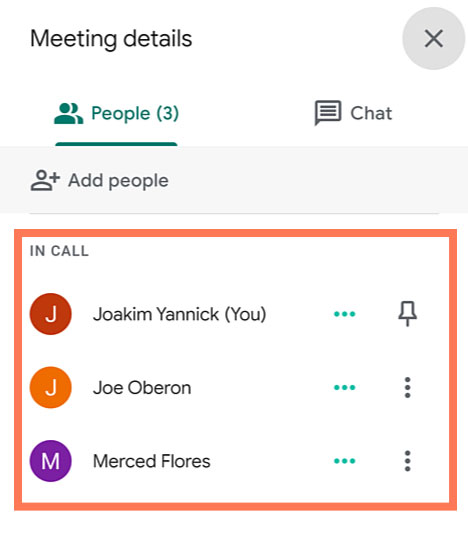
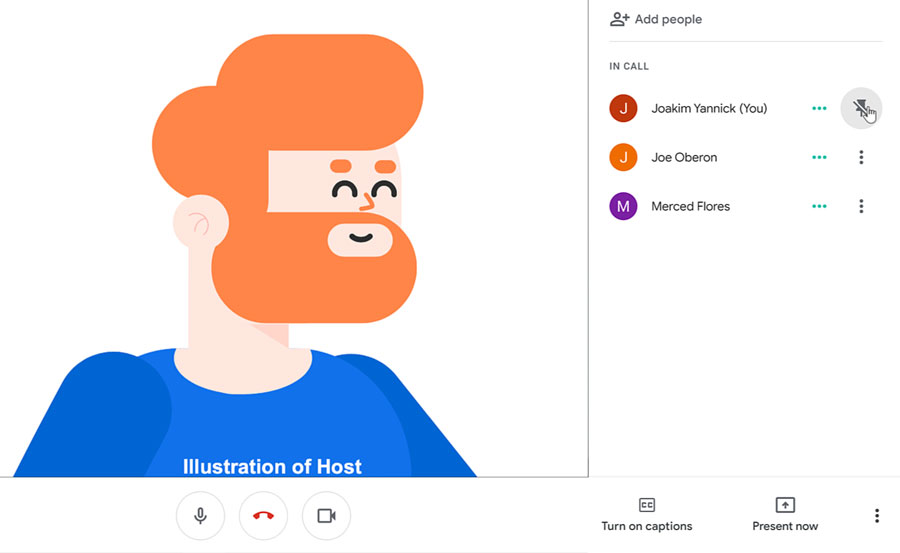
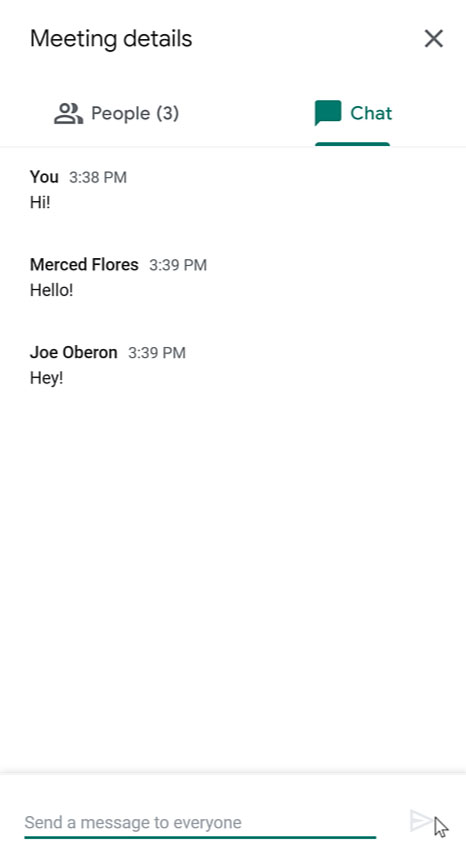
When you can't meet in-person, video chatting is a great option. To virtually connect face-to-face, you can use the video calling app: Google Meet. Joining a Google Meet video call is easy to do and all you'll need is a link or code. In this desktop lesson, we will walk you through how to join a meeting and show you the basics of a video call.
<a href="https://shalasugam.com/how-to-present-meeting-using-google-slide/">
<svg xmlns="http://www.w3.org/2000/svg" xmlns:xlink="http://www.w3.org/1999/xlink" width="256px" height="297px" viewBox="0 0 256 297" preserveAspectRatio="xMidYMid"><defs><linearGradient x1="26.0700788%" y1="68.0422365%" x2="74.9491057%" y2="19.2791755%" id="linearGradient-1"><stop stop-color="#058B7E" offset="0%"></stop><stop stop-color="#058D80" offset="0%"></stop><stop stop-color="#058D7F" offset="100%"></stop></linearGradient><path d="M127.682686,0 C57.1657481,0 0,55.7909333 0,124.612267 C0,193.433916 57.1657481,249.224533 127.682686,249.224533 L127.954173,296.138272 C193.56002,258.867516 255.954173,209.119447 255.954173,124.612267 C255.954173,55.7909333 198.199941,0 127.682686,0 Z" id="path-2"></path><filter x="-0.4%" y="-0.3%" width="100.8%" height="100.7%" filterUnits="objectBoundingBox" id="filter-3"></filter><path d="M127.682686,0 C57.1657481,0 0,55.7909333 0,124.612267 C0,193.433916 57.1657481,249.224533 127.682686,249.224533 L127.954173,296.138272 C193.56002,258.867516 255.954173,209.119447 255.954173,124.612267 C255.954173,55.7909333 198.199941,0 127.682686,0 Z" id="path-4"></path><filter x="-0.4%" y="-0.3%" width="100.8%" height="100.7%" filterUnits="objectBoundingBox" id="filter-5"></filter><path d="M127.682686,0 C57.1657481,0 0,55.7909333 0,124.612267 C0,193.433916 57.1657481,249.224533 127.682686,249.224533 L127.954173,296.138272 C193.56002,258.867516 255.954173,209.119447 255.954173,124.612267 C255.954173,55.7909333 198.199941,0 127.682686,0 Z" id="path-6"></path><linearGradient x1="30.0482935%" y1="27.302306%" x2="81.9404293%" y2="84.6402399%" id="linearGradient-8"><stop stop-color="#000000" offset="0%"></stop><stop stop-color="#D8D8D8" stop-opacity="0" offset="100%"></stop></linearGradient><path d="M55.5801916,128.105402 L55.5801916,162.34398 C55.5801916,171.382993 62.9757472,178.778548 72.0147595,178.778548 L157.030779,178.778548 C166.069792,178.778548 173.465347,171.382993 173.465347,162.34398 L173.465347,140.721146 L207.124606,174.380405 L207.124606,128.105402 L55.5801916,128.105402 Z" id="path-9"></path><filter x="-1.0%" y="-3.0%" width="102.6%" height="111.8%" filterUnits="objectBoundingBox" id="filter-10"></filter></defs><g><path d="M127.682686,0 C57.1657481,0 0,55.7909333 0,124.612267 C0,193.433916 57.1657481,249.224533 127.682686,249.224533 L127.954173,296.138272 C193.56002,258.867516 255.954173,209.119447 255.954173,124.612267 C255.954173,55.7909333 198.199941,0 127.682686,0 Z" fill="url(#linearGradient-1)"></path><g fill="black" fill-opacity="1"><use filter="url(#filter-3)" xlink:href="#path-2"></use></g><g fill="black" fill-opacity="1"><use filter="url(#filter-5)" xlink:href="#path-4"></use></g><g><mask id="mask-7" fill="white"><use xlink:href="#path-6"></use></mask><g></g><polygon fill-opacity="0.21" fill="url(#linearGradient-8)" mask="url(#mask-7)" points="58.3180642 168.559565 167.355101 281.283951 311.894914 175.618212 207.440593 81.6987654 185.106647 119.970765"></polygon></g><g><use fill="black" fill-opacity="1" filter="url(#filter-10)" xlink:href="#path-9"></use><use fill="#F6F6F6" fill-rule="evenodd" xlink:href="#path-9"></use></g><path d="M207.124638,128.105402 L207.124638,81.6989235 L173.465379,115.28644 L173.465379,93.8668247 C173.465379,84.8274963 166.069823,77.4322568 157.030811,77.4322568 L72.0147911,77.4322568 C62.9757788,77.4322568 55.5802232,84.8274963 55.5802232,93.8668247 L55.5802232,128.105402 L207.124638,128.105402 Z" fill="#E2E2E2"></path></g></svg> </a>
<h3>
<a href="https://shalasugam.com/how-to-present-meeting-using-google-slide/">HOW TO PRESENT GOOGLE MEET USING GOOGLE SLIDE</a>
</h3>
Presenting during a video conference is a little bit different than presenting in-person. For a video conference, you need to know how to use the video app's interface so you can take charge of the meeting when it is time for you to present. To help you, we've put together a Google Meet lesson that teaches you how to present using Google Slides.
<a href="https://shalasugam.com/how-to-host-google-meeting/">
<svg xmlns="http://www.w3.org/2000/svg" xmlns:xlink="http://www.w3.org/1999/xlink" width="256px" height="297px" viewBox="0 0 256 297" preserveAspectRatio="xMidYMid"><defs><linearGradient x1="26.0700788%" y1="68.0422365%" x2="74.9491057%" y2="19.2791755%" id="linearGradient-1"><stop stop-color="#058B7E" offset="0%"></stop><stop stop-color="#058D80" offset="0%"></stop><stop stop-color="#058D7F" offset="100%"></stop></linearGradient><path d="M127.682686,0 C57.1657481,0 0,55.7909333 0,124.612267 C0,193.433916 57.1657481,249.224533 127.682686,249.224533 L127.954173,296.138272 C193.56002,258.867516 255.954173,209.119447 255.954173,124.612267 C255.954173,55.7909333 198.199941,0 127.682686,0 Z" id="path-2"></path><filter x="-0.4%" y="-0.3%" width="100.8%" height="100.7%" filterUnits="objectBoundingBox" id="filter-3"></filter><path d="M127.682686,0 C57.1657481,0 0,55.7909333 0,124.612267 C0,193.433916 57.1657481,249.224533 127.682686,249.224533 L127.954173,296.138272 C193.56002,258.867516 255.954173,209.119447 255.954173,124.612267 C255.954173,55.7909333 198.199941,0 127.682686,0 Z" id="path-4"></path><filter x="-0.4%" y="-0.3%" width="100.8%" height="100.7%" filterUnits="objectBoundingBox" id="filter-5"></filter><path d="M127.682686,0 C57.1657481,0 0,55.7909333 0,124.612267 C0,193.433916 57.1657481,249.224533 127.682686,249.224533 L127.954173,296.138272 C193.56002,258.867516 255.954173,209.119447 255.954173,124.612267 C255.954173,55.7909333 198.199941,0 127.682686,0 Z" id="path-6"></path><linearGradient x1="30.0482935%" y1="27.302306%" x2="81.9404293%" y2="84.6402399%" id="linearGradient-8"><stop stop-color="#000000" offset="0%"></stop><stop stop-color="#D8D8D8" stop-opacity="0" offset="100%"></stop></linearGradient><path d="M55.5801916,128.105402 L55.5801916,162.34398 C55.5801916,171.382993 62.9757472,178.778548 72.0147595,178.778548 L157.030779,178.778548 C166.069792,178.778548 173.465347,171.382993 173.465347,162.34398 L173.465347,140.721146 L207.124606,174.380405 L207.124606,128.105402 L55.5801916,128.105402 Z" id="path-9"></path><filter x="-1.0%" y="-3.0%" width="102.6%" height="111.8%" filterUnits="objectBoundingBox" id="filter-10"></filter></defs><g><path d="M127.682686,0 C57.1657481,0 0,55.7909333 0,124.612267 C0,193.433916 57.1657481,249.224533 127.682686,249.224533 L127.954173,296.138272 C193.56002,258.867516 255.954173,209.119447 255.954173,124.612267 C255.954173,55.7909333 198.199941,0 127.682686,0 Z" fill="url(#linearGradient-1)"></path><g fill="black" fill-opacity="1"><use filter="url(#filter-3)" xlink:href="#path-2"></use></g><g fill="black" fill-opacity="1"><use filter="url(#filter-5)" xlink:href="#path-4"></use></g><g><mask id="mask-7" fill="white"><use xlink:href="#path-6"></use></mask><g></g><polygon fill-opacity="0.21" fill="url(#linearGradient-8)" mask="url(#mask-7)" points="58.3180642 168.559565 167.355101 281.283951 311.894914 175.618212 207.440593 81.6987654 185.106647 119.970765"></polygon></g><g><use fill="black" fill-opacity="1" filter="url(#filter-10)" xlink:href="#path-9"></use><use fill="#F6F6F6" fill-rule="evenodd" xlink:href="#path-9"></use></g><path d="M207.124638,128.105402 L207.124638,81.6989235 L173.465379,115.28644 L173.465379,93.8668247 C173.465379,84.8274963 166.069823,77.4322568 157.030811,77.4322568 L72.0147911,77.4322568 C62.9757788,77.4322568 55.5802232,84.8274963 55.5802232,93.8668247 L55.5802232,128.105402 L207.124638,128.105402 Z" fill="#E2E2E2"></path></g></svg> </a>
<h3>
<a href="https://shalasugam.com/how-to-host-google-meeting/">How to Host a Meeting</a>
</h3>
Whether you want to talk with friends or conduct a business meeting, you can use Google Meet as a practical alternative to meeting in-person. Google Meet lets you plan a virtual meeting ahead of time or start a spur of the moment video chat. To help you host a video call, we've put together a lesson that teaches you how to set up and carry out a meeting.
<a href="https://shalasugam.com/google-meet-with-mobile-app/">
<svg xmlns="http://www.w3.org/2000/svg" xmlns:xlink="http://www.w3.org/1999/xlink" width="256px" height="297px" viewBox="0 0 256 297" preserveAspectRatio="xMidYMid"><defs><linearGradient x1="26.0700788%" y1="68.0422365%" x2="74.9491057%" y2="19.2791755%" id="linearGradient-1"><stop stop-color="#058B7E" offset="0%"></stop><stop stop-color="#058D80" offset="0%"></stop><stop stop-color="#058D7F" offset="100%"></stop></linearGradient><path d="M127.682686,0 C57.1657481,0 0,55.7909333 0,124.612267 C0,193.433916 57.1657481,249.224533 127.682686,249.224533 L127.954173,296.138272 C193.56002,258.867516 255.954173,209.119447 255.954173,124.612267 C255.954173,55.7909333 198.199941,0 127.682686,0 Z" id="path-2"></path><filter x="-0.4%" y="-0.3%" width="100.8%" height="100.7%" filterUnits="objectBoundingBox" id="filter-3"></filter><path d="M127.682686,0 C57.1657481,0 0,55.7909333 0,124.612267 C0,193.433916 57.1657481,249.224533 127.682686,249.224533 L127.954173,296.138272 C193.56002,258.867516 255.954173,209.119447 255.954173,124.612267 C255.954173,55.7909333 198.199941,0 127.682686,0 Z" id="path-4"></path><filter x="-0.4%" y="-0.3%" width="100.8%" height="100.7%" filterUnits="objectBoundingBox" id="filter-5"></filter><path d="M127.682686,0 C57.1657481,0 0,55.7909333 0,124.612267 C0,193.433916 57.1657481,249.224533 127.682686,249.224533 L127.954173,296.138272 C193.56002,258.867516 255.954173,209.119447 255.954173,124.612267 C255.954173,55.7909333 198.199941,0 127.682686,0 Z" id="path-6"></path><linearGradient x1="30.0482935%" y1="27.302306%" x2="81.9404293%" y2="84.6402399%" id="linearGradient-8"><stop stop-color="#000000" offset="0%"></stop><stop stop-color="#D8D8D8" stop-opacity="0" offset="100%"></stop></linearGradient><path d="M55.5801916,128.105402 L55.5801916,162.34398 C55.5801916,171.382993 62.9757472,178.778548 72.0147595,178.778548 L157.030779,178.778548 C166.069792,178.778548 173.465347,171.382993 173.465347,162.34398 L173.465347,140.721146 L207.124606,174.380405 L207.124606,128.105402 L55.5801916,128.105402 Z" id="path-9"></path><filter x="-1.0%" y="-3.0%" width="102.6%" height="111.8%" filterUnits="objectBoundingBox" id="filter-10"></filter></defs><g><path d="M127.682686,0 C57.1657481,0 0,55.7909333 0,124.612267 C0,193.433916 57.1657481,249.224533 127.682686,249.224533 L127.954173,296.138272 C193.56002,258.867516 255.954173,209.119447 255.954173,124.612267 C255.954173,55.7909333 198.199941,0 127.682686,0 Z" fill="url(#linearGradient-1)"></path><g fill="black" fill-opacity="1"><use filter="url(#filter-3)" xlink:href="#path-2"></use></g><g fill="black" fill-opacity="1"><use filter="url(#filter-5)" xlink:href="#path-4"></use></g><g><mask id="mask-7" fill="white"><use xlink:href="#path-6"></use></mask><g></g><polygon fill-opacity="0.21" fill="url(#linearGradient-8)" mask="url(#mask-7)" points="58.3180642 168.559565 167.355101 281.283951 311.894914 175.618212 207.440593 81.6987654 185.106647 119.970765"></polygon></g><g><use fill="black" fill-opacity="1" filter="url(#filter-10)" xlink:href="#path-9"></use><use fill="#F6F6F6" fill-rule="evenodd" xlink:href="#path-9"></use></g><path d="M207.124638,128.105402 L207.124638,81.6989235 L173.465379,115.28644 L173.465379,93.8668247 C173.465379,84.8274963 166.069823,77.4322568 157.030811,77.4322568 L72.0147911,77.4322568 C62.9757788,77.4322568 55.5802232,84.8274963 55.5802232,93.8668247 L55.5802232,128.105402 L207.124638,128.105402 Z" fill="#E2E2E2"></path></g></svg> </a>
<h3>
<a href="https://shalasugam.com/google-meet-with-mobile-app/">HOW TO GOOGLE MEET WITH MOBILE APP</a>
</h3>
Most of us have our smartphone or tablet nearby to talk to coworkers, family members, and friends. Instead of calling or emailing, you can virtually connect face-to-face with a simple video call. In this lesson, we'll teach you how to video chat using the Google Meet mobile app.
<h3>HOW TO PRESENT GOOGLE MEET USING GOOGLE SLIDE</h3>
<header><a href="https://shalasugam.com/wp-content/uploads/2021/05/PNG-File.png"><img src="https://shalasugam.com/wp-content/uploads/2021/05/PNG-File-300x190.png" alt="" width="300" height="190" /></a><h1><a href="/en/google-meet/">Google Meet</a> - How to Present Using Google Slides</h1><img id="header-img" src="https://media.gcflearnfree.org/assets/edu-gcfglobal-site/images/city-aqua2.svg" alt="" /></p><header>Google Meet How to Present Using Google Slides</header><p> </p></header><h1>Google Meet: How to Present Using Google Slides</h1><p>601bf80d4136932698f4bda8<br />601bfd2a4136932698f4bdab</p> <h3 tabindex="0" aria-label="Lesson Divider Lesson 3: How to Present Using Google Slides">Lesson 3: How to Present Using Google Slides</h3><h3>How to present using Google Slides</h3><p>Presenting during a video conference is a little bit different than presenting in-person. For a video conference, you need to know how to use the video app's interface so you can take charge of the meeting when it is time for you to present. To help you, we've put together a Google Meet lesson that teaches you how to present using Google Slides.
Watch the video below to learn how to present using Google Slides.
Getting started
To begin, you’ll need to be using Chrome as your web browser.
Also, you should have already logged into your Google account.
Next, you’ll need to have already created a Google Calendar event for the meeting.
Then, open a tab with your Google Slides presentation.
Join a meeting from Google Calendar
First, click the scheduled event you have already created.
Within the event’s information, click the Join with Google Meet button to join the video call.
A new tab opens to start the Google Meet. Some pop-ups may occur if you haven’t approved the use of your microphone, camera, and notifications. Click Allow for these pop-ups.
You can choose to join the meeting with your microphone and camera on or off by clicking their icons. Some people turn off their microphone to mute themselves so that no one can hear them. Others keep their microphone on, but may turn off their camera so no one can see them. If you change your mind, you can adjust these settings inside the call.
Presenting options
There are two ways you can present. One is right at the start of the video call. The other is later on in the video call. We’ll show you both options.
Start of the meeting
To have the meeting begin with your presentation, click Present.
A dialog box appears asking you to allow Google Chrome to record your computer screen. You may have to adjust your computer’s settings if you want to proceed. If you do not allow this, you’ll only be able to present a Chrome Tab.
If you do allow this, you’ll be able to present a Chrome Tab, Your Entire Screen, or an Application Window. For this example, we’ll click the Entire Screen option.
If what you are presenting needs to have audio enabled, make sure that the checkbox for Share audio is checked.
Then, click the screen that you want to share followed by the Share button.
Select the tab that has your Google Slides presentation.
Next, click the Present button.
You can now carry out your presentation while the people in the call watch it on their own screens. When you are finished presenting, click the Stop sharing button.
Later in the meeting
If you are not the first to present, click Join now instead.
When you are ready to present, click Present now from the toolbar.
You can choose either to present Your entire screen, A window, or A tab. Presenting by tab is only available if you are using Chrome as your web browser. For this example, we’ll select A tab.
Looking at the dialog box, keep the checkbox for Shared audio checked if what you are presenting needs to have audio enabled.
Select the tab that you want to share. Then, click the Share button.
Next, click Present.
The people in the call can now watch it on their own screens. When you are finished presenting, click the Stop button.
Video conferencing tips
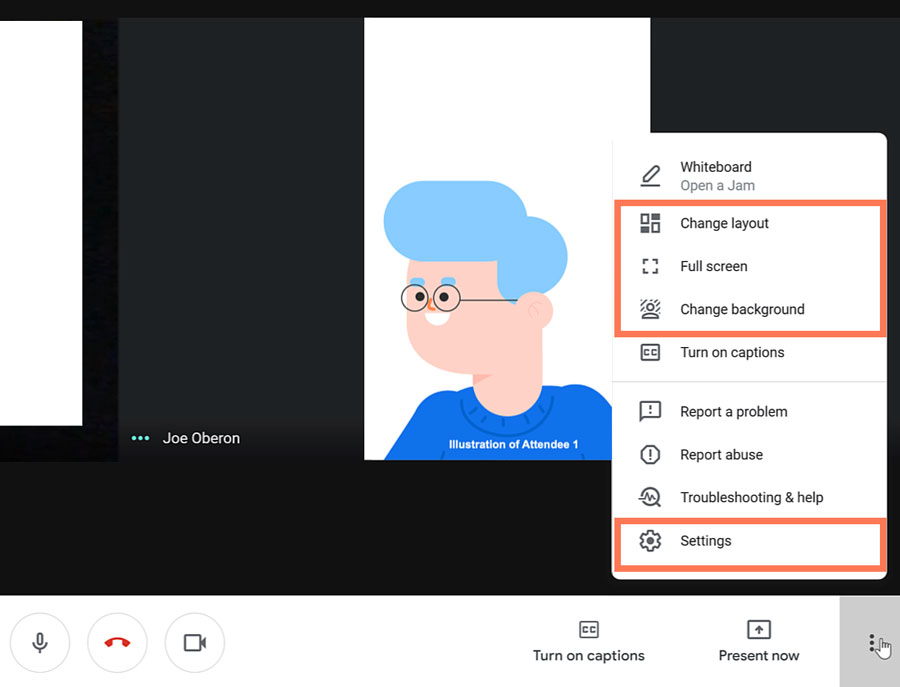
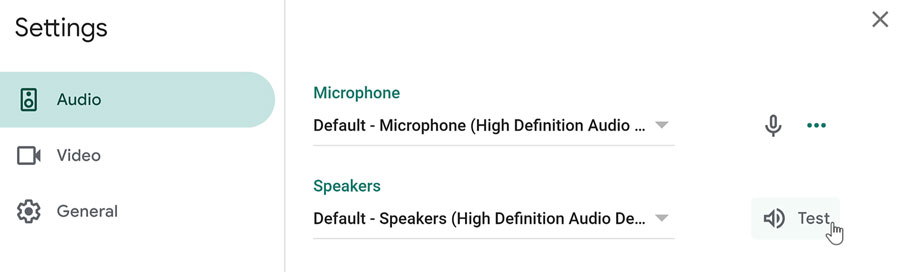
If you experience technical difficulties, you can make adjustments in Settings. On the bottom toolbar, click the three dots icon. A menu appears showing more features. Within Settings, you can make changes to your Audio and Video to make sure you have the correct equipment selected. You can also Test your Speakers to make sure they are working properly.
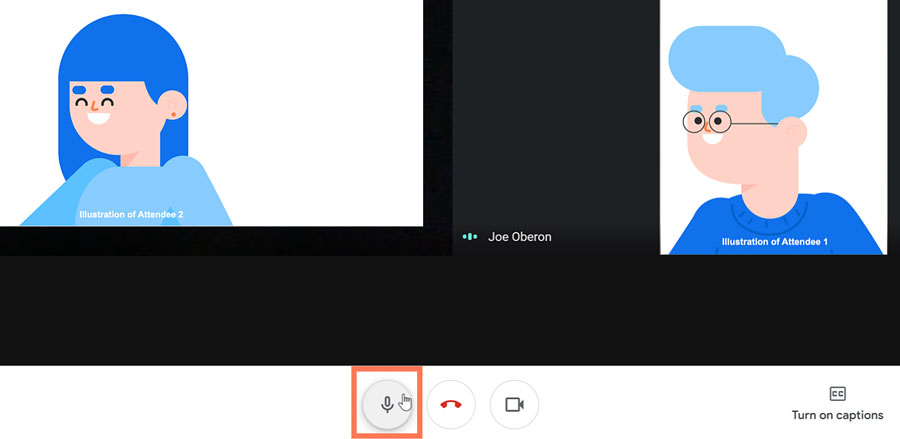
Looking at the bottom toolbar, you also have the option to Turn off microphone. This will mute your ability to speak in the meeting.
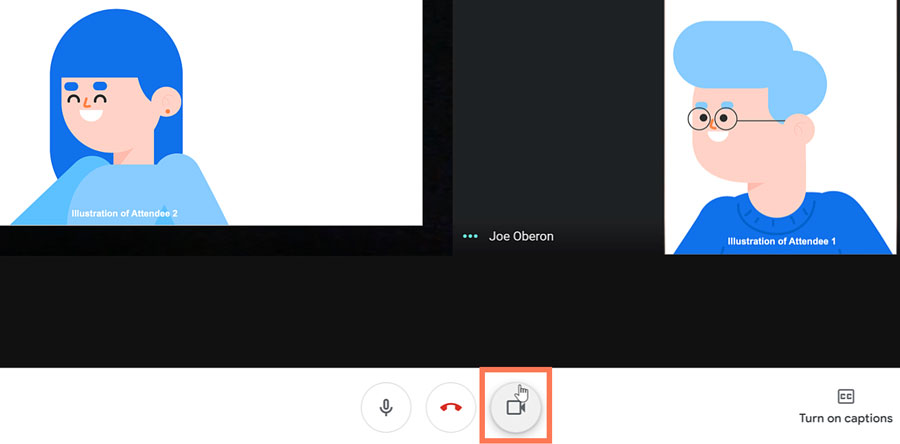
Also on the bottom toolbar, there is the option to Turn off camera. This will hide you from the audience.
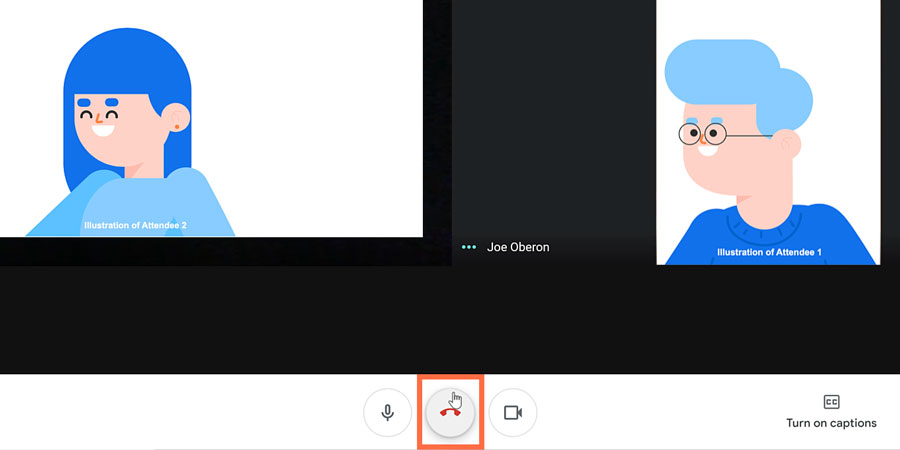
When you are done with your video call, click the Leave call icon on the bottom toolbar.
        <h3>our teaching team</h3>
                                            <img width="150" height="150" src="https://shalasugam.com/wp-content/uploads/2021/03/BALDEV-e1616250695880-150x150.jpeg" alt="" loading="lazy" srcset="https://i0.wp.com/shalasugam.com/wp-content/uploads/2021/03/BALDEV-e1616250695880.jpeg?resize=150%2C150&ssl=1 150w, https://i0.wp.com/shalasugam.com/wp-content/uploads/2021/03/BALDEV-e1616250695880.jpeg?zoom=2&resize=150%2C150&ssl=1 300w, https://i0.wp.com/shalasugam.com/wp-content/uploads/2021/03/BALDEV-e1616250695880.jpeg?zoom=3&resize=150%2C150&ssl=1 450w" sizes="(max-width: 150px) 100vw, 150px" />
        <h2>Baldev Chaudhary</h2>
        <h2>freelancer Expert</h2>
    <p>A strict teacher that has been teaching since the age of 16. Chaudhary won't give you any slack, so you will have to do the very best work you've done in your life.</p>
                <a target="_blank" rel="noopener">
                    Facebook-f
                                        </a>
                <a target="_blank" rel="noopener">
                    Twitter
                                        </a>
                <a target="_blank" rel="noopener">
                    Linkedin
                                        </a>
                                            <img width="150" height="150" src="https://shalasugam.com/wp-content/uploads/2021/03/K-L-SEN-e1616168372369-150x150.jpeg" alt="" loading="lazy" srcset="https://i0.wp.com/shalasugam.com/wp-content/uploads/2021/03/K-L-SEN-e1616168372369.jpeg?resize=150%2C150&ssl=1 150w, https://i0.wp.com/shalasugam.com/wp-content/uploads/2021/03/K-L-SEN-e1616168372369.jpeg?zoom=2&resize=150%2C150&ssl=1 300w, https://i0.wp.com/shalasugam.com/wp-content/uploads/2021/03/K-L-SEN-e1616168372369.jpeg?zoom=3&resize=150%2C150&ssl=1 450w" sizes="(max-width: 150px) 100vw, 150px" />
        <h2>K. L. SEN</h2>
        <h2> Computer Science</h2>
    <p>K. L. SEN has a Degree in both Computer Science and Design. His beginner course is a must see for any aspiring web professional who want to learn from the best.</p>
                <a href="https://www.facebook.com/profile.php?id=100030171083523" target="_blank" rel="noopener">
                    Facebook-f
                                        </a>
                <a target="_blank" rel="noopener">
                    Twitter
                                        </a>
                <a target="_blank" rel="noopener">
                    Linkedin
                                        </a>
                                            <img width="162" height="165" src="https://shalasugam.com/wp-content/uploads/2021/05/teacher2.jpg" alt="" loading="lazy" />
        <h2>Gaby Williams</h2>
        <h2>AI Expert</h2>
    <p>If there's someone who can explain anything, Gaby is the one. He teaches you not just how to do something, but why to do it this way and not the other.</p>
                <a target="_blank" rel="noopener">
                    Facebook-f
                                        </a>
                <a target="_blank" rel="noopener">
                    Twitter
                                        </a>
                <a target="_blank" rel="noopener">
                    Linkedin
                                        </a>
        <h2>Learn from the very best</h2>
    <p>Join our course and start building the most wanted career available today. We make sure every class is easily understood, and that all students reach the same level of expertise needed for today's hi-tech industry.</p>
            <h3>
                Working hours
            </h3>
                            <p>Monday- friday 8:00-18:30 Hrs <br>(Phone until 17:30 Hrs)<br>Friday - 8:00-14:00
Saturday – Sunday : holiday
We are here
MERTA CITY, NAGAUR 341510 SHALA SUGAM <br>Phone:+91 9079977228 <br>Fax:+91 9079977228 <br>Email: shalasugam@gmail.com
<iframe frameborder="0" scrolling="no" marginheight="0" marginwidth="0" src="https://maps.google.com/maps?q=MERTA%20CITY%2C%20NAGAUR%2C%20RAJASTHAN%2C%20INDIA&t=m&z=10&output=embed&iwloc=near" title="MERTA CITY, NAGAUR, RAJASTHAN, INDIA" aria-label="MERTA CITY, NAGAUR, RAJASTHAN, INDIA"></iframe>
<a href="https://shalasugam.com/best-online-assessment-tools-for-teachers/"> <h2>
MAKE CHANGE IN YOURSELF BY
.
</h2>
</a>
<h2>Do you want to become a modern and creative teacher ?</h2>
<h2>क्या आप एक मॉडर्न और क्रिएटिव शिक्षक बनना चाहते हैं।</h2>
<h2>हमारे सोशल मिडिया ज्वाइन करने का लिंक नीचे दिया जा रहा हैं | 👇</h2>
<a href="https://t.me/SHALASUGAM" role="button">
FOR ALL JOIN OUR TELEGRAM
</a>
<a href="https://shalasugam.com/join-whatsapp-group/" role="button">
TEACHERS WHATSAPP GROUPS
</a>
<a href="https://chat.whatsapp.com/E3qrUAS6vTk6HKmTgPhGTD" role="button">
STUDENTS WHATSAPP GROUPS
</a>
<h2>हमारे YOUTUBE CHANNELS को ज्वाइन करने का लिंक नीचे दिया जा रहा हैं | 👇</h2>
<a href="https://www.youtube.com/channel/UCSXr_0qFpsF3OgUthnS75pA" role="button">
JOIN SHALA SUGAM CHANNEL
</a>
<a href="https://youtube.com/channel/UCSyHhgfxMtZfo-R7R6UlXXw" role="button">
JOIN SHIKSHA SUGAM CHANNEL
</a>
Share on facebook
Facebook
Share on twitter
Twitter
Share on linkedin
LinkedIn
Share on whatsapp
WhatsApp
Share on telegram
Telegram
<h2>COURSE को ज्वाइन करने के लिए यहाँ रजिस्ट्रेशन फॉर्म भरें 👇</h2>
<a href="https://shalasugam.com/online-free-course-by-shala-sugam/" role="button">
CLICK HERE FOR REGISTARTION
</a>
<nav itemscope="itemscope" itemtype="http://schema.org/SiteNavigationElement" data-toggle-icon="<i aria-hidden="true" tabindex="0" class="fas fa-align-justify"></i>" data-close-icon="<i aria-hidden="true" tabindex="0" class="far fa-window-close"></i>" data-full-width="yes"><ul id="menu-1-29801b11"><li id="menu-item-170"><a href="https://shalasugam.com/" itemprop="url" itemprop="url" class = "hfe-menu-item">HOME</a></li>
Share on facebook
Facebook
Share on twitter
Twitter
Share on linkedin
LinkedIn
Share on whatsapp
WhatsApp
Share on telegram
Telegram
Learn from the very best
Join our course and start building the most wanted career available today. We make sure every class is easily understood, and that all students reach the same level of expertise needed for today’s hi-tech industry.
Working hours
Monday- Thursday:8:00-18:30 Hrs (Phone until 17:30 Hrs) Friday – 8:00-14:00
This is Totaly free course will teach you all the required skills needed when designing and developing A Website, Application and MS Office and Internet Access.</p>
<a href="https://shalasugam.com/online-free-course-by-shala-sugam/" role="button">
Start your Free trial
</a>
<h3>
Who is it for?
</h3>
<p>The course is aimed at anyone who wants to work as digital person like teachers, students, competitors and others.
<img width="1" height="1" src="https://shalasugam.com/wp-content/uploads/2021/05/main-illustration.svg" alt="" loading="lazy" />
<a href="https://shalasugam.com/how-to-join-google-meeting/" rel="nofollow" google="">
<svg xmlns="http://www.w3.org/2000/svg" xmlns:xlink="http://www.w3.org/1999/xlink" width="256px" height="297px" viewBox="0 0 256 297" preserveAspectRatio="xMidYMid"><defs><linearGradient x1="26.0700788%" y1="68.0422365%" x2="74.9491057%" y2="19.2791755%" id="linearGradient-1"><stop stop-color="#058B7E" offset="0%"></stop><stop stop-color="#058D80" offset="0%"></stop><stop stop-color="#058D7F" offset="100%"></stop></linearGradient><path d="M127.682686,0 C57.1657481,0 0,55.7909333 0,124.612267 C0,193.433916 57.1657481,249.224533 127.682686,249.224533 L127.954173,296.138272 C193.56002,258.867516 255.954173,209.119447 255.954173,124.612267 C255.954173,55.7909333 198.199941,0 127.682686,0 Z" id="path-2"></path><filter x="-0.4%" y="-0.3%" width="100.8%" height="100.7%" filterUnits="objectBoundingBox" id="filter-3"></filter><path d="M127.682686,0 C57.1657481,0 0,55.7909333 0,124.612267 C0,193.433916 57.1657481,249.224533 127.682686,249.224533 L127.954173,296.138272 C193.56002,258.867516 255.954173,209.119447 255.954173,124.612267 C255.954173,55.7909333 198.199941,0 127.682686,0 Z" id="path-4"></path><filter x="-0.4%" y="-0.3%" width="100.8%" height="100.7%" filterUnits="objectBoundingBox" id="filter-5"></filter><path d="M127.682686,0 C57.1657481,0 0,55.7909333 0,124.612267 C0,193.433916 57.1657481,249.224533 127.682686,249.224533 L127.954173,296.138272 C193.56002,258.867516 255.954173,209.119447 255.954173,124.612267 C255.954173,55.7909333 198.199941,0 127.682686,0 Z" id="path-6"></path><linearGradient x1="30.0482935%" y1="27.302306%" x2="81.9404293%" y2="84.6402399%" id="linearGradient-8"><stop stop-color="#000000" offset="0%"></stop><stop stop-color="#D8D8D8" stop-opacity="0" offset="100%"></stop></linearGradient><path d="M55.5801916,128.105402 L55.5801916,162.34398 C55.5801916,171.382993 62.9757472,178.778548 72.0147595,178.778548 L157.030779,178.778548 C166.069792,178.778548 173.465347,171.382993 173.465347,162.34398 L173.465347,140.721146 L207.124606,174.380405 L207.124606,128.105402 L55.5801916,128.105402 Z" id="path-9"></path><filter x="-1.0%" y="-3.0%" width="102.6%" height="111.8%" filterUnits="objectBoundingBox" id="filter-10"></filter></defs><g><path d="M127.682686,0 C57.1657481,0 0,55.7909333 0,124.612267 C0,193.433916 57.1657481,249.224533 127.682686,249.224533 L127.954173,296.138272 C193.56002,258.867516 255.954173,209.119447 255.954173,124.612267 C255.954173,55.7909333 198.199941,0 127.682686,0 Z" fill="url(#linearGradient-1)"></path><g fill="black" fill-opacity="1"><use filter="url(#filter-3)" xlink:href="#path-2"></use></g><g fill="black" fill-opacity="1"><use filter="url(#filter-5)" xlink:href="#path-4"></use></g><g><mask id="mask-7" fill="white"><use xlink:href="#path-6"></use></mask><g></g><polygon fill-opacity="0.21" fill="url(#linearGradient-8)" mask="url(#mask-7)" points="58.3180642 168.559565 167.355101 281.283951 311.894914 175.618212 207.440593 81.6987654 185.106647 119.970765"></polygon></g><g><use fill="black" fill-opacity="1" filter="url(#filter-10)" xlink:href="#path-9"></use><use fill="#F6F6F6" fill-rule="evenodd" xlink:href="#path-9"></use></g><path d="M207.124638,128.105402 L207.124638,81.6989235 L173.465379,115.28644 L173.465379,93.8668247 C173.465379,84.8274963 166.069823,77.4322568 157.030811,77.4322568 L72.0147911,77.4322568 C62.9757788,77.4322568 55.5802232,84.8274963 55.5802232,93.8668247 L55.5802232,128.105402 L207.124638,128.105402 Z" fill="#E2E2E2"></path></g></svg> </a>
<h3>
<a href="https://shalasugam.com/how-to-join-google-meeting/" rel="nofollow" google="">HOW TO JOIN GOOGLE MEET</a>
</h3>
When you can't meet in-person, video chatting is a great option. To virtually connect face-to-face, you can use the video calling app: Google Meet. Joining a Google Meet video call is easy to do and all you'll need is a link or code. In this desktop lesson, we will walk you through how to join a meeting and show you the basics of a video call.
<a href="https://shalasugam.com/how-to-present-meeting-using-google-slide/">
<svg xmlns="http://www.w3.org/2000/svg" xmlns:xlink="http://www.w3.org/1999/xlink" width="256px" height="297px" viewBox="0 0 256 297" preserveAspectRatio="xMidYMid"><defs><linearGradient x1="26.0700788%" y1="68.0422365%" x2="74.9491057%" y2="19.2791755%" id="linearGradient-1"><stop stop-color="#058B7E" offset="0%"></stop><stop stop-color="#058D80" offset="0%"></stop><stop stop-color="#058D7F" offset="100%"></stop></linearGradient><path d="M127.682686,0 C57.1657481,0 0,55.7909333 0,124.612267 C0,193.433916 57.1657481,249.224533 127.682686,249.224533 L127.954173,296.138272 C193.56002,258.867516 255.954173,209.119447 255.954173,124.612267 C255.954173,55.7909333 198.199941,0 127.682686,0 Z" id="path-2"></path><filter x="-0.4%" y="-0.3%" width="100.8%" height="100.7%" filterUnits="objectBoundingBox" id="filter-3"></filter><path d="M127.682686,0 C57.1657481,0 0,55.7909333 0,124.612267 C0,193.433916 57.1657481,249.224533 127.682686,249.224533 L127.954173,296.138272 C193.56002,258.867516 255.954173,209.119447 255.954173,124.612267 C255.954173,55.7909333 198.199941,0 127.682686,0 Z" id="path-4"></path><filter x="-0.4%" y="-0.3%" width="100.8%" height="100.7%" filterUnits="objectBoundingBox" id="filter-5"></filter><path d="M127.682686,0 C57.1657481,0 0,55.7909333 0,124.612267 C0,193.433916 57.1657481,249.224533 127.682686,249.224533 L127.954173,296.138272 C193.56002,258.867516 255.954173,209.119447 255.954173,124.612267 C255.954173,55.7909333 198.199941,0 127.682686,0 Z" id="path-6"></path><linearGradient x1="30.0482935%" y1="27.302306%" x2="81.9404293%" y2="84.6402399%" id="linearGradient-8"><stop stop-color="#000000" offset="0%"></stop><stop stop-color="#D8D8D8" stop-opacity="0" offset="100%"></stop></linearGradient><path d="M55.5801916,128.105402 L55.5801916,162.34398 C55.5801916,171.382993 62.9757472,178.778548 72.0147595,178.778548 L157.030779,178.778548 C166.069792,178.778548 173.465347,171.382993 173.465347,162.34398 L173.465347,140.721146 L207.124606,174.380405 L207.124606,128.105402 L55.5801916,128.105402 Z" id="path-9"></path><filter x="-1.0%" y="-3.0%" width="102.6%" height="111.8%" filterUnits="objectBoundingBox" id="filter-10"></filter></defs><g><path d="M127.682686,0 C57.1657481,0 0,55.7909333 0,124.612267 C0,193.433916 57.1657481,249.224533 127.682686,249.224533 L127.954173,296.138272 C193.56002,258.867516 255.954173,209.119447 255.954173,124.612267 C255.954173,55.7909333 198.199941,0 127.682686,0 Z" fill="url(#linearGradient-1)"></path><g fill="black" fill-opacity="1"><use filter="url(#filter-3)" xlink:href="#path-2"></use></g><g fill="black" fill-opacity="1"><use filter="url(#filter-5)" xlink:href="#path-4"></use></g><g><mask id="mask-7" fill="white"><use xlink:href="#path-6"></use></mask><g></g><polygon fill-opacity="0.21" fill="url(#linearGradient-8)" mask="url(#mask-7)" points="58.3180642 168.559565 167.355101 281.283951 311.894914 175.618212 207.440593 81.6987654 185.106647 119.970765"></polygon></g><g><use fill="black" fill-opacity="1" filter="url(#filter-10)" xlink:href="#path-9"></use><use fill="#F6F6F6" fill-rule="evenodd" xlink:href="#path-9"></use></g><path d="M207.124638,128.105402 L207.124638,81.6989235 L173.465379,115.28644 L173.465379,93.8668247 C173.465379,84.8274963 166.069823,77.4322568 157.030811,77.4322568 L72.0147911,77.4322568 C62.9757788,77.4322568 55.5802232,84.8274963 55.5802232,93.8668247 L55.5802232,128.105402 L207.124638,128.105402 Z" fill="#E2E2E2"></path></g></svg> </a>
<h3>
<a href="https://shalasugam.com/how-to-present-meeting-using-google-slide/">HOW TO PRESENT GOOGLE MEET USING GOOGLE SLIDE</a>
</h3>
Presenting during a video conference is a little bit different than presenting in-person. For a video conference, you need to know how to use the video app's interface so you can take charge of the meeting when it is time for you to present. To help you, we've put together a Google Meet lesson that teaches you how to present using Google Slides.
<a href="https://shalasugam.com/how-to-host-google-meeting/">
<svg xmlns="http://www.w3.org/2000/svg" xmlns:xlink="http://www.w3.org/1999/xlink" width="256px" height="297px" viewBox="0 0 256 297" preserveAspectRatio="xMidYMid"><defs><linearGradient x1="26.0700788%" y1="68.0422365%" x2="74.9491057%" y2="19.2791755%" id="linearGradient-1"><stop stop-color="#058B7E" offset="0%"></stop><stop stop-color="#058D80" offset="0%"></stop><stop stop-color="#058D7F" offset="100%"></stop></linearGradient><path d="M127.682686,0 C57.1657481,0 0,55.7909333 0,124.612267 C0,193.433916 57.1657481,249.224533 127.682686,249.224533 L127.954173,296.138272 C193.56002,258.867516 255.954173,209.119447 255.954173,124.612267 C255.954173,55.7909333 198.199941,0 127.682686,0 Z" id="path-2"></path><filter x="-0.4%" y="-0.3%" width="100.8%" height="100.7%" filterUnits="objectBoundingBox" id="filter-3"></filter><path d="M127.682686,0 C57.1657481,0 0,55.7909333 0,124.612267 C0,193.433916 57.1657481,249.224533 127.682686,249.224533 L127.954173,296.138272 C193.56002,258.867516 255.954173,209.119447 255.954173,124.612267 C255.954173,55.7909333 198.199941,0 127.682686,0 Z" id="path-4"></path><filter x="-0.4%" y="-0.3%" width="100.8%" height="100.7%" filterUnits="objectBoundingBox" id="filter-5"></filter><path d="M127.682686,0 C57.1657481,0 0,55.7909333 0,124.612267 C0,193.433916 57.1657481,249.224533 127.682686,249.224533 L127.954173,296.138272 C193.56002,258.867516 255.954173,209.119447 255.954173,124.612267 C255.954173,55.7909333 198.199941,0 127.682686,0 Z" id="path-6"></path><linearGradient x1="30.0482935%" y1="27.302306%" x2="81.9404293%" y2="84.6402399%" id="linearGradient-8"><stop stop-color="#000000" offset="0%"></stop><stop stop-color="#D8D8D8" stop-opacity="0" offset="100%"></stop></linearGradient><path d="M55.5801916,128.105402 L55.5801916,162.34398 C55.5801916,171.382993 62.9757472,178.778548 72.0147595,178.778548 L157.030779,178.778548 C166.069792,178.778548 173.465347,171.382993 173.465347,162.34398 L173.465347,140.721146 L207.124606,174.380405 L207.124606,128.105402 L55.5801916,128.105402 Z" id="path-9"></path><filter x="-1.0%" y="-3.0%" width="102.6%" height="111.8%" filterUnits="objectBoundingBox" id="filter-10"></filter></defs><g><path d="M127.682686,0 C57.1657481,0 0,55.7909333 0,124.612267 C0,193.433916 57.1657481,249.224533 127.682686,249.224533 L127.954173,296.138272 C193.56002,258.867516 255.954173,209.119447 255.954173,124.612267 C255.954173,55.7909333 198.199941,0 127.682686,0 Z" fill="url(#linearGradient-1)"></path><g fill="black" fill-opacity="1"><use filter="url(#filter-3)" xlink:href="#path-2"></use></g><g fill="black" fill-opacity="1"><use filter="url(#filter-5)" xlink:href="#path-4"></use></g><g><mask id="mask-7" fill="white"><use xlink:href="#path-6"></use></mask><g></g><polygon fill-opacity="0.21" fill="url(#linearGradient-8)" mask="url(#mask-7)" points="58.3180642 168.559565 167.355101 281.283951 311.894914 175.618212 207.440593 81.6987654 185.106647 119.970765"></polygon></g><g><use fill="black" fill-opacity="1" filter="url(#filter-10)" xlink:href="#path-9"></use><use fill="#F6F6F6" fill-rule="evenodd" xlink:href="#path-9"></use></g><path d="M207.124638,128.105402 L207.124638,81.6989235 L173.465379,115.28644 L173.465379,93.8668247 C173.465379,84.8274963 166.069823,77.4322568 157.030811,77.4322568 L72.0147911,77.4322568 C62.9757788,77.4322568 55.5802232,84.8274963 55.5802232,93.8668247 L55.5802232,128.105402 L207.124638,128.105402 Z" fill="#E2E2E2"></path></g></svg> </a>
<h3>
<a href="https://shalasugam.com/how-to-host-google-meeting/">How to Host a Meeting</a>
</h3>
Whether you want to talk with friends or conduct a business meeting, you can use Google Meet as a practical alternative to meeting in-person. Google Meet lets you plan a virtual meeting ahead of time or start a spur of the moment video chat. To help you host a video call, we've put together a lesson that teaches you how to set up and carry out a meeting.
<a href="https://shalasugam.com/google-meet-with-mobile-app/">
<svg xmlns="http://www.w3.org/2000/svg" xmlns:xlink="http://www.w3.org/1999/xlink" width="256px" height="297px" viewBox="0 0 256 297" preserveAspectRatio="xMidYMid"><defs><linearGradient x1="26.0700788%" y1="68.0422365%" x2="74.9491057%" y2="19.2791755%" id="linearGradient-1"><stop stop-color="#058B7E" offset="0%"></stop><stop stop-color="#058D80" offset="0%"></stop><stop stop-color="#058D7F" offset="100%"></stop></linearGradient><path d="M127.682686,0 C57.1657481,0 0,55.7909333 0,124.612267 C0,193.433916 57.1657481,249.224533 127.682686,249.224533 L127.954173,296.138272 C193.56002,258.867516 255.954173,209.119447 255.954173,124.612267 C255.954173,55.7909333 198.199941,0 127.682686,0 Z" id="path-2"></path><filter x="-0.4%" y="-0.3%" width="100.8%" height="100.7%" filterUnits="objectBoundingBox" id="filter-3"></filter><path d="M127.682686,0 C57.1657481,0 0,55.7909333 0,124.612267 C0,193.433916 57.1657481,249.224533 127.682686,249.224533 L127.954173,296.138272 C193.56002,258.867516 255.954173,209.119447 255.954173,124.612267 C255.954173,55.7909333 198.199941,0 127.682686,0 Z" id="path-4"></path><filter x="-0.4%" y="-0.3%" width="100.8%" height="100.7%" filterUnits="objectBoundingBox" id="filter-5"></filter><path d="M127.682686,0 C57.1657481,0 0,55.7909333 0,124.612267 C0,193.433916 57.1657481,249.224533 127.682686,249.224533 L127.954173,296.138272 C193.56002,258.867516 255.954173,209.119447 255.954173,124.612267 C255.954173,55.7909333 198.199941,0 127.682686,0 Z" id="path-6"></path><linearGradient x1="30.0482935%" y1="27.302306%" x2="81.9404293%" y2="84.6402399%" id="linearGradient-8"><stop stop-color="#000000" offset="0%"></stop><stop stop-color="#D8D8D8" stop-opacity="0" offset="100%"></stop></linearGradient><path d="M55.5801916,128.105402 L55.5801916,162.34398 C55.5801916,171.382993 62.9757472,178.778548 72.0147595,178.778548 L157.030779,178.778548 C166.069792,178.778548 173.465347,171.382993 173.465347,162.34398 L173.465347,140.721146 L207.124606,174.380405 L207.124606,128.105402 L55.5801916,128.105402 Z" id="path-9"></path><filter x="-1.0%" y="-3.0%" width="102.6%" height="111.8%" filterUnits="objectBoundingBox" id="filter-10"></filter></defs><g><path d="M127.682686,0 C57.1657481,0 0,55.7909333 0,124.612267 C0,193.433916 57.1657481,249.224533 127.682686,249.224533 L127.954173,296.138272 C193.56002,258.867516 255.954173,209.119447 255.954173,124.612267 C255.954173,55.7909333 198.199941,0 127.682686,0 Z" fill="url(#linearGradient-1)"></path><g fill="black" fill-opacity="1"><use filter="url(#filter-3)" xlink:href="#path-2"></use></g><g fill="black" fill-opacity="1"><use filter="url(#filter-5)" xlink:href="#path-4"></use></g><g><mask id="mask-7" fill="white"><use xlink:href="#path-6"></use></mask><g></g><polygon fill-opacity="0.21" fill="url(#linearGradient-8)" mask="url(#mask-7)" points="58.3180642 168.559565 167.355101 281.283951 311.894914 175.618212 207.440593 81.6987654 185.106647 119.970765"></polygon></g><g><use fill="black" fill-opacity="1" filter="url(#filter-10)" xlink:href="#path-9"></use><use fill="#F6F6F6" fill-rule="evenodd" xlink:href="#path-9"></use></g><path d="M207.124638,128.105402 L207.124638,81.6989235 L173.465379,115.28644 L173.465379,93.8668247 C173.465379,84.8274963 166.069823,77.4322568 157.030811,77.4322568 L72.0147911,77.4322568 C62.9757788,77.4322568 55.5802232,84.8274963 55.5802232,93.8668247 L55.5802232,128.105402 L207.124638,128.105402 Z" fill="#E2E2E2"></path></g></svg> </a>
<h3>
<a href="https://shalasugam.com/google-meet-with-mobile-app/">HOW TO GOOGLE MEET WITH MOBILE APP</a>
</h3>
Most of us have our smartphone or tablet nearby to talk to coworkers, family members, and friends. Instead of calling or emailing, you can virtually connect face-to-face with a simple video call. In this lesson, we'll teach you how to video chat using the Google Meet mobile app.
<h3>How to Host a Meeting</h3>
<h1>Google Meet - How to Host a Meeting</h1>
Google Meet How to Host a Meeting
601bf80d4136932698f4bda8 601bfd294136932698f4bdaa
Lesson 2: How to Host a Meeting
How to host a meetingWhether you want to talk with friends or conduct a business meeting, you can use Google Meet as a practical alternative to meeting in-person. Google Meet lets you plan a virtual meeting ahead of time or start a spur of the moment video chat. To help you host a video call, we’ve put together a lesson that teaches you how to set up and carry out a meeting.Watch the video below to learn how to arrange and host a meeting.
In our example, we are using Chrome as our web browser, but you can use the one you’d prefer since Google Meet works with most web browsers. To set up and host a meeting, you’ll need to log in using your Google Account.To create a video call for a later time:
First, click the New meeting button.
From the menu, click Create a meeting for later.
A dialog box appears giving you a link to copy. Click the copy icon.
Now, you can paste it in an email or messaging service to invite others to the meeting. It is important that you save this link so that you can access it later too. Otherwise, you won’t have the link to join the video call. We suggest writing it down or pasting it in a new Google Doc.
Click the X to close out it.
Plan a meeting using Google Calendar:
Click the New meeting button.
Then, select Schedule in Google Calendar from the menu.
A new tab will open taking you to Google Calendar to create an event. You’ll see that the event already has a Google Meet link provided.
After filling in the event information, click the Add guests field and type their email addresses.
When you are done, click Save.
To send the email invitations, click Send.
The event will be added to your calendar and you can refer back to it when needed. Before the meeting, simply click the Join with Google Meet button to begin the video call.
To quickly start a video call:
Click the New meeting button.
Then, select Start an instant meeting from the menu.
Some pop-ups may occur if you haven’t approved the use of your microphone, camera, and notifications. Click Allow for these pop-ups.
Before entering the meeting, you can decide the settings you want to use. You can choose to join the meeting with your microphone and camera on or off by clicking their icons. Some people turn off their microphone to mute themselves so that no one can hear them. Others keep their microphone on, but may turn off their camera so no one can see them. You can make changes to these settings inside the video call too.
If you are using Chrome as your web browser, you also have the choice of changing your background. People use this feature to hide what is actually behind them; especially, if it might be distracting to those in the video call. Once you’ve made your choice, click the icon again to close the panel.
To enter the meeting, click Join Now.
For an instant meeting, the video call opens with a dialog box letting you click Copy joining info or Add people to the meeting.
Click the Enter name or email field to type their emails.
When you are done, click the Send email button.
Hosting the meetingAs the host, you are the person who permits or denies an attendee from entering the video chat. When people without an invitation join the meeting, a dialog box will pop-up. You’ll have the choice to Admit or Deny entry for each person. Keep in mind that those denied will not be able to join the video chat. Understanding the video tile functionsOnce people have joined the video call, you can carry out your meeting. On your screen, you’ll notice your video tile as well as the video tiles of the people in the call.
When you hover your mouse over a person’s video tile, you can choose whether you want to pin that person’s tile to your main screen. This is helpful if there are many people in the call, but you are speaking only to one person and want to see their screen. Click to unpin them to see other people’s screens in the call.
You can click their microphone icon to mute them. Muting means that the individual can’t be heard because their microphone has been turned off by you. The person will then have to unmute from their own device to turn their audio on again.
The circle with the minus icon lets you remove that person from the meeting. Be careful since this can’t be undone and they won’t be able to rejoin the meeting.
The top toolbar
If you want to invite more people to the meeting or see who is already in the call, you can click the Show everyone icon. To send more invitations, you can select Add people. Below, you’ll see who is In Call.
If you don’t want to see everyone in the call, you can click the pushpin icon next to your name to only see yourself on the screen. You can click it again to unpin yourself.
Click the Chat tab to send a message to everyone involved in the call. Type your message in the field at the bottom of the panel then click the arrow button to send it. You can also see messages from those that are already in the call here. When you are done, click the X to close the panel.
The three dots menuOn the bottom toolbar starting in the bottom-right corner, click the three dots icon. A pop-up menu appears showing more features.
Select Change layout. This will make it easier to see everyone who is a part of the meeting. Take a look at the dialog box and choose the option that would work best for you. Click the X to close out of it.
From the More options menu, you can choose Full screen if you want the Google Meet to take up your entire desktop screen. If you didn’t set up a background before joining the call or want to change it, you can select Change background.
Within Settings, you can make changes to your Audio and Video to make sure you have the correct equipment selected. You can also Test your Speakers to make sure they are working properly. Click the X to close out of it.
Exploring the bottom toolbar functions
On the bottom toolbar, you also have the option to Turn off microphone. No one will be able to hear you until you turn it back on by clicking the icon again.
There is also the option to Turn off camera. This will hide you from the audience until you click the icon again.
Finally, when you are done with your video call, simply, click the Leave call icon.
our teaching team
                                            <img width="150" height="150" src="https://shalasugam.com/wp-content/uploads/2021/03/BALDEV-e1616250695880-150x150.jpeg" alt="" loading="lazy" srcset="https://i0.wp.com/shalasugam.com/wp-content/uploads/2021/03/BALDEV-e1616250695880.jpeg?resize=150%2C150&ssl=1 150w, https://i0.wp.com/shalasugam.com/wp-content/uploads/2021/03/BALDEV-e1616250695880.jpeg?zoom=2&resize=150%2C150&ssl=1 300w, https://i0.wp.com/shalasugam.com/wp-content/uploads/2021/03/BALDEV-e1616250695880.jpeg?zoom=3&resize=150%2C150&ssl=1 450w" sizes="(max-width: 150px) 100vw, 150px" />
        <h2>Baldev Chaudhary</h2>
        <h2>freelancer Expert</h2>
    <p>A strict teacher that has been teaching since the age of 16. Chaudhary won't give you any slack, so you will have to do the very best work you've done in your life.</p>
                <a target="_blank" rel="noopener">
                    Facebook-f
                                        </a>
                <a target="_blank" rel="noopener">
                    Twitter
                                        </a>
                <a target="_blank" rel="noopener">
                    Linkedin
                                        </a>
                                            <img width="150" height="150" src="https://shalasugam.com/wp-content/uploads/2021/03/K-L-SEN-e1616168372369-150x150.jpeg" alt="" loading="lazy" srcset="https://i0.wp.com/shalasugam.com/wp-content/uploads/2021/03/K-L-SEN-e1616168372369.jpeg?resize=150%2C150&ssl=1 150w, https://i0.wp.com/shalasugam.com/wp-content/uploads/2021/03/K-L-SEN-e1616168372369.jpeg?zoom=2&resize=150%2C150&ssl=1 300w, https://i0.wp.com/shalasugam.com/wp-content/uploads/2021/03/K-L-SEN-e1616168372369.jpeg?zoom=3&resize=150%2C150&ssl=1 450w" sizes="(max-width: 150px) 100vw, 150px" />
        <h2>K. L. SEN</h2>
        <h2> Computer Science</h2>
    <p>K. L. SEN has a Degree in both Computer Science and Design. His beginner course is a must see for any aspiring web professional who want to learn from the best.</p>
                <a href="https://www.facebook.com/profile.php?id=100030171083523" target="_blank" rel="noopener">
                    Facebook-f
                                        </a>
                <a target="_blank" rel="noopener">
                    Twitter
                                        </a>
                <a target="_blank" rel="noopener">
                    Linkedin
                                        </a>
                                            <img width="162" height="165" src="https://shalasugam.com/wp-content/uploads/2021/05/teacher2.jpg" alt="" loading="lazy" />
        <h2>Gaby Williams</h2>
        <h2>AI Expert</h2>
    <p>If there's someone who can explain anything, Gaby is the one. He teaches you not just how to do something, but why to do it this way and not the other.</p>
                <a target="_blank" rel="noopener">
                    Facebook-f
                                        </a>
                <a target="_blank" rel="noopener">
                    Twitter
                                        </a>
                <a target="_blank" rel="noopener">
                    Linkedin
                                        </a>
        <h2>Learn from the very best</h2>
    <p>Join our course and start building the most wanted career available today. We make sure every class is easily understood, and that all students reach the same level of expertise needed for today's hi-tech industry.</p>
            <h3>
                Working hours
            </h3>
                            <p>Monday- friday 8:00-18:30 Hrs <br>(Phone until 17:30 Hrs)<br>Friday - 8:00-14:00
Saturday – Sunday : holiday
We are here
MERTA CITY, NAGAUR 341510 SHALA SUGAM <br>Phone:+91 9079977228 <br>Fax:+91 9079977228 <br>Email: shalasugam@gmail.com
<iframe frameborder="0" scrolling="no" marginheight="0" marginwidth="0" src="https://maps.google.com/maps?q=MERTA%20CITY%2C%20NAGAUR%2C%20RAJASTHAN%2C%20INDIA&t=m&z=10&output=embed&iwloc=near" title="MERTA CITY, NAGAUR, RAJASTHAN, INDIA" aria-label="MERTA CITY, NAGAUR, RAJASTHAN, INDIA"></iframe>
<a href="https://shalasugam.com/best-online-assessment-tools-for-teachers/"> <h2>
MAKE CHANGE IN YOURSELF BY
.
</h2>
</a>
<h2>Do you want to become a modern and creative teacher ?</h2>
<h2>क्या आप एक मॉडर्न और क्रिएटिव शिक्षक बनना चाहते हैं।</h2>
<h2>हमारे सोशल मिडिया ज्वाइन करने का लिंक नीचे दिया जा रहा हैं | 👇</h2>
<a href="https://t.me/SHALASUGAM" role="button">
FOR ALL JOIN OUR TELEGRAM
</a>
<a href="https://shalasugam.com/join-whatsapp-group/" role="button">
TEACHERS WHATSAPP GROUPS
</a>
<a href="https://chat.whatsapp.com/E3qrUAS6vTk6HKmTgPhGTD" role="button">
STUDENTS WHATSAPP GROUPS
</a>
<h2>हमारे YOUTUBE CHANNELS को ज्वाइन करने का लिंक नीचे दिया जा रहा हैं | 👇</h2>
<a href="https://www.youtube.com/channel/UCSXr_0qFpsF3OgUthnS75pA" role="button">
JOIN SHALA SUGAM CHANNEL
</a>
<a href="https://youtube.com/channel/UCSyHhgfxMtZfo-R7R6UlXXw" role="button">
JOIN SHIKSHA SUGAM CHANNEL
</a>
Share on facebook
Facebook
Share on twitter
Twitter
Share on linkedin
LinkedIn
Share on whatsapp
WhatsApp
Share on telegram
Telegram
<h2>COURSE को ज्वाइन करने के लिए यहाँ रजिस्ट्रेशन फॉर्म भरें 👇</h2>
<a href="https://shalasugam.com/online-free-course-by-shala-sugam/" role="button">
CLICK HERE FOR REGISTARTION
</a>
<nav itemscope="itemscope" itemtype="http://schema.org/SiteNavigationElement" data-toggle-icon="<i aria-hidden="true" tabindex="0" class="fas fa-align-justify"></i>" data-close-icon="<i aria-hidden="true" tabindex="0" class="far fa-window-close"></i>" data-full-width="yes"><ul id="menu-1-29801b11"><li id="menu-item-170"><a href="https://shalasugam.com/" itemprop="url" itemprop="url" class = "hfe-menu-item">HOME</a></li>
Share on facebook
Facebook
Share on twitter
Twitter
Share on linkedin
LinkedIn
Share on whatsapp
WhatsApp
Share on telegram
Telegram
Learn from the very best
Join our course and start building the most wanted career available today. We make sure every class is easily understood, and that all students reach the same level of expertise needed for today’s hi-tech industry.
Working hours
Monday- Thursday:8:00-18:30 Hrs (Phone until 17:30 Hrs) Friday – 8:00-14:00

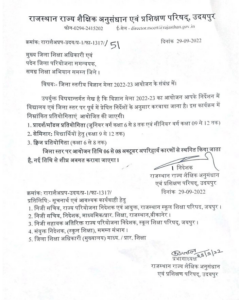
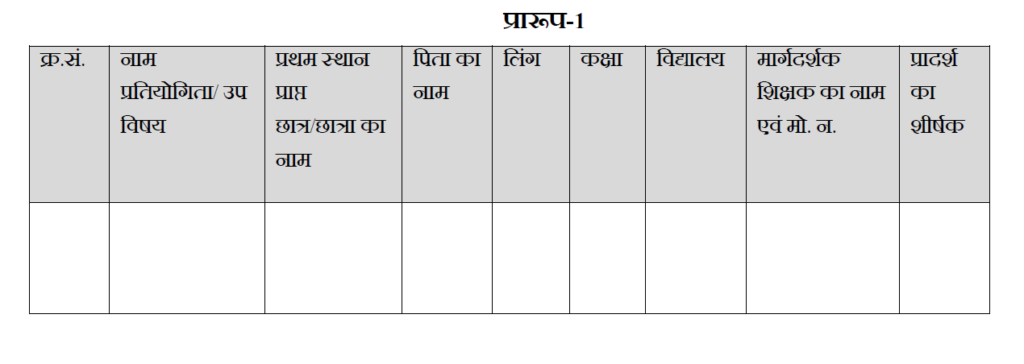
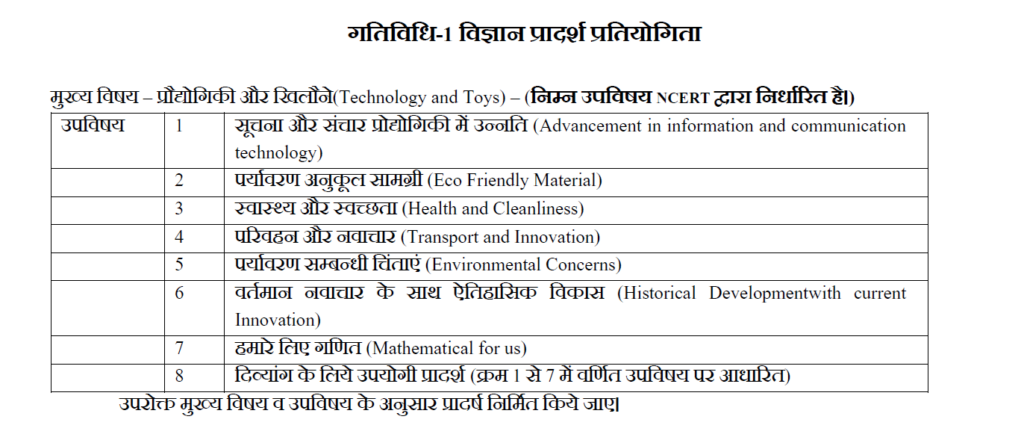
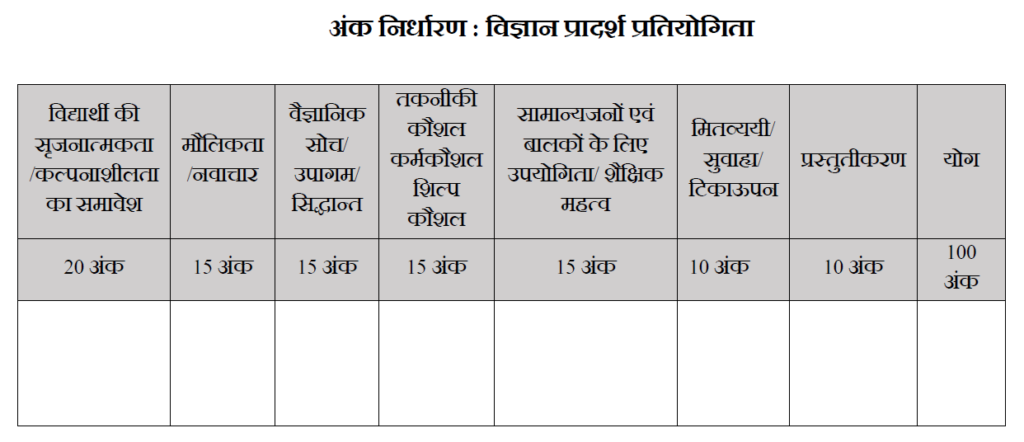
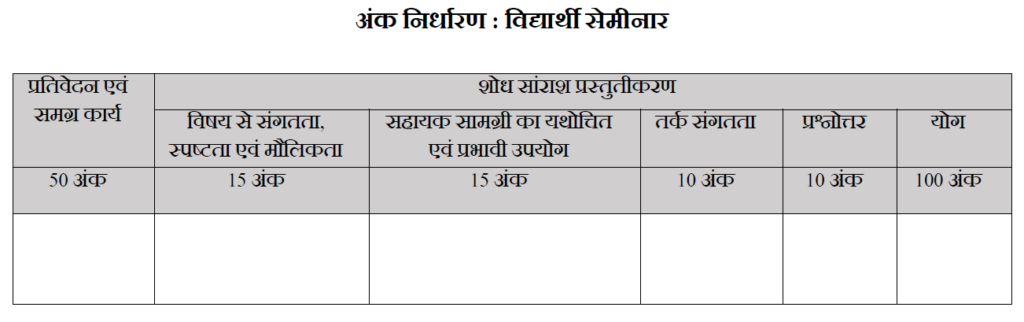
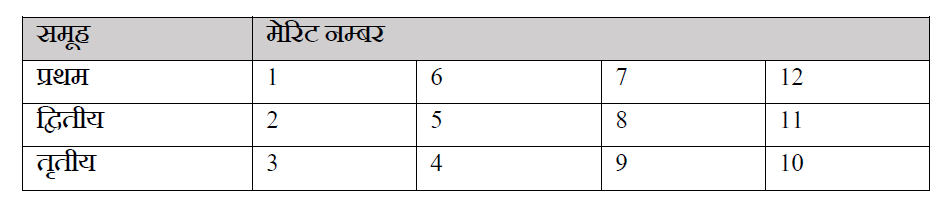


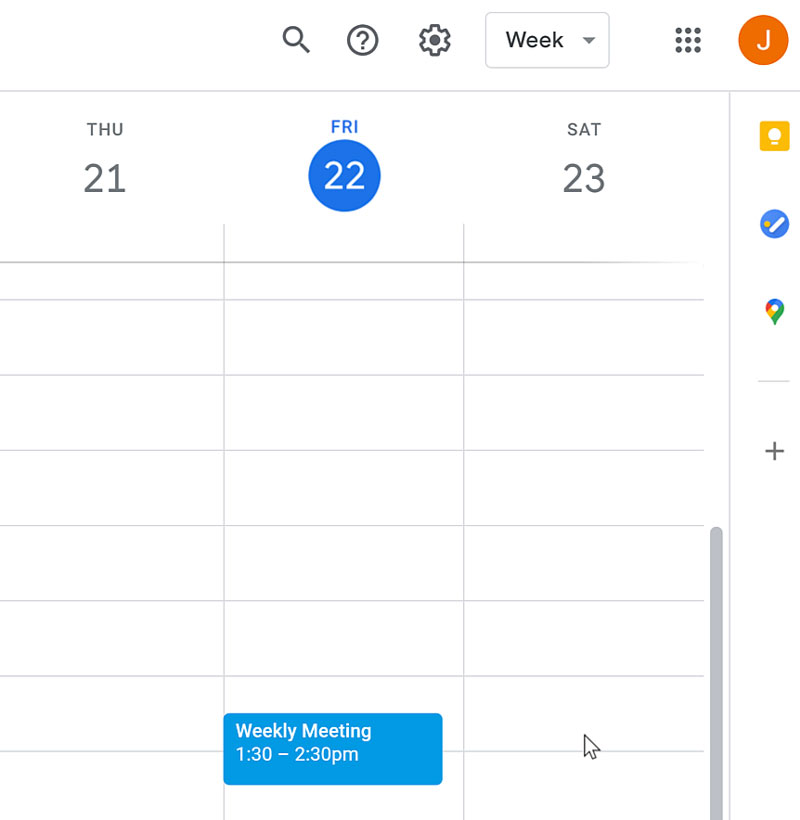
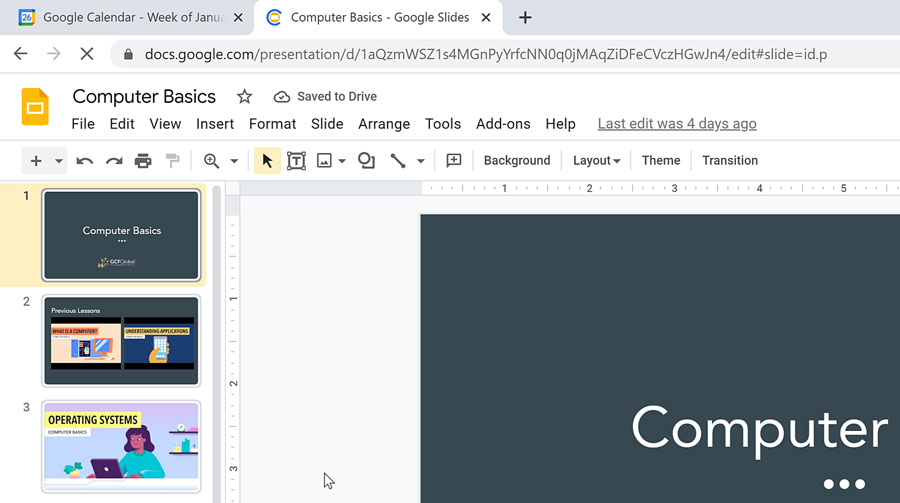
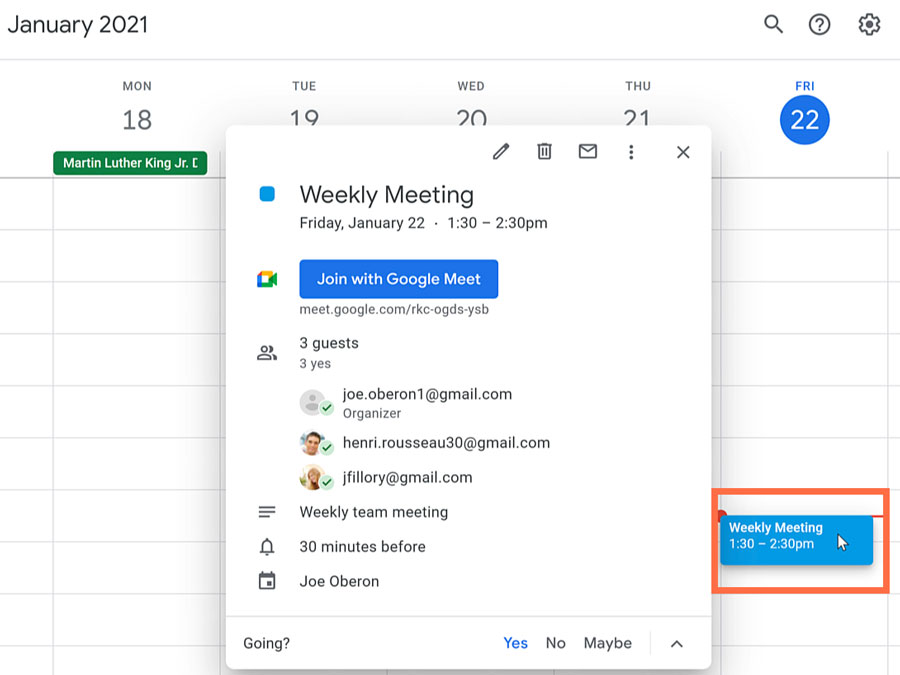
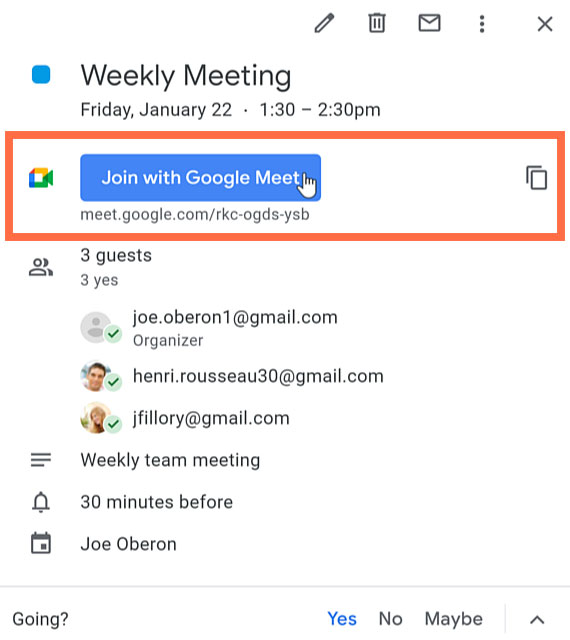
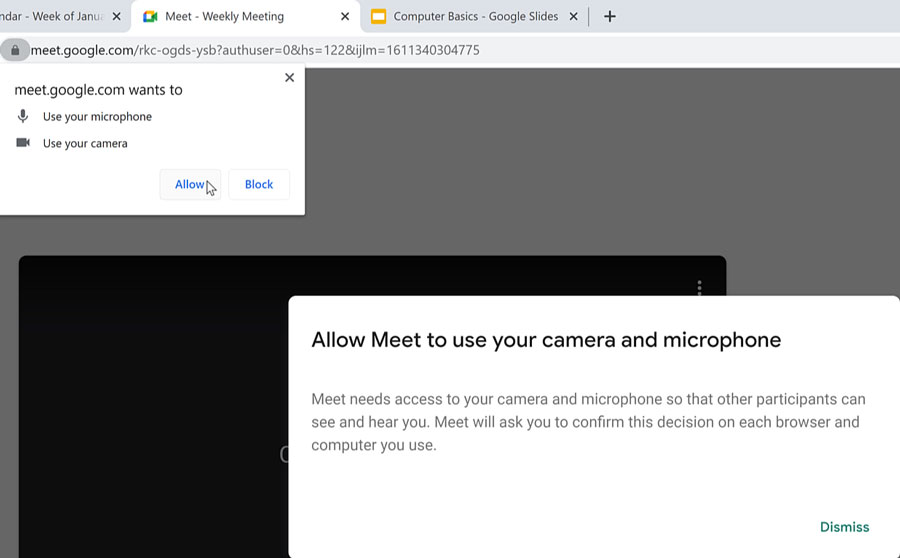
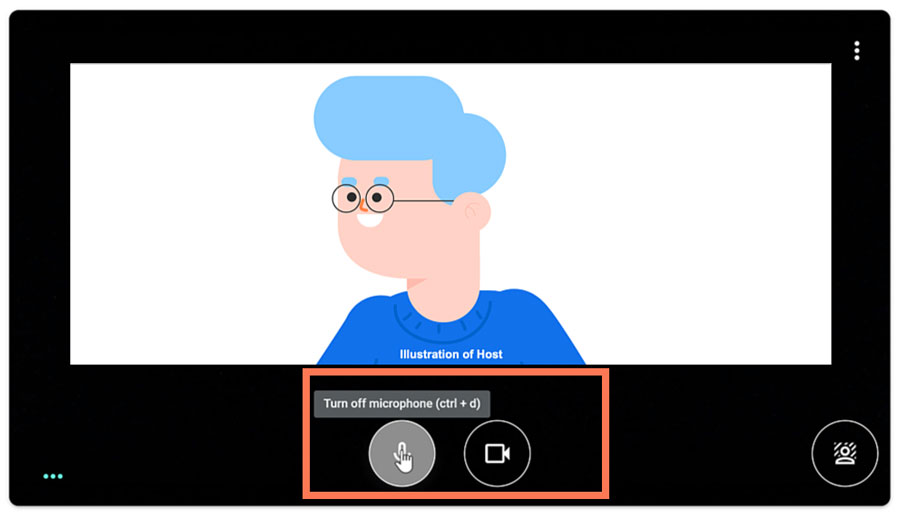
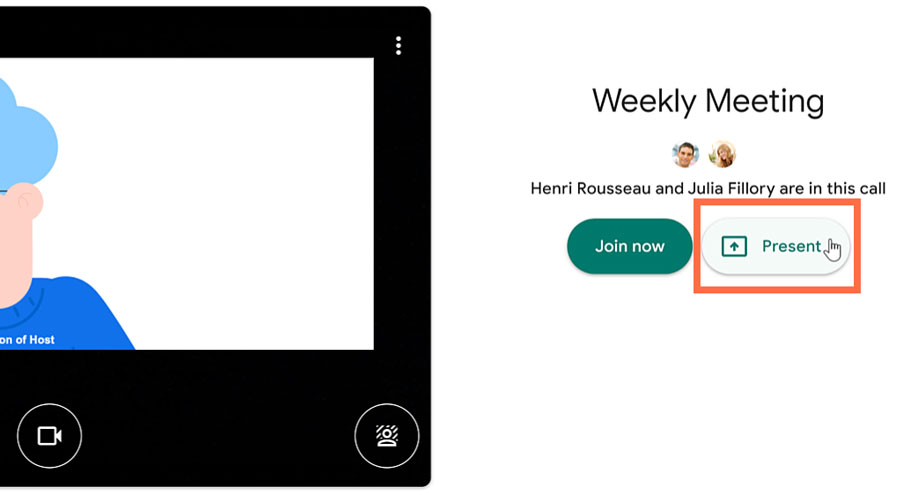
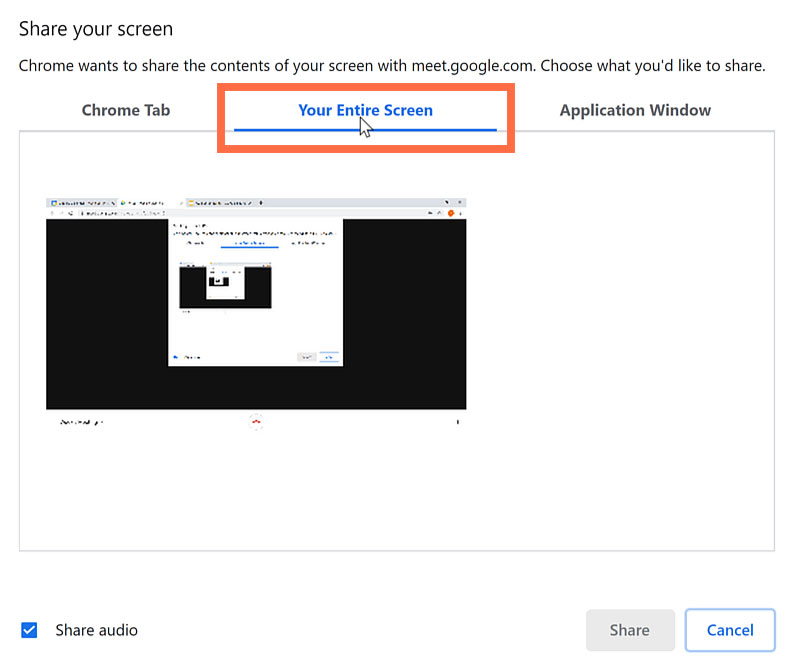
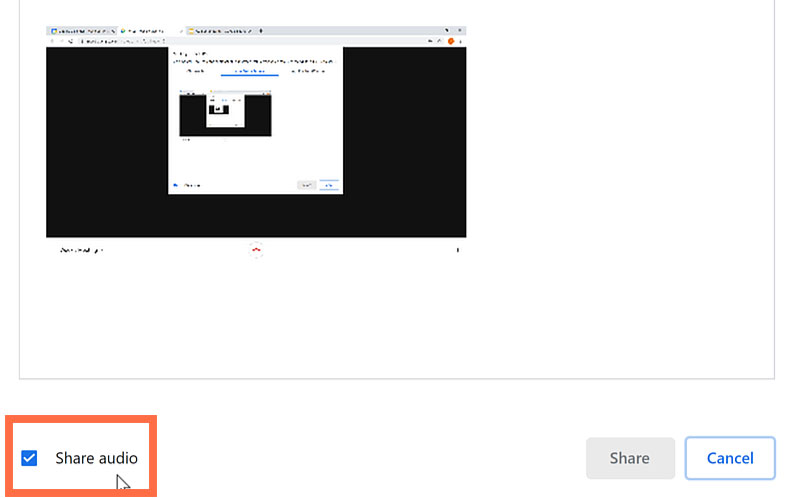
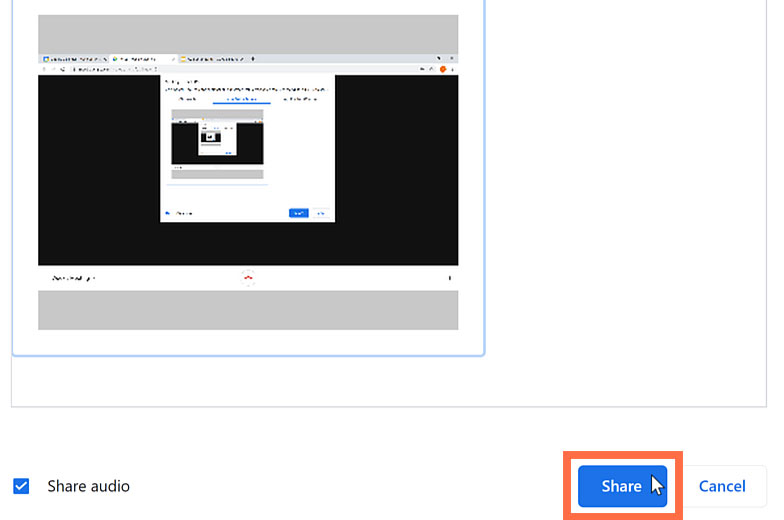
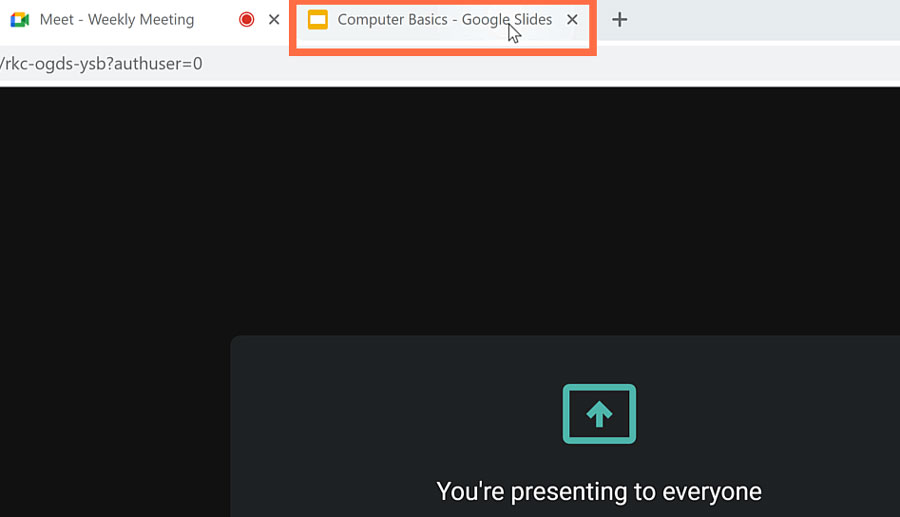
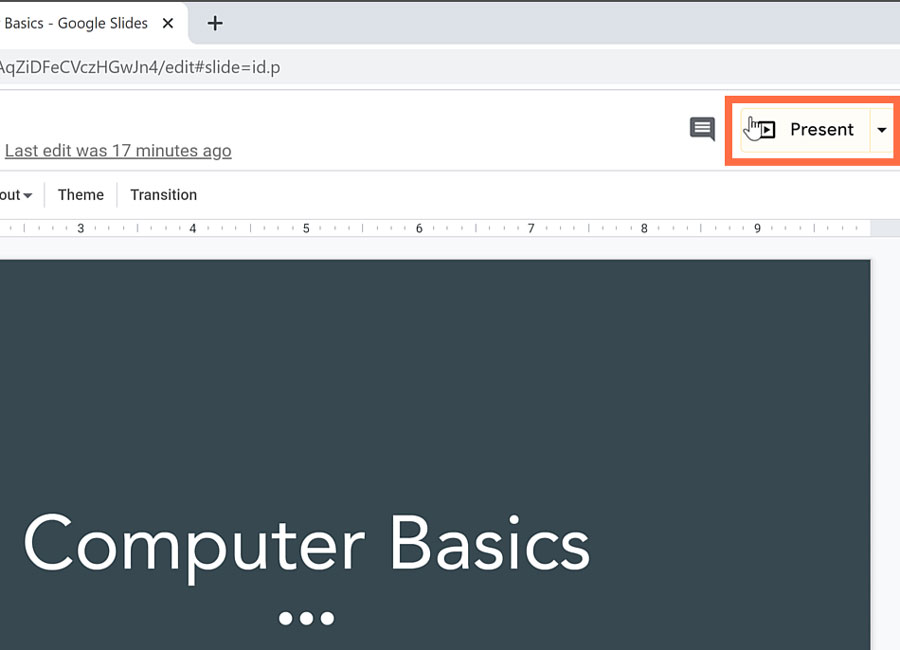
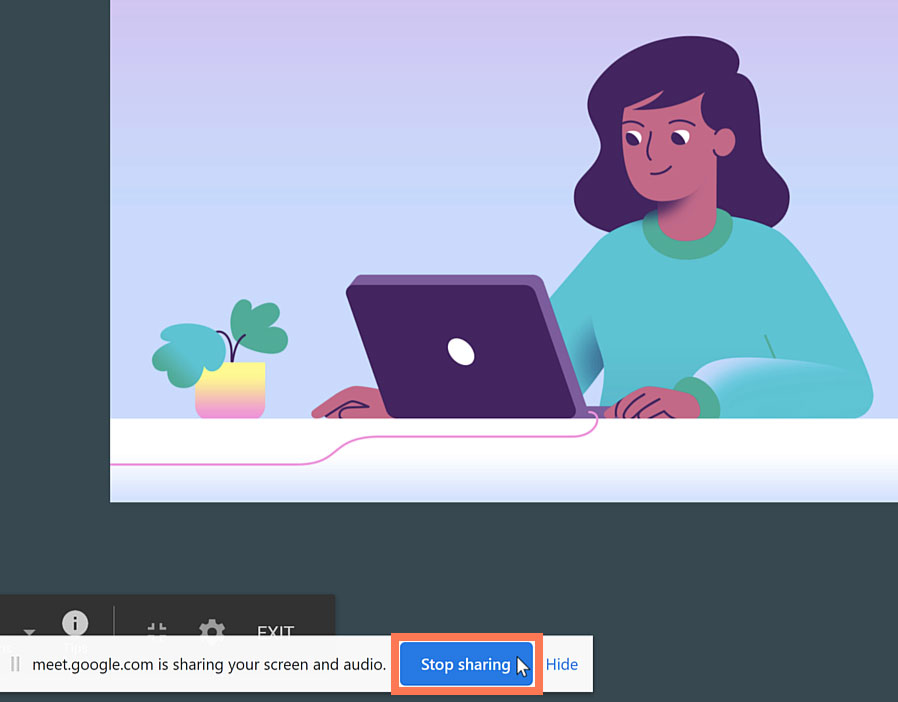
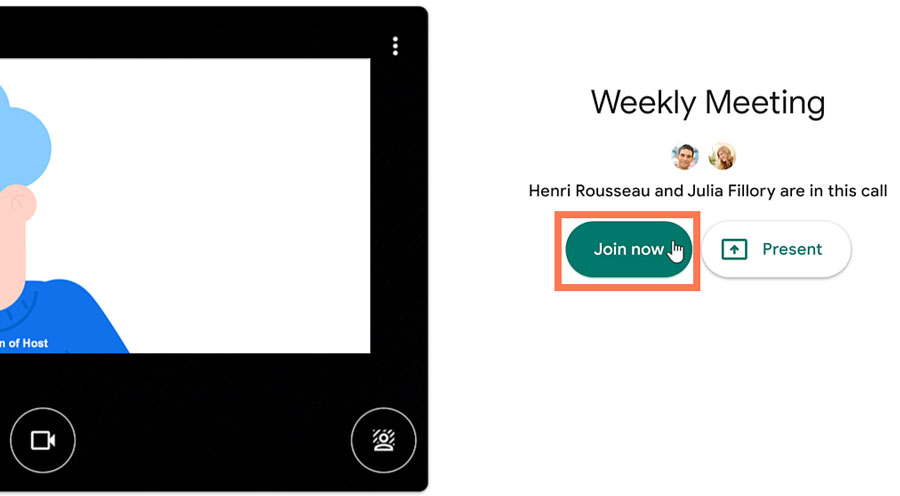
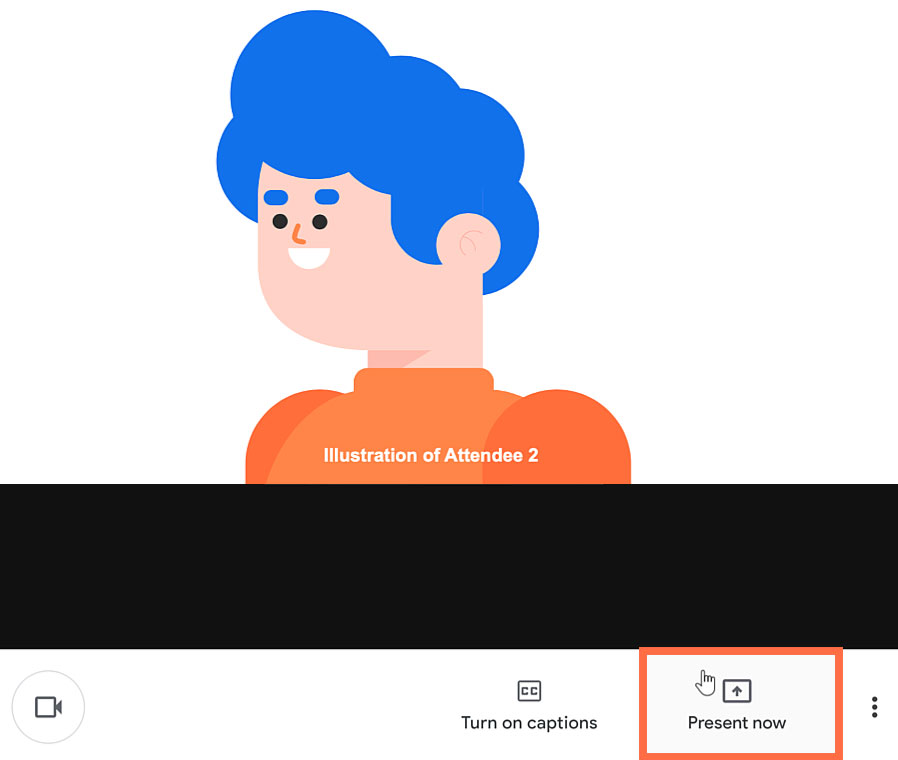
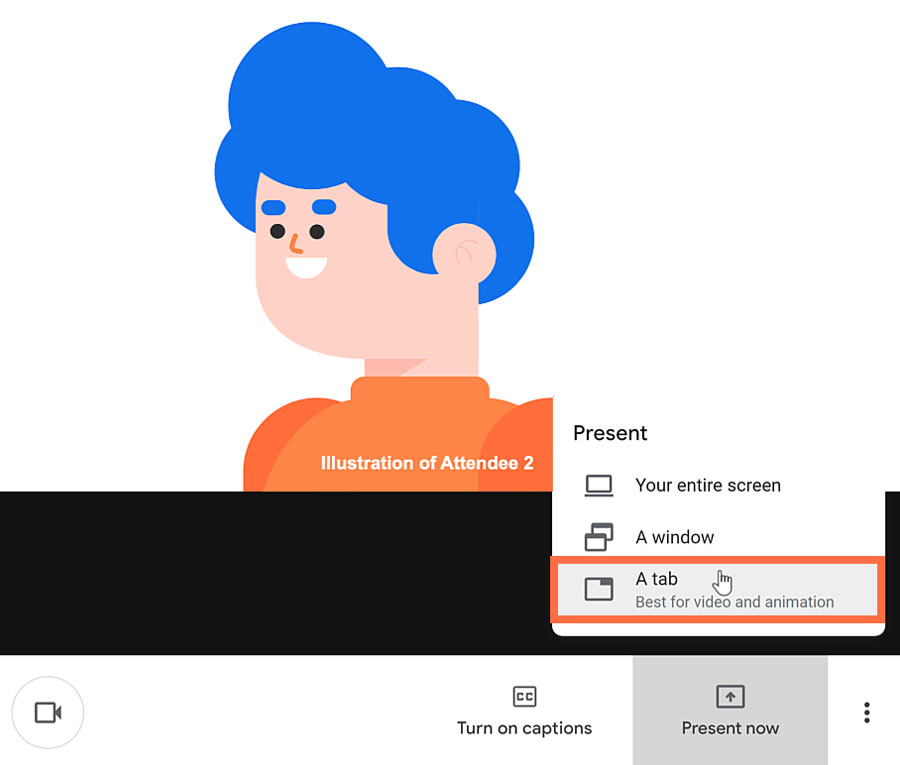
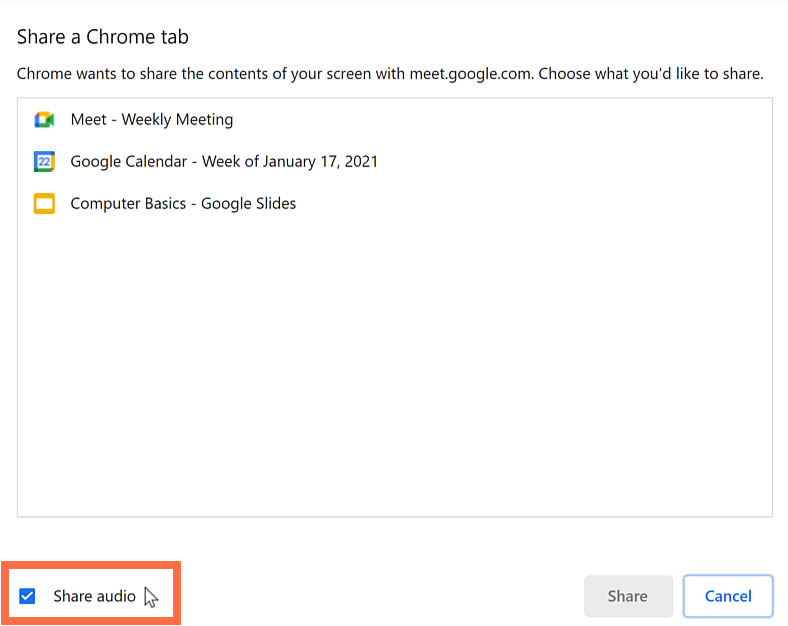
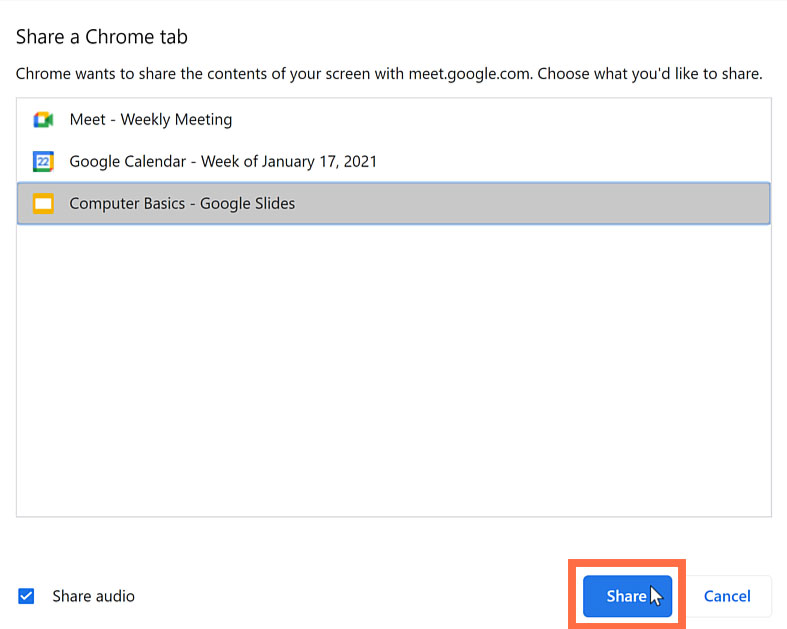
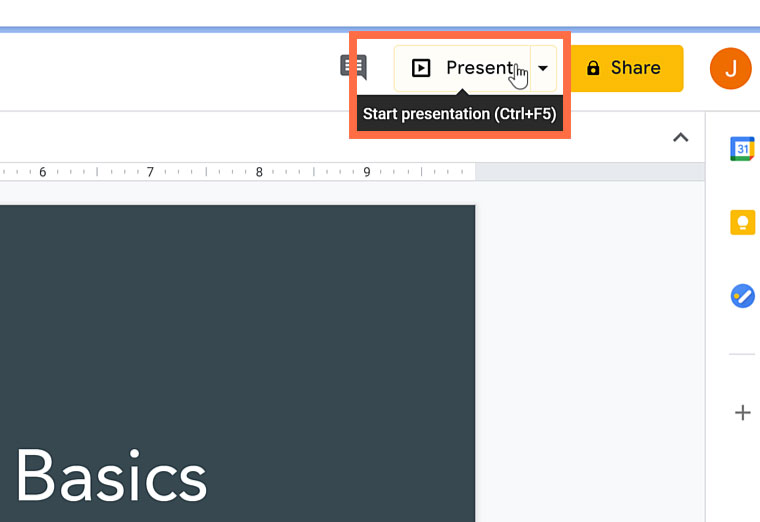
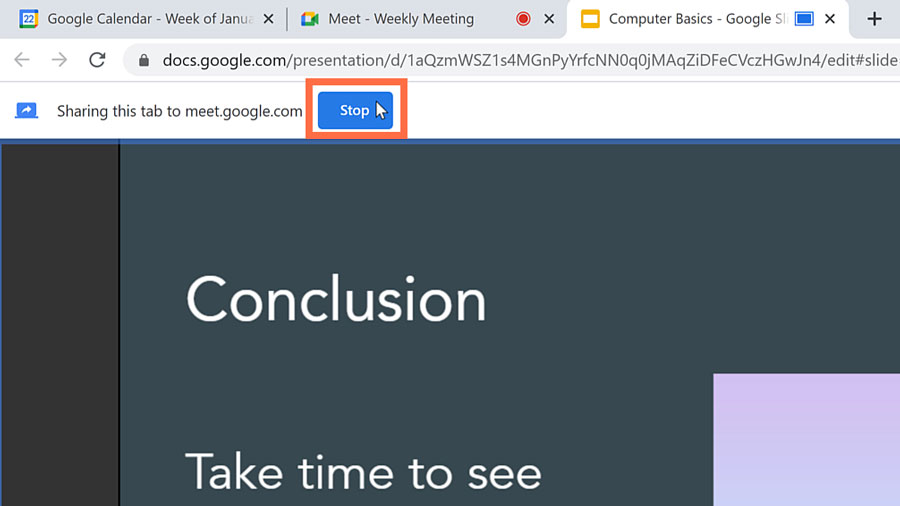
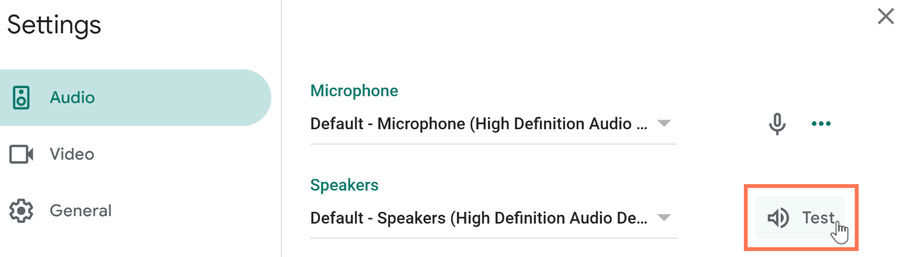
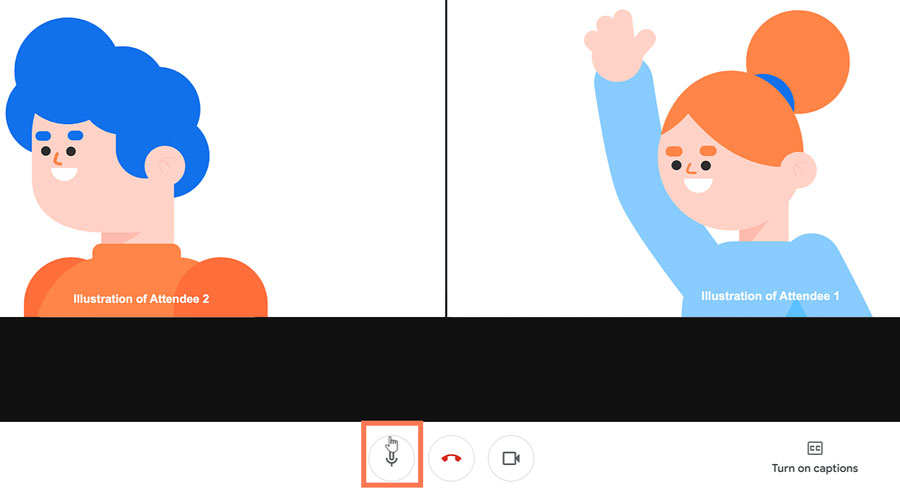
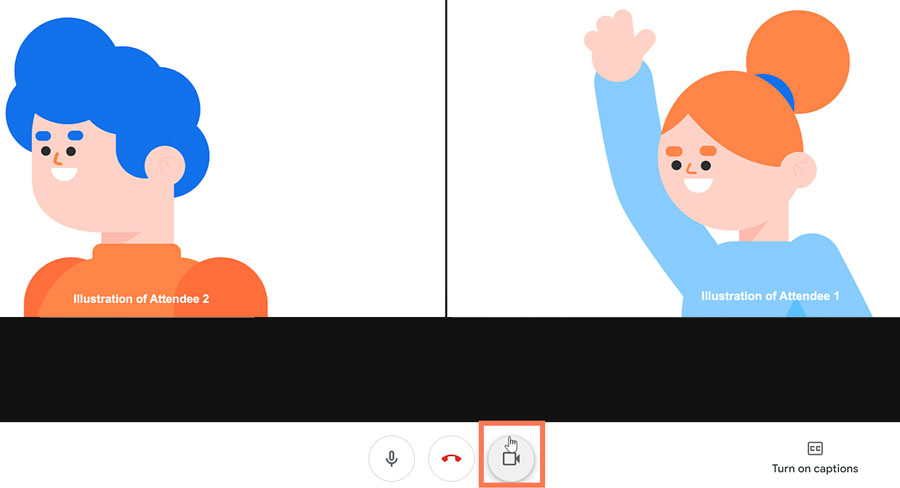
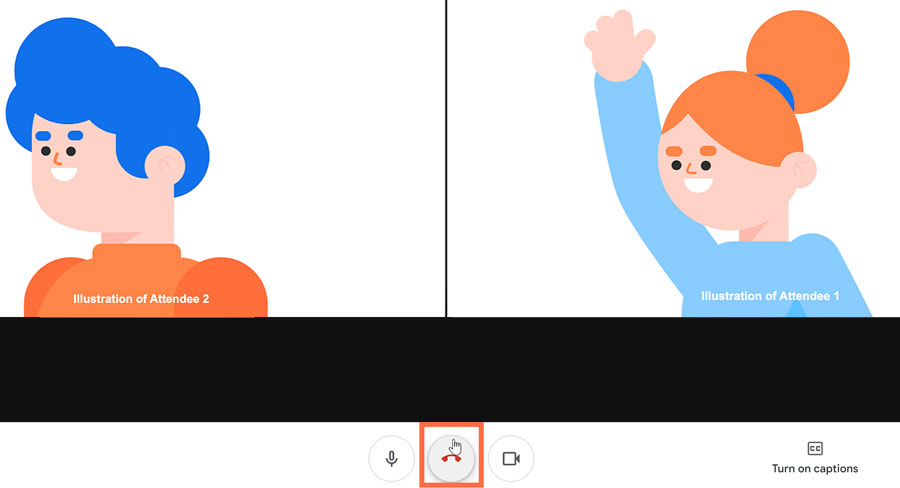



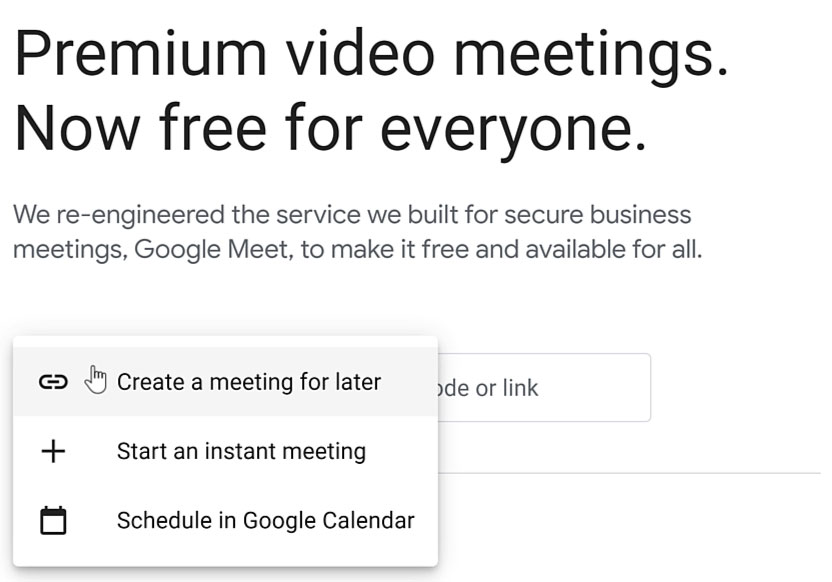
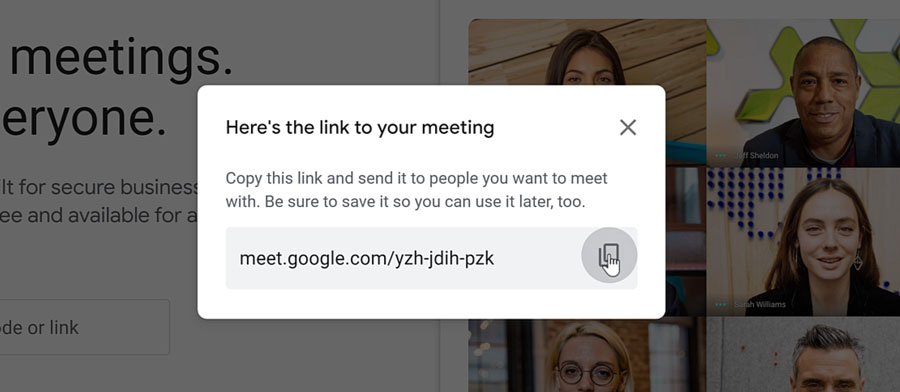
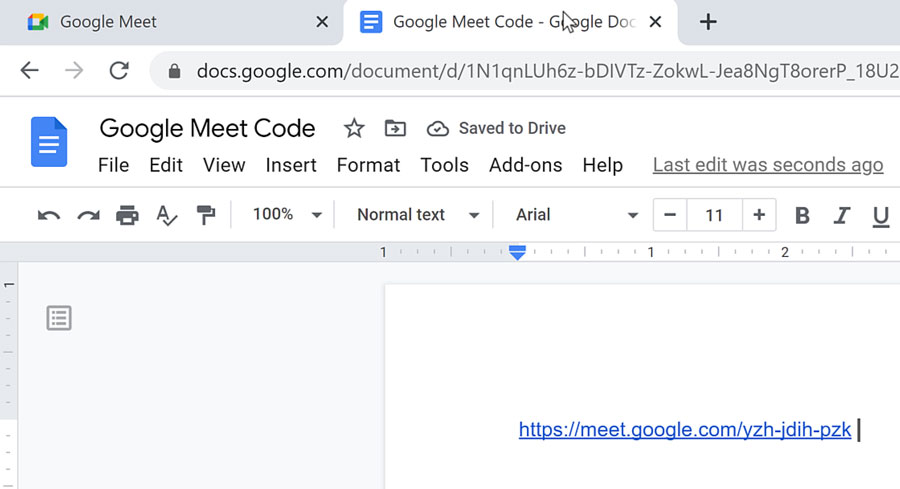
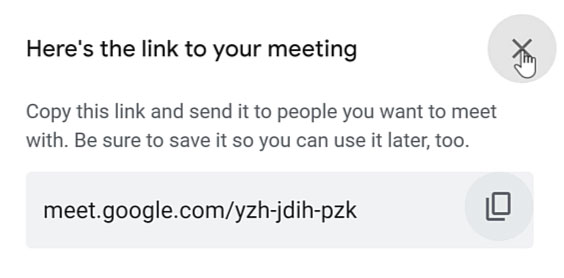
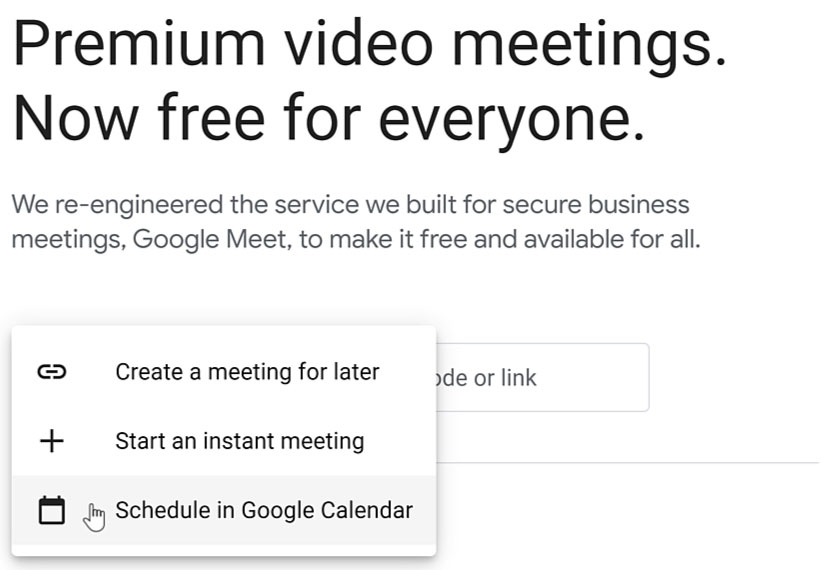
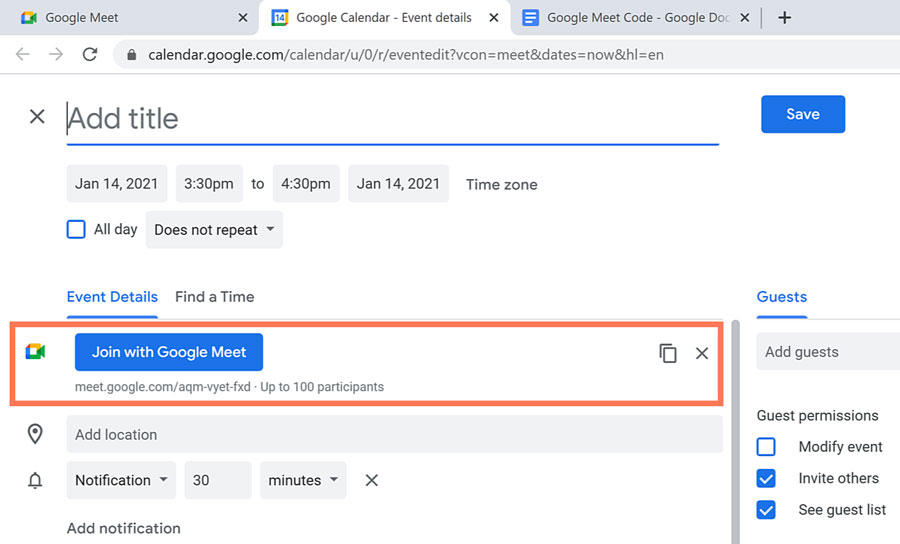
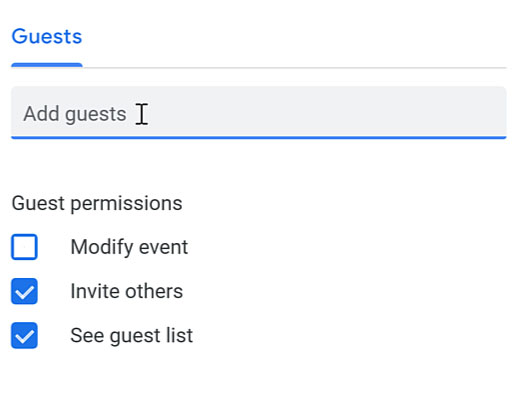
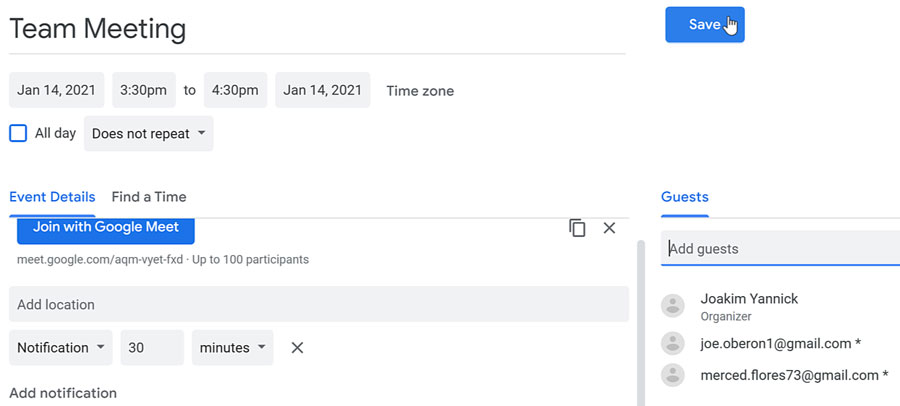
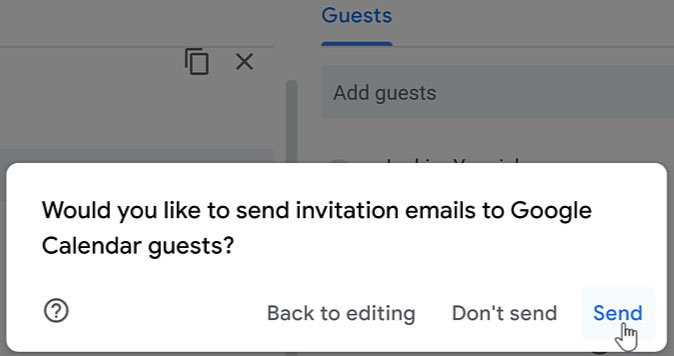
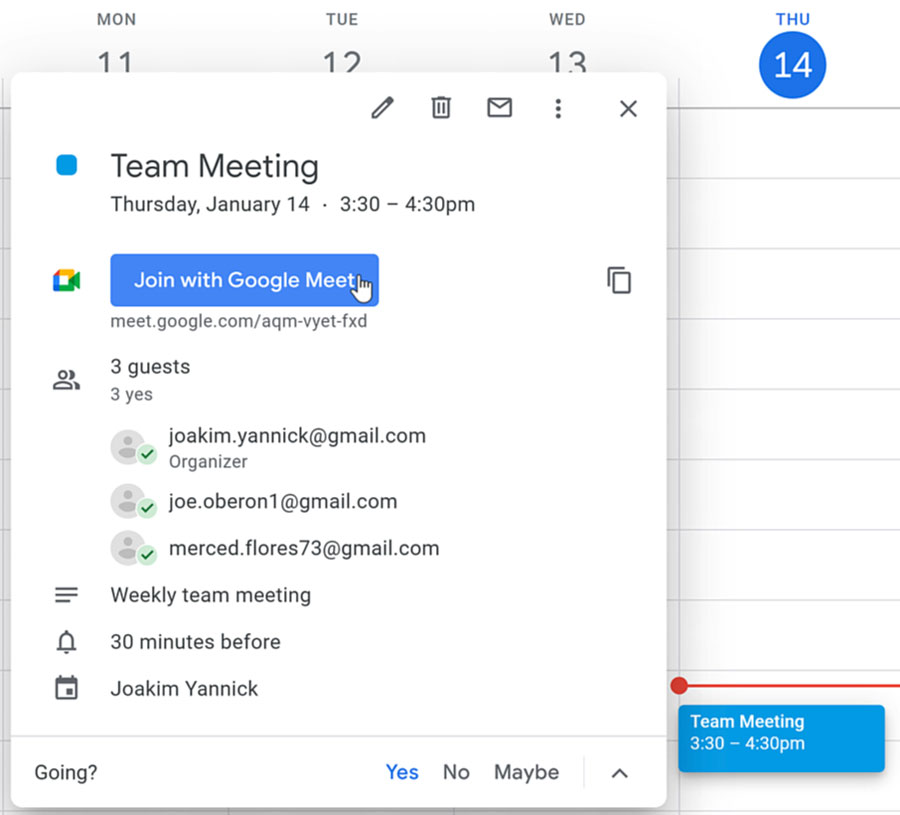
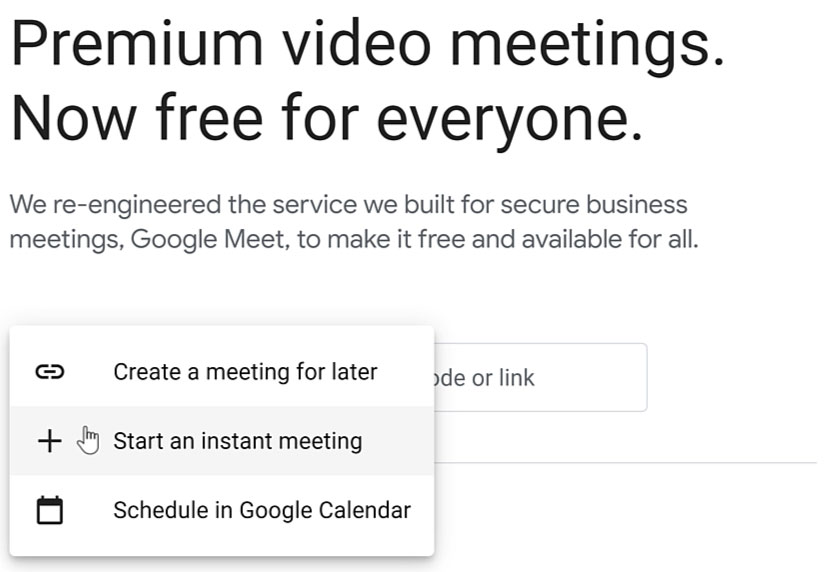
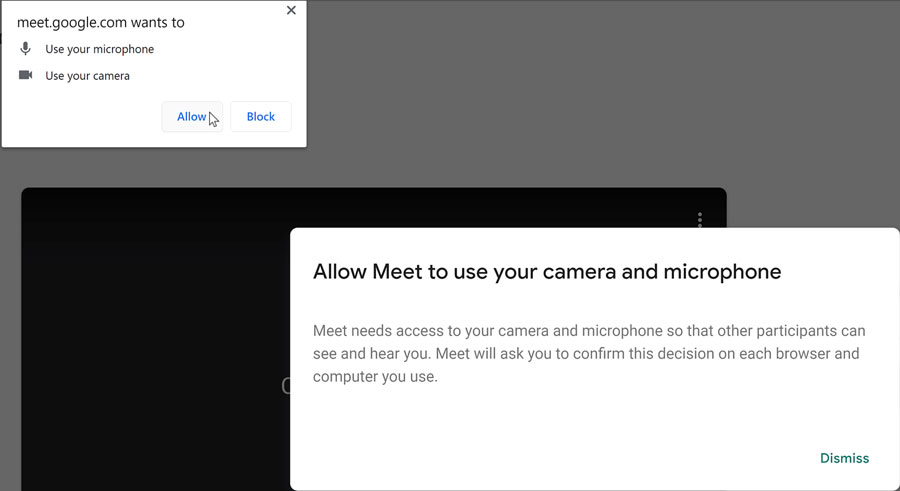
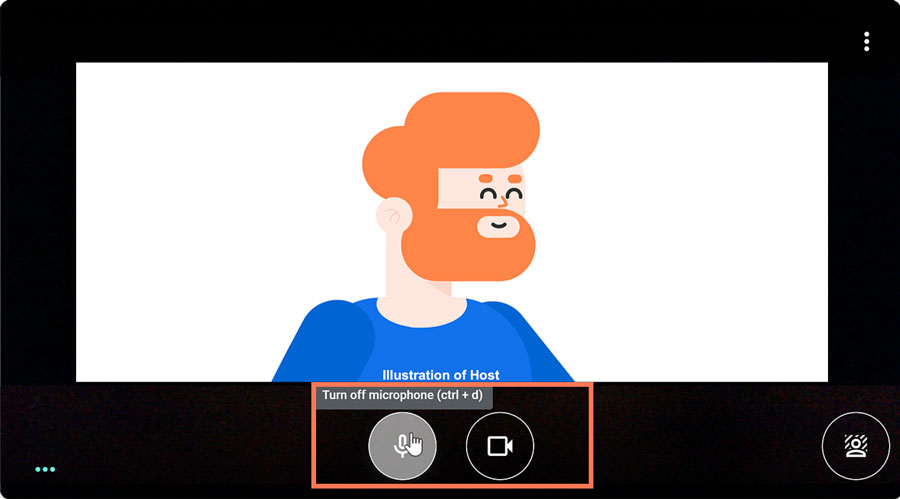
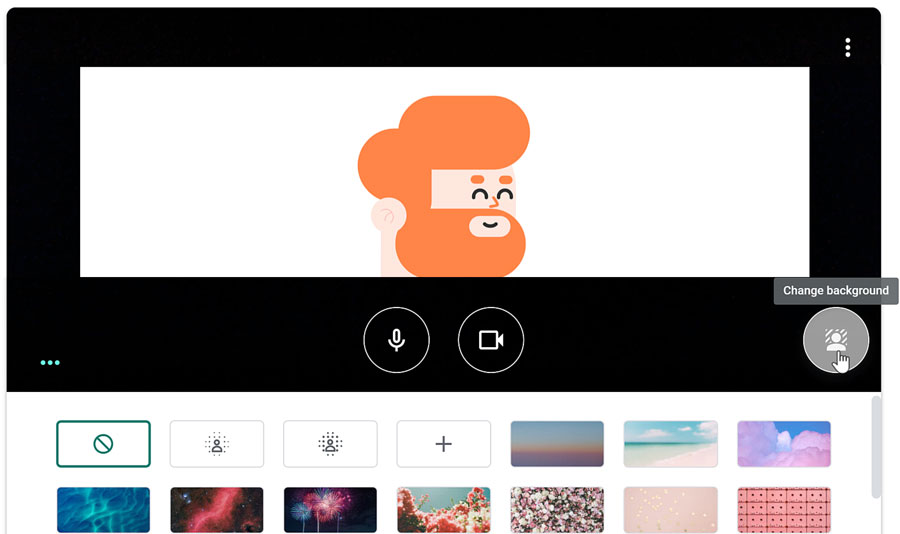

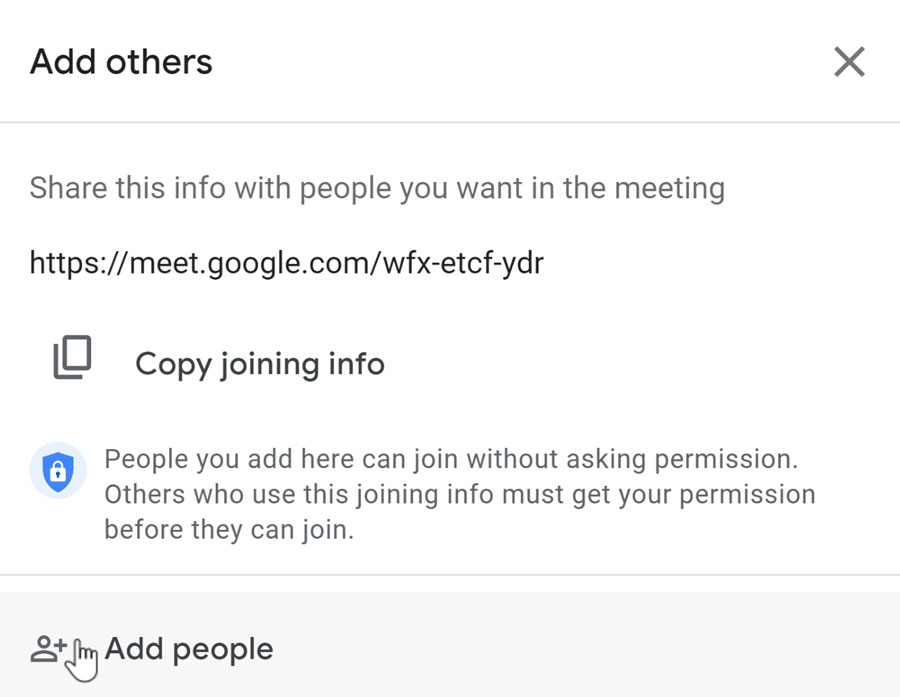
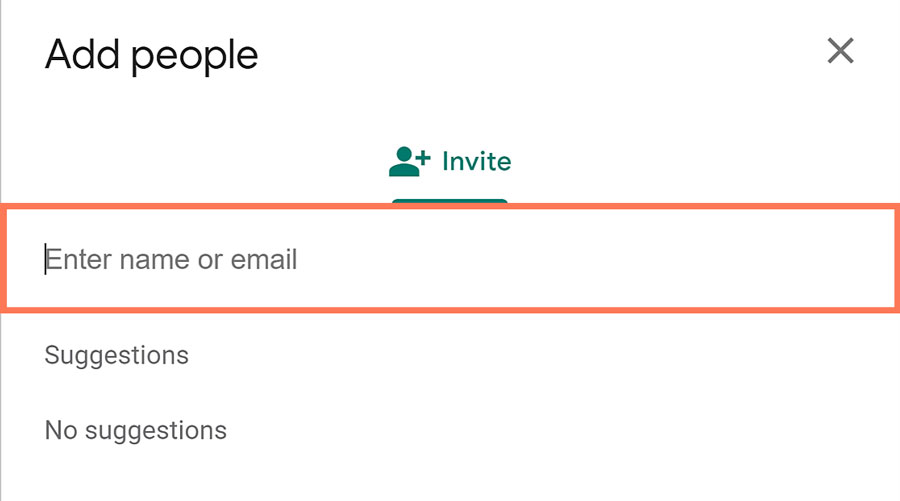
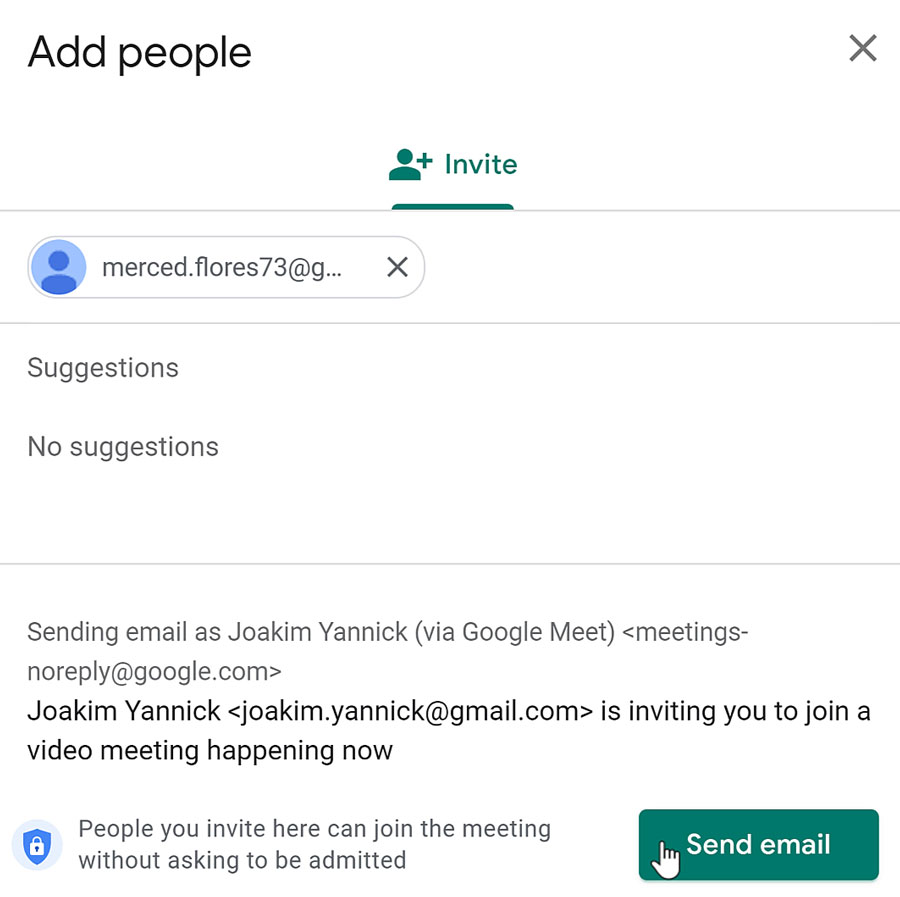
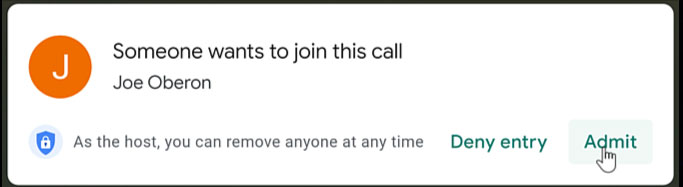 Understanding the video tile functionsOnce people have joined the video call, you can carry out your meeting. On your screen, you’ll notice your video tile as well as the video tiles of the people in the call.