HOW TO JOIN GOOGLE MEETING

HOW TO JOIN GOOGLE MEETING

How to Be a Digital Teacher

    This is Totaly free course will teach you all the required skills needed when designing and developing A Website, Application and MS Office and Internet Access.</p>        
        <a href="https://shalasugam.com/online-free-course-by-shala-sugam/" role="button">
                    Start your Free trial
                </a>
            <h3>
                Who is it for?
            </h3>
                            <p>The course is aimed at anyone who wants to work as digital person like teachers, students, competitors and others.
                                            <img width="1" height="1" src="https://shalasugam.com/wp-content/uploads/2021/05/main-illustration.svg" alt="" loading="lazy" />                                                     
            <a href="https://shalasugam.com/how-to-join-google-meeting/" rel="nofollow" google="">
            <svg xmlns="http://www.w3.org/2000/svg" xmlns:xlink="http://www.w3.org/1999/xlink" width="256px" height="297px" viewBox="0 0 256 297" preserveAspectRatio="xMidYMid"><defs><linearGradient x1="26.0700788%" y1="68.0422365%" x2="74.9491057%" y2="19.2791755%" id="linearGradient-1"><stop stop-color="#058B7E" offset="0%"></stop><stop stop-color="#058D80" offset="0%"></stop><stop stop-color="#058D7F" offset="100%"></stop></linearGradient><path d="M127.682686,0 C57.1657481,0 0,55.7909333 0,124.612267 C0,193.433916 57.1657481,249.224533 127.682686,249.224533 L127.954173,296.138272 C193.56002,258.867516 255.954173,209.119447 255.954173,124.612267 C255.954173,55.7909333 198.199941,0 127.682686,0 Z" id="path-2"></path><filter x="-0.4%" y="-0.3%" width="100.8%" height="100.7%" filterUnits="objectBoundingBox" id="filter-3"></filter><path d="M127.682686,0 C57.1657481,0 0,55.7909333 0,124.612267 C0,193.433916 57.1657481,249.224533 127.682686,249.224533 L127.954173,296.138272 C193.56002,258.867516 255.954173,209.119447 255.954173,124.612267 C255.954173,55.7909333 198.199941,0 127.682686,0 Z" id="path-4"></path><filter x="-0.4%" y="-0.3%" width="100.8%" height="100.7%" filterUnits="objectBoundingBox" id="filter-5"></filter><path d="M127.682686,0 C57.1657481,0 0,55.7909333 0,124.612267 C0,193.433916 57.1657481,249.224533 127.682686,249.224533 L127.954173,296.138272 C193.56002,258.867516 255.954173,209.119447 255.954173,124.612267 C255.954173,55.7909333 198.199941,0 127.682686,0 Z" id="path-6"></path><linearGradient x1="30.0482935%" y1="27.302306%" x2="81.9404293%" y2="84.6402399%" id="linearGradient-8"><stop stop-color="#000000" offset="0%"></stop><stop stop-color="#D8D8D8" stop-opacity="0" offset="100%"></stop></linearGradient><path d="M55.5801916,128.105402 L55.5801916,162.34398 C55.5801916,171.382993 62.9757472,178.778548 72.0147595,178.778548 L157.030779,178.778548 C166.069792,178.778548 173.465347,171.382993 173.465347,162.34398 L173.465347,140.721146 L207.124606,174.380405 L207.124606,128.105402 L55.5801916,128.105402 Z" id="path-9"></path><filter x="-1.0%" y="-3.0%" width="102.6%" height="111.8%" filterUnits="objectBoundingBox" id="filter-10"></filter></defs><g><path d="M127.682686,0 C57.1657481,0 0,55.7909333 0,124.612267 C0,193.433916 57.1657481,249.224533 127.682686,249.224533 L127.954173,296.138272 C193.56002,258.867516 255.954173,209.119447 255.954173,124.612267 C255.954173,55.7909333 198.199941,0 127.682686,0 Z" fill="url(#linearGradient-1)"></path><g fill="black" fill-opacity="1"><use filter="url(#filter-3)" xlink:href="#path-2"></use></g><g fill="black" fill-opacity="1"><use filter="url(#filter-5)" xlink:href="#path-4"></use></g><g><mask id="mask-7" fill="white"><use xlink:href="#path-6"></use></mask><g></g><polygon fill-opacity="0.21" fill="url(#linearGradient-8)" mask="url(#mask-7)" points="58.3180642 168.559565 167.355101 281.283951 311.894914 175.618212 207.440593 81.6987654 185.106647 119.970765"></polygon></g><g><use fill="black" fill-opacity="1" filter="url(#filter-10)" xlink:href="#path-9"></use><use fill="#F6F6F6" fill-rule="evenodd" xlink:href="#path-9"></use></g><path d="M207.124638,128.105402 L207.124638,81.6989235 L173.465379,115.28644 L173.465379,93.8668247 C173.465379,84.8274963 166.069823,77.4322568 157.030811,77.4322568 L72.0147911,77.4322568 C62.9757788,77.4322568 55.5802232,84.8274963 55.5802232,93.8668247 L55.5802232,128.105402 L207.124638,128.105402 Z" fill="#E2E2E2"></path></g></svg>               </a>
            <h3>
                <a href="https://shalasugam.com/how-to-join-google-meeting/" rel="nofollow" google="">HOW TO JOIN GOOGLE MEET</a>
            </h3>
                            When you can't meet in-person, video chatting is a great option. To virtually connect face-to-face, you can use the video calling app: Google Meet. Joining a Google Meet video call is easy to do and all you'll need is a link or code. In this desktop lesson, we will walk you through how to join a meeting and show you the basics of a video call.
            <a href="https://shalasugam.com/how-to-present-meeting-using-google-slide/">
            <svg xmlns="http://www.w3.org/2000/svg" xmlns:xlink="http://www.w3.org/1999/xlink" width="256px" height="297px" viewBox="0 0 256 297" preserveAspectRatio="xMidYMid"><defs><linearGradient x1="26.0700788%" y1="68.0422365%" x2="74.9491057%" y2="19.2791755%" id="linearGradient-1"><stop stop-color="#058B7E" offset="0%"></stop><stop stop-color="#058D80" offset="0%"></stop><stop stop-color="#058D7F" offset="100%"></stop></linearGradient><path d="M127.682686,0 C57.1657481,0 0,55.7909333 0,124.612267 C0,193.433916 57.1657481,249.224533 127.682686,249.224533 L127.954173,296.138272 C193.56002,258.867516 255.954173,209.119447 255.954173,124.612267 C255.954173,55.7909333 198.199941,0 127.682686,0 Z" id="path-2"></path><filter x="-0.4%" y="-0.3%" width="100.8%" height="100.7%" filterUnits="objectBoundingBox" id="filter-3"></filter><path d="M127.682686,0 C57.1657481,0 0,55.7909333 0,124.612267 C0,193.433916 57.1657481,249.224533 127.682686,249.224533 L127.954173,296.138272 C193.56002,258.867516 255.954173,209.119447 255.954173,124.612267 C255.954173,55.7909333 198.199941,0 127.682686,0 Z" id="path-4"></path><filter x="-0.4%" y="-0.3%" width="100.8%" height="100.7%" filterUnits="objectBoundingBox" id="filter-5"></filter><path d="M127.682686,0 C57.1657481,0 0,55.7909333 0,124.612267 C0,193.433916 57.1657481,249.224533 127.682686,249.224533 L127.954173,296.138272 C193.56002,258.867516 255.954173,209.119447 255.954173,124.612267 C255.954173,55.7909333 198.199941,0 127.682686,0 Z" id="path-6"></path><linearGradient x1="30.0482935%" y1="27.302306%" x2="81.9404293%" y2="84.6402399%" id="linearGradient-8"><stop stop-color="#000000" offset="0%"></stop><stop stop-color="#D8D8D8" stop-opacity="0" offset="100%"></stop></linearGradient><path d="M55.5801916,128.105402 L55.5801916,162.34398 C55.5801916,171.382993 62.9757472,178.778548 72.0147595,178.778548 L157.030779,178.778548 C166.069792,178.778548 173.465347,171.382993 173.465347,162.34398 L173.465347,140.721146 L207.124606,174.380405 L207.124606,128.105402 L55.5801916,128.105402 Z" id="path-9"></path><filter x="-1.0%" y="-3.0%" width="102.6%" height="111.8%" filterUnits="objectBoundingBox" id="filter-10"></filter></defs><g><path d="M127.682686,0 C57.1657481,0 0,55.7909333 0,124.612267 C0,193.433916 57.1657481,249.224533 127.682686,249.224533 L127.954173,296.138272 C193.56002,258.867516 255.954173,209.119447 255.954173,124.612267 C255.954173,55.7909333 198.199941,0 127.682686,0 Z" fill="url(#linearGradient-1)"></path><g fill="black" fill-opacity="1"><use filter="url(#filter-3)" xlink:href="#path-2"></use></g><g fill="black" fill-opacity="1"><use filter="url(#filter-5)" xlink:href="#path-4"></use></g><g><mask id="mask-7" fill="white"><use xlink:href="#path-6"></use></mask><g></g><polygon fill-opacity="0.21" fill="url(#linearGradient-8)" mask="url(#mask-7)" points="58.3180642 168.559565 167.355101 281.283951 311.894914 175.618212 207.440593 81.6987654 185.106647 119.970765"></polygon></g><g><use fill="black" fill-opacity="1" filter="url(#filter-10)" xlink:href="#path-9"></use><use fill="#F6F6F6" fill-rule="evenodd" xlink:href="#path-9"></use></g><path d="M207.124638,128.105402 L207.124638,81.6989235 L173.465379,115.28644 L173.465379,93.8668247 C173.465379,84.8274963 166.069823,77.4322568 157.030811,77.4322568 L72.0147911,77.4322568 C62.9757788,77.4322568 55.5802232,84.8274963 55.5802232,93.8668247 L55.5802232,128.105402 L207.124638,128.105402 Z" fill="#E2E2E2"></path></g></svg>               </a>
            <h3>
                <a href="https://shalasugam.com/how-to-present-meeting-using-google-slide/">HOW TO PRESENT GOOGLE MEET USING GOOGLE SLIDE​</a>
            </h3>
                            Presenting during a video conference is a little bit different than presenting in-person. For a video conference, you need to know how to use the video app's interface so you can take charge of the meeting when it is time for you to present. To help you, we've put together a Google Meet lesson that teaches you how to present using Google Slides.
            <a href="https://shalasugam.com/how-to-host-google-meeting/">
            <svg xmlns="http://www.w3.org/2000/svg" xmlns:xlink="http://www.w3.org/1999/xlink" width="256px" height="297px" viewBox="0 0 256 297" preserveAspectRatio="xMidYMid"><defs><linearGradient x1="26.0700788%" y1="68.0422365%" x2="74.9491057%" y2="19.2791755%" id="linearGradient-1"><stop stop-color="#058B7E" offset="0%"></stop><stop stop-color="#058D80" offset="0%"></stop><stop stop-color="#058D7F" offset="100%"></stop></linearGradient><path d="M127.682686,0 C57.1657481,0 0,55.7909333 0,124.612267 C0,193.433916 57.1657481,249.224533 127.682686,249.224533 L127.954173,296.138272 C193.56002,258.867516 255.954173,209.119447 255.954173,124.612267 C255.954173,55.7909333 198.199941,0 127.682686,0 Z" id="path-2"></path><filter x="-0.4%" y="-0.3%" width="100.8%" height="100.7%" filterUnits="objectBoundingBox" id="filter-3"></filter><path d="M127.682686,0 C57.1657481,0 0,55.7909333 0,124.612267 C0,193.433916 57.1657481,249.224533 127.682686,249.224533 L127.954173,296.138272 C193.56002,258.867516 255.954173,209.119447 255.954173,124.612267 C255.954173,55.7909333 198.199941,0 127.682686,0 Z" id="path-4"></path><filter x="-0.4%" y="-0.3%" width="100.8%" height="100.7%" filterUnits="objectBoundingBox" id="filter-5"></filter><path d="M127.682686,0 C57.1657481,0 0,55.7909333 0,124.612267 C0,193.433916 57.1657481,249.224533 127.682686,249.224533 L127.954173,296.138272 C193.56002,258.867516 255.954173,209.119447 255.954173,124.612267 C255.954173,55.7909333 198.199941,0 127.682686,0 Z" id="path-6"></path><linearGradient x1="30.0482935%" y1="27.302306%" x2="81.9404293%" y2="84.6402399%" id="linearGradient-8"><stop stop-color="#000000" offset="0%"></stop><stop stop-color="#D8D8D8" stop-opacity="0" offset="100%"></stop></linearGradient><path d="M55.5801916,128.105402 L55.5801916,162.34398 C55.5801916,171.382993 62.9757472,178.778548 72.0147595,178.778548 L157.030779,178.778548 C166.069792,178.778548 173.465347,171.382993 173.465347,162.34398 L173.465347,140.721146 L207.124606,174.380405 L207.124606,128.105402 L55.5801916,128.105402 Z" id="path-9"></path><filter x="-1.0%" y="-3.0%" width="102.6%" height="111.8%" filterUnits="objectBoundingBox" id="filter-10"></filter></defs><g><path d="M127.682686,0 C57.1657481,0 0,55.7909333 0,124.612267 C0,193.433916 57.1657481,249.224533 127.682686,249.224533 L127.954173,296.138272 C193.56002,258.867516 255.954173,209.119447 255.954173,124.612267 C255.954173,55.7909333 198.199941,0 127.682686,0 Z" fill="url(#linearGradient-1)"></path><g fill="black" fill-opacity="1"><use filter="url(#filter-3)" xlink:href="#path-2"></use></g><g fill="black" fill-opacity="1"><use filter="url(#filter-5)" xlink:href="#path-4"></use></g><g><mask id="mask-7" fill="white"><use xlink:href="#path-6"></use></mask><g></g><polygon fill-opacity="0.21" fill="url(#linearGradient-8)" mask="url(#mask-7)" points="58.3180642 168.559565 167.355101 281.283951 311.894914 175.618212 207.440593 81.6987654 185.106647 119.970765"></polygon></g><g><use fill="black" fill-opacity="1" filter="url(#filter-10)" xlink:href="#path-9"></use><use fill="#F6F6F6" fill-rule="evenodd" xlink:href="#path-9"></use></g><path d="M207.124638,128.105402 L207.124638,81.6989235 L173.465379,115.28644 L173.465379,93.8668247 C173.465379,84.8274963 166.069823,77.4322568 157.030811,77.4322568 L72.0147911,77.4322568 C62.9757788,77.4322568 55.5802232,84.8274963 55.5802232,93.8668247 L55.5802232,128.105402 L207.124638,128.105402 Z" fill="#E2E2E2"></path></g></svg>               </a>
            <h3>
                <a href="https://shalasugam.com/how-to-host-google-meeting/">How to Host a Meeting</a>
            </h3>
                            Whether you want to talk with friends or conduct a business meeting, you can use Google Meet as a practical alternative to meeting in-person. Google Meet lets you plan a virtual meeting ahead of time or start a spur of the moment video chat. To help you host a video call, we've put together a lesson that teaches you how to set up and carry out a meeting.
            <a href="https://shalasugam.com/google-meet-with-mobile-app/">
            <svg xmlns="http://www.w3.org/2000/svg" xmlns:xlink="http://www.w3.org/1999/xlink" width="256px" height="297px" viewBox="0 0 256 297" preserveAspectRatio="xMidYMid"><defs><linearGradient x1="26.0700788%" y1="68.0422365%" x2="74.9491057%" y2="19.2791755%" id="linearGradient-1"><stop stop-color="#058B7E" offset="0%"></stop><stop stop-color="#058D80" offset="0%"></stop><stop stop-color="#058D7F" offset="100%"></stop></linearGradient><path d="M127.682686,0 C57.1657481,0 0,55.7909333 0,124.612267 C0,193.433916 57.1657481,249.224533 127.682686,249.224533 L127.954173,296.138272 C193.56002,258.867516 255.954173,209.119447 255.954173,124.612267 C255.954173,55.7909333 198.199941,0 127.682686,0 Z" id="path-2"></path><filter x="-0.4%" y="-0.3%" width="100.8%" height="100.7%" filterUnits="objectBoundingBox" id="filter-3"></filter><path d="M127.682686,0 C57.1657481,0 0,55.7909333 0,124.612267 C0,193.433916 57.1657481,249.224533 127.682686,249.224533 L127.954173,296.138272 C193.56002,258.867516 255.954173,209.119447 255.954173,124.612267 C255.954173,55.7909333 198.199941,0 127.682686,0 Z" id="path-4"></path><filter x="-0.4%" y="-0.3%" width="100.8%" height="100.7%" filterUnits="objectBoundingBox" id="filter-5"></filter><path d="M127.682686,0 C57.1657481,0 0,55.7909333 0,124.612267 C0,193.433916 57.1657481,249.224533 127.682686,249.224533 L127.954173,296.138272 C193.56002,258.867516 255.954173,209.119447 255.954173,124.612267 C255.954173,55.7909333 198.199941,0 127.682686,0 Z" id="path-6"></path><linearGradient x1="30.0482935%" y1="27.302306%" x2="81.9404293%" y2="84.6402399%" id="linearGradient-8"><stop stop-color="#000000" offset="0%"></stop><stop stop-color="#D8D8D8" stop-opacity="0" offset="100%"></stop></linearGradient><path d="M55.5801916,128.105402 L55.5801916,162.34398 C55.5801916,171.382993 62.9757472,178.778548 72.0147595,178.778548 L157.030779,178.778548 C166.069792,178.778548 173.465347,171.382993 173.465347,162.34398 L173.465347,140.721146 L207.124606,174.380405 L207.124606,128.105402 L55.5801916,128.105402 Z" id="path-9"></path><filter x="-1.0%" y="-3.0%" width="102.6%" height="111.8%" filterUnits="objectBoundingBox" id="filter-10"></filter></defs><g><path d="M127.682686,0 C57.1657481,0 0,55.7909333 0,124.612267 C0,193.433916 57.1657481,249.224533 127.682686,249.224533 L127.954173,296.138272 C193.56002,258.867516 255.954173,209.119447 255.954173,124.612267 C255.954173,55.7909333 198.199941,0 127.682686,0 Z" fill="url(#linearGradient-1)"></path><g fill="black" fill-opacity="1"><use filter="url(#filter-3)" xlink:href="#path-2"></use></g><g fill="black" fill-opacity="1"><use filter="url(#filter-5)" xlink:href="#path-4"></use></g><g><mask id="mask-7" fill="white"><use xlink:href="#path-6"></use></mask><g></g><polygon fill-opacity="0.21" fill="url(#linearGradient-8)" mask="url(#mask-7)" points="58.3180642 168.559565 167.355101 281.283951 311.894914 175.618212 207.440593 81.6987654 185.106647 119.970765"></polygon></g><g><use fill="black" fill-opacity="1" filter="url(#filter-10)" xlink:href="#path-9"></use><use fill="#F6F6F6" fill-rule="evenodd" xlink:href="#path-9"></use></g><path d="M207.124638,128.105402 L207.124638,81.6989235 L173.465379,115.28644 L173.465379,93.8668247 C173.465379,84.8274963 166.069823,77.4322568 157.030811,77.4322568 L72.0147911,77.4322568 C62.9757788,77.4322568 55.5802232,84.8274963 55.5802232,93.8668247 L55.5802232,128.105402 L207.124638,128.105402 Z" fill="#E2E2E2"></path></g></svg>               </a>
            <h3>
                <a href="https://shalasugam.com/google-meet-with-mobile-app/">HOW TO GOOGLE MEET WITH MOBILE APP​</a>
            </h3>
                            Most of us have our smartphone or tablet nearby to talk to coworkers, family members, and friends. Instead of calling or emailing, you can virtually connect face-to-face with a simple video call. In this lesson, we'll teach you how to video chat using the Google Meet mobile app. 
        <h3>GOOGLE MEET TRAINING</h3>       
    <header></header><header><h1>Google Meet - How to Join a Meeting</h1><img id="header-img" src="https://media.gcflearnfree.org/assets/edu-gcfglobal-site/images/city-aqua2.svg" alt="" /></p><header>Google Meet : How to Join a Meeting</header><p><a href="https://shalasugam.com/wp-content/uploads/2021/05/PNG-File.png"><img src="https://shalasugam.com/wp-content/uploads/2021/05/PNG-File-300x190.png" alt="" width="300" height="190" /></a></p></header><h1>Google Meet: How to Join a Meeting</h1><p>601bf80d4136932698f4bda8<br />601bfd264136932698f4bda9</p><h4 tabindex="0" aria-label="Lesson Divider Lesson 1: How to Join a Meeting">Lesson 1: How to Join a Meeting</h4><h3 style="text-align: center;">How to join a meeting</h3><p style="text-align: center;">When you can't meet in-person, video chatting is a great option. To virtually connect face-to-face, you can use the video calling app: Google Meet. Joining a Google Meet video call is easy to do and all you'll need is a link or code. In this desktop lesson, we will walk you through how to join a meeting and show you the basics of a video call.</p><p style="text-align: center;">Watch the video below to learn how to join a meeting and the basics of a video call.</p><p style="text-align: center;">In our example, we are using Chrome as our web browser, but you can use the one that you'd prefer since Google Meet works with most web browsers.</p><h4 style="text-align: center;">To enter the meeting by email invitation:</h4><ol style="text-align: center;"><li>First, log in using your Google account. <img style="width: 399px; height: 401.05px;" title="logging in using a Google account" src="https://media.gcflearnfree.org/content/601bfd264136932698f4bda9_02_04_2021/google_meet_log_in.jpg" alt="logging in using a Google account" width="399" height="401.04999999999995" /></li><li>Next, you'll need to navigate to your <strong>Gmail</strong> Inbox and open the Google Meet email invitation. <img title="opening the email invitation" src="https://media.gcflearnfree.org/content/601bfd264136932698f4bda9_02_04_2021/google_meet_open_email.jpg" alt="opening the email invitation" /></li><li>From the email invitation, click the link to the Google Meet.<img style="width: 605px; height: 407.333px;" title="clicking the Google Meet link" src="https://media.gcflearnfree.org/content/601bfd264136932698f4bda9_02_04_2021/google_meet_email_link.jpg" alt="clicking the Google Meet link" width="605" height="407.333" /></li><li>Some pop-ups may occur if you haven't approved the use of your microphone, camera, and notifications. Click <strong>Allow</strong> for these pop-ups.<img title="allowing the microphone and camera" src="https://media.gcflearnfree.org/content/601bfd264136932698f4bda9_02_04_2021/google_meet_allow_notifications.jpg" alt="allowing the microphone and camera" /></li><li>Before entering the meeting, you can decide the settings you want to use. You can choose to join the meeting with your microphone and camera on or off by clicking their icons. Turning your microphone off is a way to mute yourself right at the start of the meeting while turning your camera off is a way to make sure no one can see you. You can always change these options inside the video call too.<img title="showing the microphone and camera icons" src="https://media.gcflearnfree.org/content/601bfd264136932698f4bda9_02_04_2021/google_meet_microphone.jpg" alt="showing the microphone and camera icons" /></li><li>Now that you have your settings ready, click <strong>Ask to join</strong>.<img style="width: 306px; height: 157.133px;" title="clicking Ask to join" src="https://media.gcflearnfree.org/content/601bfd264136932698f4bda9_02_04_2021/google_meet_asktojoin2.jpg" alt="clicking Ask to join" width="306" height="157.133" /></li></ol><p style="text-align: center;">If you received a <strong>Google Calendar</strong> invite instead of a email invitation, click the event to see more information. Then, click the <strong>Join with Google Meet</strong> button.
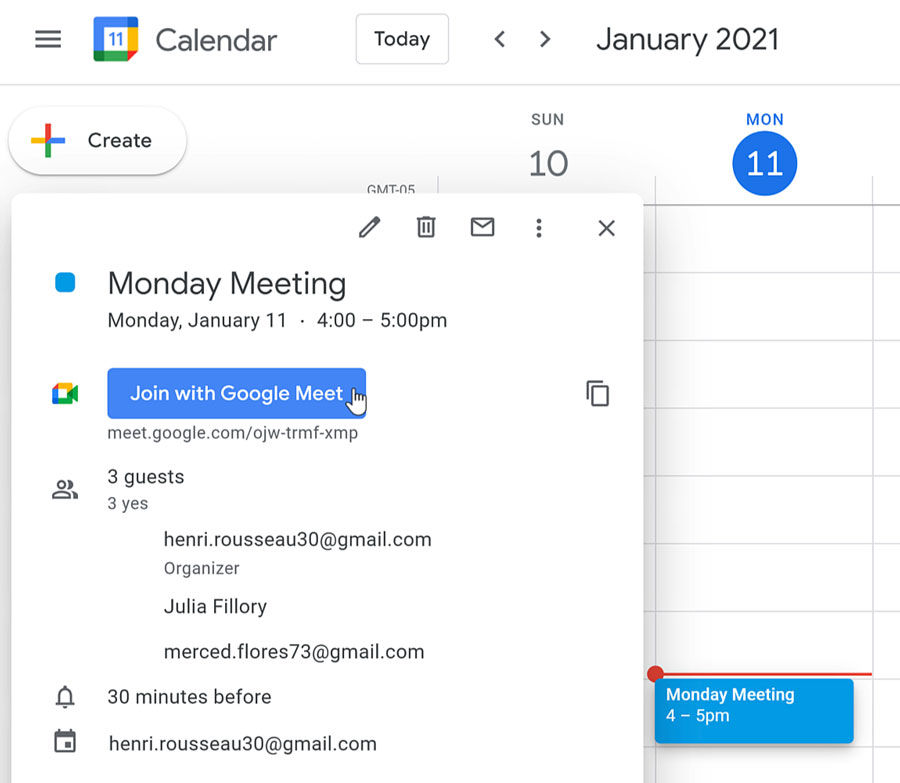
clicking the Join with Google Meet button in Google Calendar

To navigate the call:

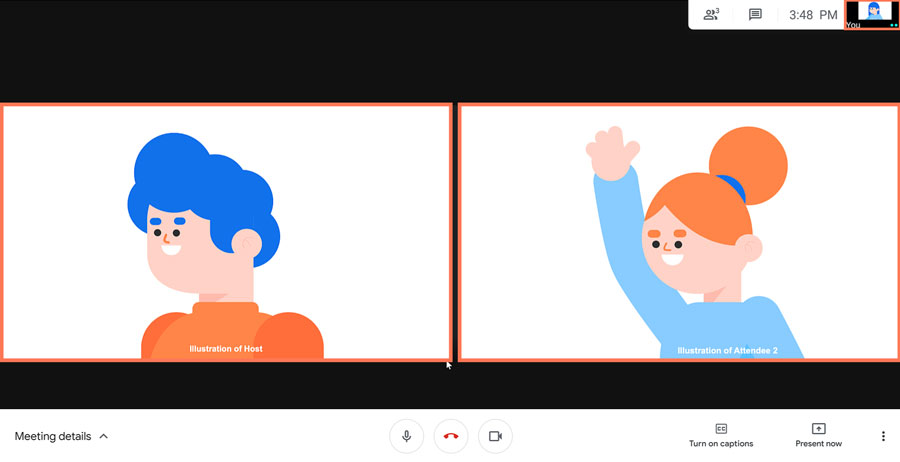
  • Once you’ve joined the video call, you’ll see your video tile as well as the video tiles of the people you are video chatting with on your desktop screen.highlighting the video tiles
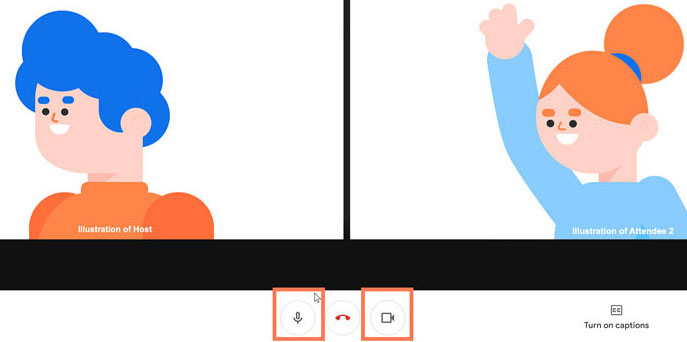
  • To see the bottom toolbar, you may need to move your mouse. There you can turn on or off your microphone or camera at any time just by clicking on or off their icons.viewing the microphone and camera icons
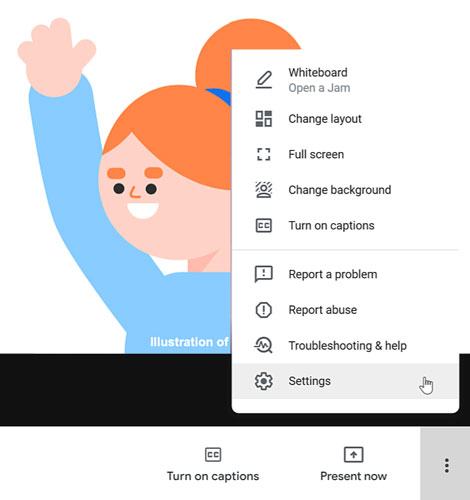
  • On the bottom toolbar, click the three dots icon. A pop-up menu appears showing more features. We’ll talk more about Settings later in this lesson.clicking Settings
  • In the top-right corner, there’s a smaller toolbar. You can see written messages by clicking the message icon.clicking the message icon

To send a written message:

  1. Click the message icon located at the top-right of your screen.clicking the message icon
  2. You can type your message in the field then click the right-arrow button to have it sent to everyone in the video chat. You can also read and respond to messages from those in the call here too.typing a message and sending it by clicking the arrow button
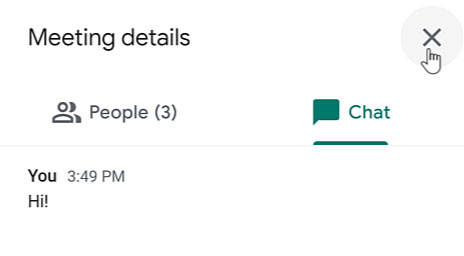
  3. To close out of the video call messaging, click the X.closing the Chat pane

To open Settings:

  1. Looking at the bottom toolbar, click the three dots icon followed by Settings.clicking Settings
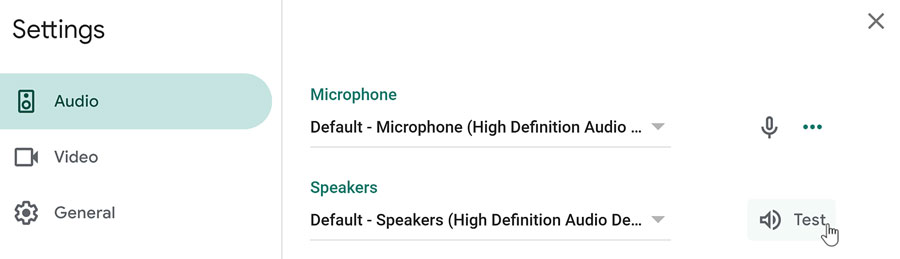
  2. Within Settings, you can make changes to your Audio and Video to make sure you have the correct equipment selected.
  3. Within Audio, you can Test your Speakers to make sure they are working properly. The settings are helpful if you find yourself unable to hear who you are talking to or they say that they can’t hear or see you.testing speakers
  4. To close out of Settings, click the X.

To end the video call:
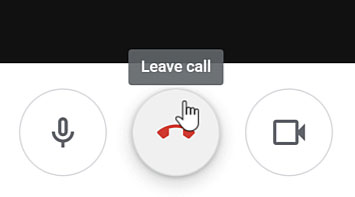
clicking the Leave call button

Move your mouse to have the bottom toolbar appear. Then, when you’re ready to end the video call, click the red Leave call icon.


        <h3>our teaching team</h3>      
                                            <img width="150" height="150" src="https://shalasugam.com/wp-content/uploads/2021/03/BALDEV-e1616250695880-150x150.jpeg" alt="" loading="lazy" srcset="https://i0.wp.com/shalasugam.com/wp-content/uploads/2021/03/BALDEV-e1616250695880.jpeg?resize=150%2C150&ssl=1 150w, https://i0.wp.com/shalasugam.com/wp-content/uploads/2021/03/BALDEV-e1616250695880.jpeg?zoom=2&resize=150%2C150&ssl=1 300w, https://i0.wp.com/shalasugam.com/wp-content/uploads/2021/03/BALDEV-e1616250695880.jpeg?zoom=3&resize=150%2C150&ssl=1 450w" sizes="(max-width: 150px) 100vw, 150px" />                                                      
        <h2>Baldev Chaudhary</h2>       
        <h2>freelancer Expert</h2>      
    <p>A strict teacher that has been teaching since the age of 16. Chaudhary won't give you any slack, so you will have to do the very best work you've done in your life.</p>     
                <a target="_blank" rel="noopener">
                    Facebook-f
                                        </a>
                <a target="_blank" rel="noopener">
                    Twitter
                                        </a>
                <a target="_blank" rel="noopener">
                    Linkedin
                                        </a>
                                            <img width="150" height="150" src="https://shalasugam.com/wp-content/uploads/2021/03/K-L-SEN-e1616168372369-150x150.jpeg" alt="" loading="lazy" srcset="https://i0.wp.com/shalasugam.com/wp-content/uploads/2021/03/K-L-SEN-e1616168372369.jpeg?resize=150%2C150&ssl=1 150w, https://i0.wp.com/shalasugam.com/wp-content/uploads/2021/03/K-L-SEN-e1616168372369.jpeg?zoom=2&resize=150%2C150&ssl=1 300w, https://i0.wp.com/shalasugam.com/wp-content/uploads/2021/03/K-L-SEN-e1616168372369.jpeg?zoom=3&resize=150%2C150&ssl=1 450w" sizes="(max-width: 150px) 100vw, 150px" />                                                      
        <h2>K. L. SEN</h2>      
        <h2> Computer Science</h2>      
    <p>K. L. SEN has a Degree in both Computer Science and Design. His beginner course is a must see for any aspiring web professional who want to learn from the best.</p>     
                <a href="https://www.facebook.com/profile.php?id=100030171083523" target="_blank" rel="noopener">
                    Facebook-f
                                        </a>
                <a target="_blank" rel="noopener">
                    Twitter
                                        </a>
                <a target="_blank" rel="noopener">
                    Linkedin
                                        </a>
                                            <img width="162" height="165" src="https://shalasugam.com/wp-content/uploads/2021/05/teacher2.jpg" alt="" loading="lazy" />                                                     
        <h2>Gaby Williams</h2>      
        <h2>AI Expert</h2>      
    <p>If there's someone who can explain anything, Gaby is the one. He teaches you not just how to do something, but why to do it this way and not the other.</p>      
                <a target="_blank" rel="noopener">
                    Facebook-f
                                        </a>
                <a target="_blank" rel="noopener">
                    Twitter
                                        </a>
                <a target="_blank" rel="noopener">
                    Linkedin
                                        </a>
        <h2>Learn from the very best</h2>       
    <p>Join our course and start building the most wanted career available today. We make sure every class is easily understood, and that all students reach the same level of expertise needed for today's hi-tech industry.</p>       
            <h3>
                Working hours
            </h3>
                            <p>Monday- friday 8:00-18:30 Hrs <br>(Phone until 17:30 Hrs)<br>Friday - 8:00-14:00

Saturday – Sunday : holiday

We are here

                            MERTA CITY, NAGAUR 341510 SHALA SUGAM <br>Phone:+91 9079977228 <br>Fax:+91 9079977228 <br>Email: shalasugam@gmail.com
        <iframe frameborder="0" scrolling="no" marginheight="0" marginwidth="0" src="https://maps.google.com/maps?q=MERTA%20CITY%2C%20NAGAUR%2C%20RAJASTHAN%2C%20INDIA&t=m&z=10&output=embed&iwloc=near" title="MERTA CITY, NAGAUR, RAJASTHAN, INDIA" aria-label="MERTA CITY, NAGAUR, RAJASTHAN, INDIA"></iframe>       
        <a href="https://shalasugam.com/best-online-assessment-tools-for-teachers/">       <h2>
                        MAKE CHANGE IN YOURSELF BY
                        .
                </h2>
    </a>        
        <h2>Do you want to become a modern and creative teacher ?</h2>      
        <h2>क्या आप एक मॉडर्न और क्रिएटिव शिक्षक बनना चाहते हैं।</h2>       
        <h2>हमारे सोशल मिडिया ज्वाइन करने का लिंक नीचे दिया जा रहा हैं | 👇</h2>     
        <a href="https://t.me/SHALASUGAM" role="button">
                    FOR ALL JOIN OUR TELEGRAM
                </a>
        <a href="https://shalasugam.com/join-whatsapp-group/" role="button">
                    TEACHERS WHATSAPP GROUPS
                </a>
        <a href="https://chat.whatsapp.com/E3qrUAS6vTk6HKmTgPhGTD" role="button">
                    STUDENTS WHATSAPP GROUPS
                </a>
        <h2>हमारे YOUTUBE CHANNELS को ज्वाइन करने  का  लिंक नीचे दिया जा रहा हैं | 👇</h2>       
        <a href="https://www.youtube.com/channel/UCSXr_0qFpsF3OgUthnS75pA" role="button">
                    JOIN  SHALA SUGAM CHANNEL 
                </a>
        <a href="https://youtube.com/channel/UCSyHhgfxMtZfo-R7R6UlXXw" role="button">
                    JOIN  SHIKSHA SUGAM CHANNEL 
                </a>
                            Share on facebook
                                    Facebook                                    
                            Share on twitter
                                    Twitter                                 
                            Share on linkedin
                                    LinkedIn                                    
                            Share on whatsapp
                                    WhatsApp                                    
                            Share on telegram
                                    Telegram                                    
        <h2>COURSE को ज्वाइन करने के लिए यहाँ रजिस्ट्रेशन फॉर्म भरें 👇</h2>     
        <a href="https://shalasugam.com/online-free-course-by-shala-sugam/" role="button">
                    CLICK HERE FOR REGISTARTION 
                </a>
            <nav itemscope="itemscope" itemtype="http://schema.org/SiteNavigationElement" data-toggle-icon="&lt;i aria-hidden=&quot;true&quot; tabindex=&quot;0&quot; class=&quot;fas fa-align-justify&quot;&gt;&lt;/i&gt;" data-close-icon="&lt;i aria-hidden=&quot;true&quot; tabindex=&quot;0&quot; class=&quot;far fa-window-close&quot;&gt;&lt;/i&gt;" data-full-width="yes"><ul id="menu-1-29801b11"><li id="menu-item-170"><a href="https://shalasugam.com/" itemprop="url" itemprop="url" class = "hfe-menu-item">HOME</a></li>

Share on facebook
Facebook
Share on twitter
Twitter
Share on linkedin
LinkedIn
Share on whatsapp
WhatsApp
Share on telegram
Telegram

Learn from the very best

Join our course and start building the most wanted career available today. We make sure every class is easily understood, and that all students reach the same level of expertise needed for today’s hi-tech industry.

Working hours

Monday- Thursday:8:00-18:30 Hrs
(Phone until 17:30 Hrs)
Friday – 8:00-14:00

We are here

Westfield London 2039-2041 Westfield
Phone:+44 20 8834 4688
Fax:+44 20 8859 6598
Email: info@collage.com

HOW TO JOIN GOOGLE MEETING

LEARN HOW TO USE GOOGLE MEET

free online programming courses

HOW TO JOIN GOOGLE MEET

When you can’t meet in-person, video chatting is a great option. To virtually connect face-to-face, you can use the video calling app: Google Meet. Joining a Google Meet video call is easy to do and all you’ll need is a link or code. In this desktop lesson, we will walk you through how to join a meeting and show you the basics of a video call.

HOW TO PRESENT GOOGLE MEET USING GOOGLE SLIDE​

Presenting during a video conference is a little bit different than presenting in-person. For a video conference, you need to know how to use the video app’s interface so you can take charge of the meeting when it is time for you to present. To help you, we’ve put together a Google Meet lesson that teaches you how to present using Google Slides.

How to Host a Meeting

Whether you want to talk with friends or conduct a business meeting, you can use Google Meet as a practical alternative to meeting in-person. Google Meet lets you plan a virtual meeting ahead of time or start a spur of the moment video chat. To help you host a video call, we’ve put together a lesson that teaches you how to set up and carry out a meeting.

HOW TO GOOGLE MEET WITH MOBILE APP​

Most of us have our smartphone or tablet nearby to talk to coworkers, family members, and friends. Instead of calling or emailing, you can virtually connect face-to-face with a simple video call. In this lesson, we’ll teach you how to video chat using the Google Meet mobile app.
https://www.youtube.com/watch?v=LFkrBtQOOH4

How to Be a Digital Teacher

This is Totaly free course will teach you all the required skills needed when designing and developing A Website, Application and MS Office and Internet Access.


Start your Free trial

Who is it for?

The course is aimed at anyone who wants to work as digital person like teachers, students, competitors and others.
main illustration

our teaching team

BALDEV e1616250695880

Baldev Chaudhary

freelancer Expert

A strict teacher that has been teaching since the age of 16. Chaudhary won’t give you any slack, so you will have to do the very best work you’ve done in your life.


Facebook-f


Twitter


Linkedin

K L SEN e1616168372369

K. L. SEN

Computer Science

K. L. SEN has a Degree in both Computer Science and Design. His beginner course is a must see for any aspiring web professional who want to learn from the best.


Facebook-f


Twitter


Linkedin

teacher2

Gaby Williams

AI Expert

If there’s someone who can explain anything, Gaby is the one. He teaches you not just how to do something, but why to do it this way and not the other.


Facebook-f


Twitter


Linkedin

MAKE CHANGE IN YOURSELF BY
.

Do you want to become a modern and creative teacher ?

क्या आप एक मॉडर्न और क्रिएटिव शिक्षक बनना चाहते हैं।

हमारे सोशल मिडिया ज्वाइन करने का लिंक नीचे दिया जा रहा हैं | 👇


FOR ALL JOIN OUR TELEGRAM


TEACHERS WHATSAPP GROUPS


STUDENTS WHATSAPP GROUPS

हमारे YOUTUBE CHANNELS को ज्वाइन करने का लिंक नीचे दिया जा रहा हैं | 👇


JOIN SHALA SUGAM CHANNEL


JOIN SHIKSHA SUGAM CHANNEL

Share on facebook
Facebook
Share on twitter
Twitter
Share on linkedin
LinkedIn
Share on whatsapp
WhatsApp
Share on telegram
Telegram

COURSE को ज्वाइन करने के लिए यहाँ रजिस्ट्रेशन फॉर्म भरें 👇


CLICK HERE FOR REGISTARTION

Share on facebook
Facebook
Share on twitter
Twitter
Share on linkedin
LinkedIn
Share on whatsapp
WhatsApp
Share on telegram
Telegram

Learn from the very best

Join our course and start building the most wanted career available today. We make sure every class is easily understood, and that all students reach the same level of expertise needed for today’s hi-tech industry.

Working hours

Monday- friday 8:00-18:30 Hrs
(Phone until 17:30 Hrs)
Friday – 8:00-14:00
Saturday – Sunday : holiday

We are here

                            MERTA CITY, NAGAUR 341510 SHALA SUGAM <br>Phone:+91 9079977228 <br>Fax:+91 9079977228 <br>Email: shalasugam@gmail.com
        <iframe frameborder="0" scrolling="no" marginheight="0" marginwidth="0" src="https://maps.google.com/maps?q=MERTA%20CITY%2C%20NAGAUR%2C%20RAJASTHAN%2C%20INDIA&t=m&z=10&output=embed&iwloc=near" title="MERTA CITY, NAGAUR, RAJASTHAN, INDIA" aria-label="MERTA CITY, NAGAUR, RAJASTHAN, INDIA"></iframe>

ONLINE FREE COURSE BY SHALA SUGAM

How to Be a Digital Teacher

    This is Totaly free course will teach you all the required skills needed when designing and developing A Website, Application and MS Office and Internet Access.</p>        
        <a href="https://shalasugam.com/online-free-course-by-shala-sugam/" role="button">
                    Start your Free trial
                </a>
            <h3>
                Who is it for?
            </h3>
                            <p>The course is aimed at anyone who wants to work as digital person like teachers, students, competitors and others.
                                            <img width="1" height="1" src="https://shalasugam.com/wp-content/uploads/2021/05/main-illustration.svg" alt="" loading="lazy" />                                                     
        <h3>our teaching team</h3>      
                                            <img width="150" height="150" src="https://shalasugam.com/wp-content/uploads/2021/03/BALDEV-e1616250695880-150x150.jpeg" alt="" loading="lazy" srcset="https://i0.wp.com/shalasugam.com/wp-content/uploads/2021/03/BALDEV-e1616250695880.jpeg?resize=150%2C150&ssl=1 150w, https://i0.wp.com/shalasugam.com/wp-content/uploads/2021/03/BALDEV-e1616250695880.jpeg?zoom=2&resize=150%2C150&ssl=1 300w, https://i0.wp.com/shalasugam.com/wp-content/uploads/2021/03/BALDEV-e1616250695880.jpeg?zoom=3&resize=150%2C150&ssl=1 450w" sizes="(max-width: 150px) 100vw, 150px" />                                                      
        <h2>Baldev Chaudhary</h2>       
        <h2>freelancer Expert</h2>      
    A strict teacher that has been teaching since the age of 16. Chaudhary won't give you any slack, so you will have to do the very best work you've done in your life.</p>        
                <a target="_blank" rel="noopener">
                    Facebook-f
                                        </a>
                <a target="_blank" rel="noopener">
                    Twitter
                                        </a>
                <a target="_blank" rel="noopener">
                    Linkedin
                                        </a>
                                            <img width="150" height="150" src="https://shalasugam.com/wp-content/uploads/2021/03/K-L-SEN-e1616168372369-150x150.jpeg" alt="" loading="lazy" srcset="https://i0.wp.com/shalasugam.com/wp-content/uploads/2021/03/K-L-SEN-e1616168372369.jpeg?resize=150%2C150&ssl=1 150w, https://i0.wp.com/shalasugam.com/wp-content/uploads/2021/03/K-L-SEN-e1616168372369.jpeg?zoom=2&resize=150%2C150&ssl=1 300w, https://i0.wp.com/shalasugam.com/wp-content/uploads/2021/03/K-L-SEN-e1616168372369.jpeg?zoom=3&resize=150%2C150&ssl=1 450w" sizes="(max-width: 150px) 100vw, 150px" />                                                      
        <h2>K. L. SEN</h2>      
        <h2> Computer Science</h2>      
    <p>K. L. SEN has a Degree in both Computer Science and Design. His beginner course is a must see for any aspiring web professional who want to learn from the best.</p>     
                <a href="https://www.facebook.com/profile.php?id=100030171083523" target="_blank" rel="noopener">
                    Facebook-f
                                        </a>
                <a target="_blank" rel="noopener">
                    Twitter
                                        </a>
                <a target="_blank" rel="noopener">
                    Linkedin
                                        </a>
                                            <img width="162" height="165" src="https://shalasugam.com/wp-content/uploads/2021/05/teacher2.jpg" alt="" loading="lazy" />                                                     
        <h2>Gaby Williams</h2>      
        <h2>AI Expert</h2>      
    <p>If there's someone who can explain anything, Gaby is the one. He teaches you not just how to do something, but why to do it this way and not the other.</p>      
                <a target="_blank" rel="noopener">
                    Facebook-f
                                        </a>
                <a target="_blank" rel="noopener">
                    Twitter
                                        </a>
                <a target="_blank" rel="noopener">
                    Linkedin
                                        </a>
                                            <img width="570" height="498" src="https://shalasugam.com/wp-content/uploads/2021/05/study-box_1.jpg" alt="" loading="lazy" srcset="https://i1.wp.com/shalasugam.com/wp-content/uploads/2021/05/study-box_1.jpg?w=570&ssl=1 570w, https://i1.wp.com/shalasugam.com/wp-content/uploads/2021/05/study-box_1.jpg?resize=300%2C262&ssl=1 300w" sizes="(max-width: 570px) 100vw, 570px" />                                                       
        <h3>Practice makes perfect</h3>     
    <p>We know about your hectic schedule. We also know the only way you truly understand a subject is by practicing it in a real environment. This is why we've set a playground area that's full of hours of exercises, questions and challenges. It even has a gaming section. </p>      
                                            <img width="750" height="375" src="https://shalasugam.com/wp-content/uploads/2021/05/free-online-programming-courses.jpg" alt="" loading="lazy" srcset="https://i1.wp.com/shalasugam.com/wp-content/uploads/2021/05/free-online-programming-courses.jpg?w=750&ssl=1 750w, https://i1.wp.com/shalasugam.com/wp-content/uploads/2021/05/free-online-programming-courses.jpg?resize=300%2C150&ssl=1 300w" sizes="(max-width: 750px) 100vw, 750px" />                                                       
        <a href="https://shalasugam.com/best-online-assessment-tools-for-teachers/">       <h2>
                        MAKE CHANGE IN YOURSELF BY
                        .
                </h2>
    </a>        
        <h2>Do you want to become a modern and creative teacher ?</h2>      
        <h2>क्या आप एक मॉडर्न और क्रिएटिव शिक्षक बनना चाहते हैं।</h2>       
        <h2>🖱️ आपको वर्तमान में तकनीकी के युग में TECHNOLOGY को अपना ही होगा जिससे आप अपने आपको नवीनीकृत कर पाएंगे।</h2>        
                                            <img width="150" height="150" src="https://shalasugam.com/wp-content/uploads/2021/05/7199896_preview-removebg-preview-e1621853294483-150x150.png" alt="" loading="lazy" srcset="https://i0.wp.com/shalasugam.com/wp-content/uploads/2021/05/7199896_preview-removebg-preview-e1621853543283.png?resize=150%2C150&ssl=1 150w, https://i0.wp.com/shalasugam.com/wp-content/uploads/2021/05/7199896_preview-removebg-preview-e1621853543283.png?resize=400%2C400&ssl=1 400w, https://i0.wp.com/shalasugam.com/wp-content/uploads/2021/05/7199896_preview-removebg-preview-e1621853543283.png?zoom=2&resize=150%2C150&ssl=1 300w" sizes="(max-width: 150px) 100vw, 150px" />                                                      
        <h2>🖱️ और यह वर्तमान समय की जरूत है और विशेषकर हम सरकारी सेवा के शिक्षकों को</h2>       
                                            <img width="275" height="183" src="https://shalasugam.com/wp-content/uploads/2021/05/download-2.jpg" alt="" loading="lazy" />                                                     
                                            <img width="275" height="183" src="https://shalasugam.com/wp-content/uploads/2021/05/images-1-2.jpg" alt="" loading="lazy" />                                                     
        <h2>🖱️ इसी कड़ी में टीम शाला सुगम ने आपके नवीनीकरण का बीड़ा उठाया है हम और रोज नवीन जानकारी, वीडियो, और अन्य साधन से आपको रूबरू करेंगे​</h2>      
                                            <img width="318" height="159" src="https://shalasugam.com/wp-content/uploads/2021/05/images-6.jpg" alt="" loading="lazy" srcset="https://i1.wp.com/shalasugam.com/wp-content/uploads/2021/05/images-6.jpg?w=318&ssl=1 318w, https://i1.wp.com/shalasugam.com/wp-content/uploads/2021/05/images-6.jpg?resize=300%2C150&ssl=1 300w" sizes="(max-width: 318px) 100vw, 318px" />                                                       
        <h2>🖥️ हमने SHIKSHA SUGAM नाम से एक YOUTUBE चैनल बनाया हैं जिसमे हम हमारे एक्सपर्ट साथियों के द्वारा आपको LIVE वेबिनार या CLASS ONLINE आयोजित करके आपको कम्प्यूटर की तकनीकी सीखाएँगे जिसमे आप निम्न सीखंगे 👇</h2>       
                                            <img width="280" height="180" src="https://shalasugam.com/wp-content/uploads/2021/05/download-1-1.jpg" alt="" loading="lazy" />                                                     
        <h2>🖥️  कम्प्यूटर कक्षा निःशुल्क जिसमे सीखें MS WORD, MS EXCEL, PPTX, बिना कोडिंग के APP बनाना अपने ऑफिस या संस्थान की वेबसाईट बनाना </h2>      
        <h2>🖥️ हमसे जुड़ने के लिए आपको नीचे दिया गया TELEGRAM व WHATSAPP GROUP ज्वाइन करा होगा जिससे आप हमारे सभी कोर्स के वीडियो की सूचना समय पर प्राप्त कर सकेंगे | </h2>      
        <h2>LEARN AND APPLY</h2>        
        <h2>A LEARNING PERSION ALWAYS GET SUCCESS</h2>      
        <h2>MAKE YOUR OWN RECOGNITION</h2>      
                                            <img width="339" height="149" src="https://shalasugam.com/wp-content/uploads/2021/05/images-16.jpg" alt="" loading="lazy" srcset="https://i1.wp.com/shalasugam.com/wp-content/uploads/2021/05/images-16.jpg?w=339&ssl=1 339w, https://i1.wp.com/shalasugam.com/wp-content/uploads/2021/05/images-16.jpg?resize=300%2C132&ssl=1 300w" sizes="(max-width: 339px) 100vw, 339px" />                                                       
                                            <img width="300" height="200" src="https://shalasugam.com/wp-content/uploads/2021/05/feat-online-classes-health-300x200.jpg" alt="" loading="lazy" srcset="https://i2.wp.com/shalasugam.com/wp-content/uploads/2021/05/feat-online-classes-health.jpg?resize=300%2C200&ssl=1 300w, https://i2.wp.com/shalasugam.com/wp-content/uploads/2021/05/feat-online-classes-health.jpg?resize=768%2C512&ssl=1 768w, https://i2.wp.com/shalasugam.com/wp-content/uploads/2021/05/feat-online-classes-health.jpg?w=770&ssl=1 770w" sizes="(max-width: 300px) 100vw, 300px" />                                                      
                                            <img width="914" height="350" src="https://shalasugam.com/wp-content/uploads/2021/05/iStock-1189916297-914x350-1.jpg" alt="" loading="lazy" srcset="https://i1.wp.com/shalasugam.com/wp-content/uploads/2021/05/iStock-1189916297-914x350-1.jpg?w=914&ssl=1 914w, https://i1.wp.com/shalasugam.com/wp-content/uploads/2021/05/iStock-1189916297-914x350-1.jpg?resize=300%2C115&ssl=1 300w, https://i1.wp.com/shalasugam.com/wp-content/uploads/2021/05/iStock-1189916297-914x350-1.jpg?resize=768%2C294&ssl=1 768w" sizes="(max-width: 914px) 100vw, 914px" />                                                      
                                            <img width="360" height="140" src="https://shalasugam.com/wp-content/uploads/2021/05/images-12.jpg" alt="" loading="lazy" srcset="https://i0.wp.com/shalasugam.com/wp-content/uploads/2021/05/images-12.jpg?w=360&ssl=1 360w, https://i0.wp.com/shalasugam.com/wp-content/uploads/2021/05/images-12.jpg?resize=300%2C117&ssl=1 300w" sizes="(max-width: 360px) 100vw, 360px" />                                                       
        <h2>MICROSOFT WORD</h2>     
        <h2>MICROSOFT EXCEL</h2>        
        <h2>MICROSOFT  POWER POINT</h2>     
        <h2>DEVELOPING APP</h2>     
        <h2>DEVELOP YOUR WEBSITES</h2>      
        <h2>MAKE QUALITY YOUTUBE VIDEOS</h2>        
                                            <img width="225" height="225" src="https://shalasugam.com/wp-content/uploads/2021/05/download-4-1.jpg" alt="" loading="lazy" srcset="https://i0.wp.com/shalasugam.com/wp-content/uploads/2021/05/download-4-1.jpg?w=225&ssl=1 225w, https://i0.wp.com/shalasugam.com/wp-content/uploads/2021/05/download-4-1.jpg?resize=150%2C150&ssl=1 150w" sizes="(max-width: 225px) 100vw, 225px" />                                                       
                                            <img width="308" height="163" src="https://shalasugam.com/wp-content/uploads/2021/05/images-2-2.jpg" alt="" loading="lazy" srcset="https://i1.wp.com/shalasugam.com/wp-content/uploads/2021/05/images-2-2.jpg?w=308&ssl=1 308w, https://i1.wp.com/shalasugam.com/wp-content/uploads/2021/05/images-2-2.jpg?resize=300%2C159&ssl=1 300w" sizes="(max-width: 308px) 100vw, 308px" />                                                       
                                            <img width="300" height="252" src="https://shalasugam.com/wp-content/uploads/2021/05/7199896_preview-removebg-preview-e1621853294483-300x252.png" alt="" loading="lazy" />                                                     
                                            <img width="360" height="140" src="https://shalasugam.com/wp-content/uploads/2021/05/images-12.jpg" alt="" loading="lazy" srcset="https://i0.wp.com/shalasugam.com/wp-content/uploads/2021/05/images-12.jpg?w=360&ssl=1 360w, https://i0.wp.com/shalasugam.com/wp-content/uploads/2021/05/images-12.jpg?resize=300%2C117&ssl=1 300w" sizes="(max-width: 360px) 100vw, 360px" />                                                       
        <h2>HEY !</h2>      
        <h2>BECOME A DIGITAL TEACHER</h2>       
        <h2>TEACH YOUR STUDENTS</h2>        
        <h2>ANYTIME ANYWHERE</h2>       
        <h2>हमारे सोशल मिडिया ज्वाइन करने का लिंक नीचे दिया जा रहा हैं | 👇</h2>     
        <a href="https://t.me/SHALASUGAM" role="button">
                    FOR ALL JOIN OUR TELEGRAM
                </a>
        <a href="https://shalasugam.com/join-whatsapp-group/" role="button">
                    TEACHERS WHATSAPP GROUPS
                </a>
        <a href="https://chat.whatsapp.com/E3qrUAS6vTk6HKmTgPhGTD" role="button">
                    STUDENTS WHATSAPP GROUPS
                </a>
        <h2>हमारे YOUTUBE CHANNELS को ज्वाइन करने  का  लिंक नीचे दिया जा रहा हैं | 👇</h2>       
        <a href="https://www.youtube.com/channel/UCSXr_0qFpsF3OgUthnS75pA" role="button">
                    JOIN  SHALA SUGAM CHANNEL 
                </a>
        <a href="https://youtube.com/channel/UCSyHhgfxMtZfo-R7R6UlXXw" role="button">
                    JOIN  SHIKSHA SUGAM CHANNEL 
                </a>
        <h3>पाठ्यक्रम जानकारी और अन्य रिसोर्स का लिंक यहाँ शेयर किया जाएगा इसलिए समय समय इस लिंक को देखते रहें |</h3>       
        <a href="#" role="button">
                    COURSE WISE SYLLABUS
                </a>
        <a href="#" role="button">
                    SYLLABUS WISE CONTENT DETAIL
                </a>
                            Share on facebook
                                    Facebook                                    
                            Share on twitter
                                    Twitter                                 
                            Share on linkedin
                                    LinkedIn                                    
                            Share on whatsapp
                                    WhatsApp                                    
                            Share on telegram
                                    Telegram                                    
        <h2>COURSE को ज्वाइन करने के लिए यहाँ रजिस्ट्रेशन फॉर्म भरें 👇</h2>     
    <iframe id="" allowtransparency="true" allowfullscreen="true" allow="geolocation; microphone; camera" src="https://my.forms.app/form/60b1fd92b42c292b4c6515af" frameborder="0" style="width: 1px; min-width:100%; height:800px; border:none;"></iframe>
        <h2>Learn from the very best</h2>       
    <p>Join our course and start building the most wanted career available today. We make sure every class is easily understood, and that all students reach the same level of expertise needed for today's hi-tech industry.</p>       
            <h3>
                Working hours
            </h3>
                            <p>Monday- friday 8:00-18:30 Hrs <br>(Phone until 17:30 Hrs)<br>Friday - 8:00-14:00

Saturday – Sunday : holiday

We are here

                            MERTA CITY, NAGAUR 341510 SHALA SUGAM <br>Phone:+91 9079977228 <br>Fax:+91 9079977228 <br>Email: shalasugam@gmail.com
        <iframe frameborder="0" scrolling="no" marginheight="0" marginwidth="0" src="https://maps.google.com/maps?q=MERTA%20CITY%2C%20NAGAUR%2C%20RAJASTHAN%2C%20INDIA&t=m&z=10&output=embed&iwloc=near" title="%3$s" aria-label="%3$s"></iframe>
            <nav itemscope="itemscope" itemtype="http://schema.org/SiteNavigationElement" data-toggle-icon="&lt;i aria-hidden=&quot;true&quot; tabindex=&quot;0&quot; class=&quot;fas fa-align-justify&quot;&gt;&lt;/i&gt;" data-close-icon="&lt;i aria-hidden=&quot;true&quot; tabindex=&quot;0&quot; class=&quot;far fa-window-close&quot;&gt;&lt;/i&gt;" data-full-width="yes"><ul id="menu-1-29801b11"><li id="menu-item-170"><a href="https://shalasugam.com/" itemprop="url" itemprop="url" itemprop="url" class = "hfe-menu-item">HOME</a></li>

Share on facebook
Facebook
Share on twitter
Twitter
Share on linkedin
LinkedIn
Share on whatsapp
WhatsApp
Share on telegram
Telegram

शिक्षकों के लिए 5 सर्वश्रेष्ठ ऑनलाइन मूल्यांकन उपकरण | 5 Best Online Assessment Tools for Teachers

MAKE CHANGE IN YOURSELF BY
.

Do you want to become a modern and creative teacher ?

क्या आप एक मॉडर्न और क्रिएटिव शिक्षक बनना चाहते हैं।

🖱️ आपको वर्तमान में तकनीकी के युग में TECHNOLOGY को अपना ही होगा जिससे आप अपने आपको नवीनीकृत कर पाएंगे।

🖱️ और यह वर्तमान समय की जरूत है और विशेषकर हम सरकारी सेवा के शिक्षकों को

🖱️ अगर हम अपने परिवर्तन नही करेंगे तो इस पेशे में निजीकरण हावी हो जाएगा और और हमारी आने वाली पीढ़ियों को यह जॉब सरकारी कार्मिक के रूप में नही मिल पायेगा, और सरकार मजबूरन नई नीति के तहत अपने परिवर्तन करेगी जिसके लिए वो स्वतंत्र है
तो देर किस बात की

🖱️ इसी कड़ी में टीम शाला सुगम ने आपके नवीनीकरण का बीड़ा उठाया है हम और रोज नवीन जानकारी, वीडियो, और अन्य साधन से आपको रूबरू करेंगे​

🖥️ हमने SHIKSHA SUGAM नाम से एक YOUTUBE चैनल बनाया हैं जिसमे हम हमारे एक्सपर्ट साथियों के द्वारा आपको LIVE वेबिनार या CLASS ONLINE आयोजित करके आपको कम्प्यूटर की तकनीकी सीखाएँगे जिसमे आप निम्न सीखंगे 👇

🖥️ कम्प्यूटर कक्षा निःशुल्क जिसमे सीखें MS WORD, MS EXCEL, PPTX, बिना कोडिंग के APP बनाना अपने ऑफिस या संस्थान की वेबसाईट बनाना

🖥️ हमसे जुड़ने के लिए आपको नीचे दिया गया TELEGRAM व WHATSAPP GROUP ज्वाइन करा होगा जिससे आप हमारे सभी कोर्स के वीडियो की सूचना समय पर प्राप्त कर सकेंगे |

हमारे सोशल मिडिया ज्वाइन करने का लिंक नीचे दिया जा रहा हैं | 👇


JOIN OUR TELEGRAM


JOIN OUR WHATSAPP GROUPS

हमारे YOUTUBE CHANNELS को ज्वाइन करने का लिंक नीचे दिया जा रहा हैं | 👇


JOIN SHALA SUGAM CHANNEL


JOIN SHIKSHA SUGAM CHANNEL

पाठ्यक्रम जानकारी और अन्य रिसोर्स का लिंक यहाँ शेयर किया जाएगा इसलिए समय समय इस लिंक को देखते रहें |


COURSE WISE SYLLABUS


SYLLABUS WISE CONTENT DETAIL

Share on facebook
Facebook
Share on twitter
Twitter
Share on linkedin
LinkedIn
Share on whatsapp
WhatsApp
Share on telegram
Telegram

ASSES YOUR STUDENT WITH
LET START

Best Online Assessment Tools for Teachers

5 Best Online Assessment Tools for Teachers

K. L. SEN MERTA|May 23, 2021Teachers need to know how well students are assimilating lessons so as not to leave anyone behind. You also have to assess each student at the end of the quarter, term, and semester and bestow a final grade that reflects both their understanding and their level of effort.

शिक्षकों को यह जानने की जरूरत है कि छात्र पाठ को कितनी अच्छी तरह आत्मसात कर रहे हैं ताकि कोई पीछे न छूटे। आपको तिमाही, अवधि और सेमेस्टर के अंत में प्रत्येक छात्र का आकलन करना होगा और एक अंतिम ग्रेड देना होगा जो उनकी समझ और उनके प्रयास के स्तर दोनों को दर्शाता है।

Online assessment tools for teachers are a necessary part of the remote learning picture. From one day to the next you need to know what your students understand. If you have a handle on their learning gaps then you can adjust your lessons to target them.

(शिक्षकों के लिए ऑनलाइन मूल्यांकन उपकरण दूरस्थ शिक्षण चित्र का एक आवश्यक हिस्सा हैं। एक दिन से दूसरे दिन तक आपको यह जानना होगा कि आपके छात्र क्या समझते हैं। यदि आपके पास उनके सीखने के अंतराल पर नियंत्रण है तो आप उन्हें लक्षित करने के लिए अपने पाठों को समायोजित कर सकते हैं।) Grades matter, but so does understanding and being able to build on lessons to-date. (ग्रेड मायने रखता है, लेकिन आज तक के पाठों को समझने और बनाने में सक्षम है।)

Formative or summative: What’s the difference?

Different assessment tools used by the teacher can be formative or summative in nature, either for shaping ongoing lessons or for grading once the instruction is complete. (शिक्षक द्वारा उपयोग किए जाने वाले विभिन्न मूल्यांकन उपकरण प्रकृति में रचनात्मक या योगात्मक हो सकते हैं, या तो चल रहे पाठों को आकार देने के लिए या निर्देश पूरा होने के बाद ग्रेडिंग के लिए।) Formative assessment tools are the quizzes, assignments, and in-class questions and discussions teachers use to gauge and guide (or form) their students’ learning process. That goes both ways, as teachers often use the answers in their students’ formative assessment tools to guide their lesson plans and lectures. (फॉर्मेटिव असेसमेंट टूल वे क्विज़, असाइनमेंट और इन-क्लास प्रश्न और चर्चाएं हैं जिनका उपयोग शिक्षक अपने छात्रों की सीखने की प्रक्रिया को मापने और मार्गदर्शन (या फॉर्म ) करने के लिए करते हैं। यह दोनों तरीकों से होता है, क्योंकि शिक्षक अक्सर अपने छात्रों के रचनात्मक मूल्यांकन टूल में उत्तरों का उपयोग अपनी पाठ योजनाओं और व्याख्यानों का मार्गदर्शन करने के लिए करते हैं।) Summative assessment tools are the final essays and tests given at the end of a project, course, semester, unit, program, or school year. Teachers use these to evaluate student learning by comparing performance to a benchmark. These are high-stakes exams with a high point value that figure heavily into a student’s grades. Some examples are midterm exams, term papers, and AP tests. (योगात्मक मूल्यांकन उपकरण एक परियोजना, पाठ्यक्रम, सेमेस्टर, इकाई, कार्यक्रम या स्कूल वर्ष के अंत में दिए गए अंतिम निबंध और परीक्षण हैं। शिक्षक प्रदर्शन की तुलना बेंचमार्क से करके छात्र सीखने का मूल्यांकन करने के लिए इनका उपयोग करते हैं। ये उच्च-दांव वाली परीक्षाएं हैं जिनमें उच्च बिंदु मूल्य होते हैं जो एक छात्र के ग्रेड में बहुत अधिक होते हैं। कुछ उदाहरण मिडटर्म परीक्षा, टर्म पेपर और एपी टेस्ट हैं।) See the top five list of assessment tools in education below for tracking student progress, with tips for how to use them. (छात्रों की प्रगति पर नज़र रखने के लिए, उनका उपयोग कैसे करें, इसके लिए युक्तियों के साथ, नीचे शिक्षा में मूल्यांकन उपकरणों की शीर्ष पांच सूची देखें।) 

1. Socrative – quizzes and questions with real-time grading

Socrative is one of the top-rated assessment tools for teachers according to hundreds of online reviews by educators and professional reviewers alike. It’s an interactive digital tool that lets you quiz, grade, and assess on-the-fly; “at the speed of learning.” Teachers can choose from quick questions for instant feedback, class counts to see who’s logged in, or full quizzes for deeper understanding. (शिक्षकों और पेशेवर समीक्षकों द्वारा समान रूप से सैकड़ों ऑनलाइन समीक्षाओं के अनुसार SOCRATIVE शिक्षकों के लिए शीर्ष-रेटेड मूल्यांकन उपकरणों में से एक है। यह एक इंटरैक्टिव डिजिटल टूल है जो आपको उड़ान के दौरान प्रश्नोत्तरी, ग्रेड और मूल्यांकन करने देता है; “सीखने की गति से।” शिक्षक त्वरित प्रतिक्रिया के लिए त्वरित प्रश्नों में से चुन सकते हैं, कक्षा में यह देखने के लिए कि किसने लॉग इन किया है, या गहरी समझ के लिए पूर्ण क्विज़ चुन सकते हैं।)

Quiz and Grade at the Speed of Learning

Immediate feedback is a vital part of the learning process. Socrative gives you just that for the classroom or office – an efficient way to monitor and evaluate learning that saves time for educators while delivering fun and engaging interactions for learners.

Download the app 

 This versatile tool lets you create polls and activities and shuffle questions, with or without student names attached. Quizzes are graded in real time, and you can store them for re-use with other groups. It works on smart phones, tablets, laptops, and other devices on MS Windows, Android, and iOS. It’s 100% free for students, and it’s simple, flexible, and aligns well with Common Core. (यह बहुमुखी टूल आपको छात्र-छात्राओं के नामों के साथ या उनके बिना मतदान और गतिविधियां बनाने और प्रश्नों को शफ़ल करने देता है। क्विज़ को वास्तविक समय में वर्गीकृत किया जाता है, और आप उन्हें अन्य समूहों के साथ पुन: उपयोग के लिए संग्रहीत कर सकते हैं। यह एमएस विंडोज, एंड्रॉइड और आईओएस पर स्मार्ट फोन, टैबलेट, लैपटॉप और अन्य उपकरणों पर काम करता है। यह छात्रों के लिए 100% मुफ़्त है, और यह सरल, लचीला है, और सामान्य कोर के साथ अच्छी तरह से संरेखित है।)  


2. Google Forms – easy to use and COPPA/FERPA compliant

The best reason to use Google Forms as an online assessment tool for education? Ease of use. Google Forms is a go-to among teachers because it’s quick and simple to create and automatically grade quizzes even if it’s your first time using the tool. Create multiple-choice quizzes or short-answer quizzes, and make an easy answer key with point assignments for each question. (शिक्षा के लिए ऑनलाइन मूल्यांकन उपकरण के रूप में Google फ़ॉर्म का उपयोग करने का सबसे अच्छा कारण ? उपयोग में आसानी। Google फ़ॉर्म शिक्षकों के बीच जाना-पहचाना है क्योंकि यह क्विज़ बनाने में तेज़ और आसान है और स्वचालित रूप से ग्रेड देता है, भले ही आप पहली बार टूल का उपयोग कर रहे हों। बहुविकल्पीय क्विज़ या लघु-उत्तर वाली क्विज़ बनाएँ, और प्रत्येक प्रश्न के लिए पॉइंट असाइनमेंट के साथ एक आसान उत्तर कुंजी बनाएँ।) 

 Google makes it easy for students to answer questions by clicking a drop-down, typing a fast text answer, or posting a short YouTube video. Teachers can view graphs and summaries of frequently missed answers for a quick bird’s-eye view of the class as a whole. You can also share grades with students at the click of a mouse. It’s COPPA/FERPA compliant, though some teachers note a few concerns around privacy. See UMass’s tutorial on how to use the assessment tool. “I have been using Google Forms a lot. I also assess by checking their daily IXL and iReady. Google Forms allows me to create the assessment and see fast results,” Margaret Waters Hall, high school teacher. 

3. Mentimeter – pre-built education templates

Pro reviewers and teachers score Mentimeter sky high among assessment tools used in the classroom. It comes pre-loaded with education templates for the classroom like a listening skills assessment, icebreakers, formative assessments, post-lecture surveys, and polls. Create quizzes and tests, manage student expectations, engage students, and even run a teacher training workshop. 

 Mentimeter gives everyone a voice, but it also has a neat feature to mute extra-loud students. 

It’s free to use and lets you create and host live quizzes either from its templates or from scratch. Pro versions for schools and universities add unlimited question slides per presentation, exports, unlimited quizzes, and support for a few dollars a month. The interface is 101-level simple, with tech support to smooth the bumps.


4. Poll Everywhere – used by 300,000 teachers

Don’t trust assessment tools for teachers that try to control your every move? Give quizzes, take attendance, and gauge understanding your own way with Poll Everywhere. It integrates with Google apps like Google Slides or MS PowerPoint and Keynote; as you prefer. It’s used by more than 75% of all Fortune 500 companies and by 300,000+ educators around the world. It also works on iOS and Android phones and tablets. 

 Get a snapshot of where students are struggling by creating questions as word clouds, open student responses, or with multiple-choice options. Then let students answer with their phones, laptops, or tablets. Teachers can get real-time feedback in their question slides without calling on specific individuals to roll out assessment as an integrated part of a larger lecture. This is a great way to give students a voice in steering the direction of live lesson plans. 


5. Kahoot – game-based assessment tool

Students love Kahoot’s game-based approach to learning and assessment. Teachers can choose from more than 40 million ready-to-go learning games or create their own in minutes. Host games live or as assignments.Students can even create their own “kahoots” to share with classmates, creating an interactive experience. Create a quiz game in minutes, import questions from spreadsheets, and search their 500-million item question bank. Want to add drawings from iOS or combine several mini-kahoots into a larger assessment? Kahoot can do that, and it can insert YouTube videos into your questions. Students can plan the assessment games by themselves or as a team, and teachers can add multiple choice or true/false questions to the games. The games are timed and scored, with point scales set up by the teacher. Plus, you can download basic reports in spreadsheets. It’s free to schools, with added features for $12 per year.

More online assessment tools for teachers

Didn’t find a tool you loved in the list above? Here is an assessment tools list with 20 more formative and summative assessment tools for teachers. 

  1. AnswerGarden – Real-time polling and brainstorming tool
  2. Backchannel Chat – Teacher-moderated Twitter-type assessment tool for education
  3. Chatzy – Lets students chime in with questions or opinions during a lecture
  4. Coggle – Mind-mapping tool that lets you get a handle on student thinking
  5. eSurvey Creator – Make student surveys and questionnaires fast
  6. Flipgrid – Let students make quick videos that respond to teacher prompts
  7. Formative – Give live assignments, grade them, and give immediate feedback
  8. Lino – A sticky-note-based virtual blackboard that lets students chime in
  9. Naiku – Make quizzes that students can take on mobile devices
  10. Pear Deck – Create interactive presentations students can take part in via smartphones
  11. Plickers – Collect formative assessment data in real time with no need for student devices
  12. The Queue – Free educational chat tool that’s similar to Twitter and facilitates remote class discussion
  13. Quizalize – Create homework and quizzes quickly, with a fast-grading feature
  14. Quizlet – Develop tests, quizzes, flashcards, and study games for mobile
  15. Remind – Send quick texts to students and parents to check for understanding
  16. Sparkpost – Adobe app that lets teachers create exit tickets with visuals and graphics
  17. SurveyPlanet – Create quick surveys to get a grasp on student knowledge
  18. Typeform – Create polls with graphical elements
  19. VoiceThread – Create discussions around documents, videos, and other materials
  20. Zoho Survey – Make mobile-ready student surveys and get real-time results

Assessments are for more than grades

During remote learning, teachers will have to evaluate students for more than educational proficiency. The best online assessment tools for teachers let them interact with students on a personal level, often through video conferencing. How are they feeling? How is everything going at home? Are they able to focus on assignments? Teachers may not come out and ask these questions, but body language cues can telegraph them at a glance. “Actually seeing and talking to the students through online video calls and communication platforms is so important. Our students can be going through a lot more than we realize being isolated at home. Sometimes the assessment has to be on a level deeper than academics,” Clifford Sullivan, high school teacher, Fayetteville PK-8, Fayetteville, WV A good screencasting app like Zoom or Flipgrid is a must for gauging student morale. To learn more check out our list of the best screencasting software for teachers.

In conclusion

It’s easy to assess student progress in the physical classroom. Paper tests, quizzes, and spot questions are just a few of the tools used in assessment we take for granted. The best online assessment tools for teachers give the same level of feedback for targeted virtual learning. Our top picks are Socrative, Google Forms, Mentimeter, Poll Everywhere, and Kahoot for their accessibility and features. These tools allow for easy quiz creation and administration. They let teachers choose whether to host activities live or as assignments. They also allow flexibility for written questions, video chat, and spot-questions. And they provide key features like instant grading, graphs, spreadsheet results delivery, and quick, automatic grade-sharing with students.

Related content you might enjoy:

        <a href="https://t.me/SHALASUGAM" role="button">
                    JOIN OUR TELEGRAM
                </a>
        <a href="https://shalasugam.com/join-whatsapp-group/" role="button">
                    JOIN OUR WHATSAPP GROUPS
                </a>
            <nav itemscope="itemscope" itemtype="http://schema.org/SiteNavigationElement" data-toggle-icon="&lt;i aria-hidden=&quot;true&quot; tabindex=&quot;0&quot; class=&quot;fas fa-align-justify&quot;&gt;&lt;/i&gt;" data-close-icon="&lt;i aria-hidden=&quot;true&quot; tabindex=&quot;0&quot; class=&quot;far fa-window-close&quot;&gt;&lt;/i&gt;" data-full-width="yes"><ul id="menu-1-29801b11"><li id="menu-item-170"><a href="https://shalasugam.com/" itemprop="url" itemprop="url" itemprop="url" class = "hfe-menu-item">HOME</a></li>

Share on facebook
Facebook
Share on twitter
Twitter
Share on linkedin
LinkedIn
Share on whatsapp
WhatsApp
Share on telegram
Telegram

HOW TO JOIN GOOGLE MEETING

राजस्थान पेशनर अधिकार पत्र Rajasthan Passenger’s Charter

राजस्थान पेशनर का अधिकार पत्र Rajasthan Passenger’s Charter


ई पेंशन ऑफिशियल वेबसाईट IPMS

पेंशनर व पेंशनर वेलफेयर ऑफिशियल वेबसाईट PPW

FINANCE DEPARTMENT OFFICIAL WEBSITE


राजस्थान राज्य पेंशनर सम्बंधित आदेश, सर्कुलर, दिशा निर्देश

राजस्थान राज्य पेंशनर सम्बंधित आदेश, सर्कुलर, दिशा निर्देश के लिए यहाँ इमेज पर क्लिक करें


निदेशालय पेंशन एवं पेंशनर्स कल्याण विभाग, राजस्थान, जयपुर पेंशनर्स (नागरिक) अधिकार पत्र

प्रस्तावना

राजस्थान देश का पहला ऐसा राज्य है जहाँ सेवानिवृत्त राज्य कर्मचारियों के पेंशन प्रकरणों के निस्तारण के लिये पृथक से पेंशन विभाग की स्थापना की गई है। पहले यह कार्य महालेखाकार, राजस्थान द्वारा किया जाता था, किन्तु सेवानिवृत्त राज्य कर्मचारियों को सुविधा देने के पुनीत उद्देश्य से 01.12.1979 को पेंशन निदेशालय की स्थापना की गई। कार्य विस्तार एवं सुविधा की दृष्टि से वर्ष 1993-94 में जोधपुर, उदयपुर, वर्ष 1994- 95 में कोटा, बीकानेर वर्ष 1995-96 में अजमेर तथा वर्ष 2014-15 में भरतपुर में क्षेत्रीय कार्यालय खोला गया वर्तमान में पेंशन प्रकरणों का निस्तारण क्षेत्रवार हो रहा है विभागाध्यक्षों व अखिल भारतीय सेवा के अधिकारियों के पेंशन प्रकरणों का निस्तारण निदेशालय पेंशन एवं पेंशनर्स कल्याण, राजस्थान, जयपुर कार्यालय द्वारा किया जाता है।

पेंशनर के हितार्थ सामान्य निर्देश

पेंशन विभाग द्वारा निष्पादित किये जाने वाले कार्य सभी आम नागरिकों से संबंधित न होकर केवल पेंशनरों से ही संबंधित हैं। अतः पेंशनर्स के हितों को पर्याप्त संरक्षण उपलब्ध हो, इसके लिये निम्नांकित सामान्य दिशा निर्देश प्रसारित किये हुये हैं:

1. पेंशनर को सेवानिवृत्ति के 2 वर्ष पूर्व उसकी सेवानिवृत्ति की सूचना मिल जावे ।

2. सेवानिवृत्ति से 1 वर्ष पूर्व सेवानिवृत्ति आदेश की प्रति मिल जावे।

3. सेवानिवृत्ति से 6 माह पूर्व पेंशन प्रकरण तैयार होकर पेंशन विभाग को प्रेषित हो जावे।

4. सेवानिवृत्ति से 1 माह पूर्व पेंशन भुगतान आदेश एवं ग्रेच्युटी भुगतान आदेश की अधिकृतियाँ जारी हो जावे।

5. आवेदन बाद समुचित समय में संशोधन अधिकृतियाँ जारी की जावे।


पेंशन विभाग का कार्यक्षेत्र

विभाग द्वारा मुख्यतः निम्नांकित कार्य निष्पादित किये जाते हैं:

1.  राज्य के सेवानिवृत्त अधिकारियों / कर्मचारियों की पेंशन /पारिवारिक पेंशन की मूल एवं संशोधित अधिकृतियाँ जारी करना।

2. राज्य केडर के अखिल भारतीय सेवा के अधिकारियों के पेंशन प्रकरणों संबंधी अधिकृतियाँ

3. स्वतंत्रता सेनानियों को पेंशन एवं नकद राशि अधिकृत करने संबंधी कार्य ।

4. पुलिस पदक, विशिष्ट और प्रशंसनीय सेवाओं के लिए पेंशन संबंधी कार्य

5. भूतपूर्व रियासतों के शासकों के हाउस होल्डर्स स्टाफ से संबंधित पेंशन के मामले ।

6. भूतपूर्व रियासतों के कर्मचारियों के पेंशन प्रकरण।

7. भूतपूर्व जागीर कर्मचारियों के पेंशन संबंधी कार्य।

8. राजस्थान लोक सेवा आयोग, निर्वाचन आयोग, राजस्व मंडल, राजस्थान नहर मण्डल, कर बोर्ड आदि के अध्यक्ष एवं सदस्यों के पेंशन संबंधी कार्य।

9. नगरपालिका/परिषदों, नगर निगम, राजस्थान खादी एवं ग्रामोद्योग बोर्ड, पंचायत समिति एवं जिला परिषद तथा नगर विकास न्यास के सेवानिवृत्त कर्मचारियों के पेंशन संबंधी मामले ।

10. मृत्यु एवं सेवानिवृत्ति उपादान राशि अधिकृत करना।

11. उपादान के कालातीत मामलों के पुनर्वैध करना।

12. पेंशन अंशदान वसूली एवं सत्यापन का कार्य।

13. सेवानिवृत्त कर्मचारियों को चिकित्सा सहायता उपलब्ध कराना ।

14. जीवनकालीन बकाया/ पेंशन बकाया के भुगतान की स्वीकृति जारी करना।

15. विभिन्न विभागों से समन्वय स्थापित कर लम्बे समय से लम्बित पेंशन प्रकरणों के निस्तारण के प्रयास करना।

16. सेवानिवृत्त कर्मचारियों की पेंशन भुगतान संबंधी समस्याओं का निस्तारण।


पेंशनर के अधिकार / हित

कार्य/ पेंशन परिलाभ पेंशन स्वीकृति हेतु जरूरी औपचारिकतायें / प्रपत्र अभियुक्ति  
पेंशन :-

 (अ) अधिवार्षिकी पेंशन :- अधिवार्षिकी पेंशन ऐसे सरकारी कर्मचारी को स्वीकृत की जावेगी जो राजस्थान सेवा नियमों के अधीन अनिवार्य सेवानिवृत्ति आयु (वर्तमान में 60 वर्ष) को प्राप्त करने पर सेवानिवृत्त होता है। परन्तु राजस्थान चिकित्सा सेवा (महाविद्यालय शाखा) के ऐसे चिकित्सा अधिकारियों के बारे में, जो एमबीबीएस डिग्री धारक हैं और राजस्थान चिकित्सा और स्वास्थ्य सेवा के ऐसे अधिकारियों के बारे में जो एमबीबीएस डिग्री धारक हैं, अधिवार्षिकी आयु 62 वर्ष होगी।  

1. मूल सेवा पुस्तिका मय सत्यापन पेंशन कुलक
2. सेवानिवृत्ति आदेश (प्रारूप – 6) ।
3. अन्तिम वेतन भुगतान प्रमाण-पत्र ।
4. विभागीय अदेयता प्रमाण-पत्र।
5. वाहन अग्रिम/ भवन निर्माण अग्रिम अदेयता प्रमाण-पत्र।
6. वर्णात्मक नामावली मय संयुक्त फोटो।
7. सेवापुस्तिका के अन्त में पेंशन अवधारण हेतु वरिष्ठ लेखा कर्मी के वेतन नियतन के सही होने का प्रमाण-पत्र। 8. सेवानिवृत्ति से ठीक पहले प्राप्त कर रहे विशेष वेतन (यदि कोई हो) का सेवापुस्तिका में इन्द्राज। इस संबंध में सेवानिवृत्ति के ठीक पहले माह की औसत फलावट कर्मचारी को अधिक लाभप्रद हो, तो ऐसे मामले में लाभ जायेगा । वाली राशि को परिलब्धि माना जायेगा।
9. कर्मचारी की जन्म दिनांक प्रमाणित होनी चाहिये।
10. यदि पेंशनर वर्कचार्ज सेवा में रहा हो व सीपीएफ सदस्य रहा हो, तो नियोक्ता के अंशदान की (मय ब्याज) हस्तान्तरण प्रविष्टि बीमा विभाग से प्राप्त कर भिजवानी होगी।  
1. कार्यालय अध्यक्ष द्वारा पेंशन प्रकरण सेवानिवृत्ति तिथि से 6 माह पूर्व पेंशन विभाग में भिजवाया जाना चाहिये।
2. (i) यदि सरकारी कर्मचारी कम से कम 28 वर्ष की अर्हकारी सेवा पूर्ण करने के पश्चात इन नियमों के प्रावधानों के अनुसार सेवानिवृत्त हो रहा है, तो पेंशन राशि की गणना उसकी सेवानिवृत्ति के ठीक पूर्व प्राप्त किये जा रहे वेतन जिसमें विशेष वेतन भी शामिल है, के पचास प्रतिशत तक के अधिकतम के अध्यधीन रहते हुए की जायेगी।
(ii) यदि सरकारी कर्मचारी 28 वर्ष की अर्हकारी सेवा पूर्ण करने से पहले किन्तु 10 वर्ष की अर्हकारी सेवा पूर्ण करने बाद इन नियमों क प्रावधानानुसार सेवानिवृत्त हो रहा है, तो पेंशन की राशि खण्ड (i) के अधीन स्वीकार्य राशि के अनुपात में होगी, जो किसी भी दशा में 8850/- से कम नहीं होगी।
3. पेंशन के लिये न्यूनतम 10 वर्ष की अर्हकारी सेवा होनी चाहिये। इसके अभाव में केवल सेवा ग्रेच्युटी ही स्वीकार्य है।
4. ऐसे सरकारी कर्मचारी को, जिसने 5 वर्ष की अर्हकारी सेवा पूर्ण कर ली हो तथा जो नियम 54 के अनुसार पेंशन या ग्रेच्युटी के लिये पात्र हो चुका हो, उसे सेवानिवृत्ति होने पर अर्हकारी सेवा की प्रत्येक पूर्ण 6 माह की सेवा के लिये उसकी परिलब्धियों की 1/4 के बराबर (तथा उस दिन देय महंगाई भत्ते सहित) सेवानिवृत्ति ग्रेच्युटी स्वीकार की जायेगी किन्तु यह परिलब्धियों के 16.5 गुना की अधिकतम सीमा के अध्यधीन होगी परन्तु यह राशि रूपये 20.00 लाख से अधिक नहीं होगी।
5. 3 माह के बराबर या अधिक के वर्ष के भिन्नांश को पूर्ण आधे वर्ष के रूप में माना जावेगा।
6. पेंशन के लिये परिलब्धियों से तात्पर्य राजस्थान सेवा नियमों के नियम 7 (24) में यथा परिभाषित वेतन से अभिप्रेत सेवानिवृत्ति/ मृत्यु उपादान के लिये अनुज्ञेय महंगाई भत्ते की रकम को भी परिलब्धि का भाग माना जाता है।  


कार्य/ पेंशन परिलाभ पेंशन स्वीकृति हेतु जरूरी औपचारिकतायें / प्रपत्र अभियुक्ति  
(ब) स्वैच्छिक सेवानिवृत्ति :-
कोई भी सरकारी कर्मचारी 15 वर्ष की अर्हकारी सेवा पूर्ण करने के बाद किसी भी समय नियुक्ति प्राधिकारी को न्यूनतम तीन माह का नोटिस देकर सेवा से निवृत्त हो सकता है ।
उपर्युक्तानुसार उपर्युक्त के अतिरिक्त 

यह कि राजस्थान सिविल सेवा पेंशन नियम 1996 के नियम 50 (1) के तहत स्वैच्छिक सेवानिवृत्ति पर अर्हकारी सेवा में 5 वर्ष की वृद्धि की जाती है, किन्तु इससे अर्हकारी सेवावधि 33 वर्ष से ज्यादा नहीं होगी व अधिवार्षिकी आयु तक सेवा में बने रहने पर होने वाली कुल योग्य सेवा से अधिक नहीं होगी । (यह प्रावधान
दिनांक 1.7.13 से सेवानिवृत कर्मचारियों पर लागू नहीं होगा)

(स) असमर्थता पेंशन :-

सरकारी कर्मचारी शारीरिक या मानसिक दुर्बलता के कारण राजकीय सेवा करने के लिये (चिकित्सीय प्रमाण पत्र के आधार पर) अयोग्य होने पर सेवानिवृत्त  किया जाने पर उक्त पेंशन स्वीकार्य

उपर्युक्तानुसार अधिवार्षिकी पेंशन के लिये दर्शित अभ्युक्तियाँ यथावत ।
(द) क्षतिपूर्ति पेंशन :-

सरकारी कर्मचारी को उसके स्थायी पद  की समाप्ति पर सेवानिवृत्त किया जाने  पर उक्त पेंशन देय होती है ।

उपर्युक्तानुसार अधिवार्षिकी पेंशन के लिये दर्शित अभ्युक्तियाँ यथावत ।
(य) अनिवार्य सेवानिवृत्ति

किसी सरकारी कर्मचारी को अकर्मण्यता  या संदेहास्पद सत्यनिष्ठा या कार्यालयीय कर्तव्यों के निर्वहन में अक्षमता या कार्यालयीय कर्तव्यों के उचित निष्पादन में अकुशलता के कारण 15 वर्ष की अर्हकारी सेवा पूर्ण करने 50 वर्ष की आयु प्राप्त कर लेने, जो भी पहले हो, पर अनिवार्य सेवानिवृत किया जाने पर उक्त पेंशन देय है।


उपर्युक्तानुसार शास्ति रुप में अनिवार्य सेवानिवृत्ति पर पेंशन या ग्रेच्युटी या दोनों क्षतिपूरक पेंशन के दो तिहाई से कम दर पर नहीं होगी या पूर्ण  क्षतिपूरक पेंशन से अधिक नहीं होगी ।
(र) अनुकंपा भत्ता :-
सरकारी कर्मचारी जिसे सेवा से बर्खास्त किया गया है, यदि मामला विशेष विचार किये जाने योग्य है, तो अनुकंपा भत्ता जो उस देय पेंशन या ग्रेच्युटी या दोनों के दो तिहाई से अधिक नहीं होगा जो यदि वह क्षतिपूरक पेंशन पर सेवानिवृत्ति होता हो उसे स्वीकार्य होती ।
उपर्युक्तानुसार अनुकंपा भत्ता 3025/- रुपये प्रतिमाह से कम राशि का नहीं होगा, किन्तु 1.7.13 से न्यूनतम अनुकंपा भत्ता 3450 होगा ।
सेवानिवृत्ति/मृत्यु ग्रेच्युटी

सरकारी कर्मचारी जिसने  पांच वर्ष  की अर्हकारी सेवा पूरी कर ली है, सेवानिवृति होने पर, अर्हकारी सेवा की प्रत्येक परिलब्धियो की एक चैथाई के बराबर सेवानिवृति ग्रेच्युटी स्वीकार की जावेगी ।

1. सेवानिवृत्ति ग्रेच्युटी के मामले में अधिवार्षिकी पेंशन के सम्मुख दर्शित औपचारिकताओं की पूर्ति

2. मृत्यु ग्रेच्युटी के मामले में आवश्यक उक्त वर्णित दस्तावेजों के साथ प्रपत्र में अपना क्लेम प्रस्तुत करना होगा |

3. मृत्यु के समय यदि कर्मचारी राजकीय आवास सुविधा का आवंटिती था तो कुछ बकाया नही प्रमाण पत्र संलग्न करना होता है पत्र संलग्न करना होता है

4. मृत्यु प्रमाण पत्र

1.  सरकारी कर्मचारी की सेवा के दौरान मृत्यु होने पर निम्नानुसार मृत्यु ग्रेच्युटी का भुगतान किया जाता है:-

  • अर्हकारी  सेवावधि ग्रेच्युटी की दर 1 वर्ष से कम परिलब्धियों का 2 गुणा
  • 1 वर्ष से 5 वर्ष के परिलब्धियों का 6 गुणा बीच
  • 5 वर्ष से 20 वर्ष  के परिलब्धियों का 12 गुणा
  • 20 वर्ष या अधिक प्रत्येक पूर्ण छः माही लिये मासिक परिलब्धि का आधा अधिक तक मासिक परिलब्धि के 33 गुणा मासिक तक अधिकतम सीमा 10.00 लाख रुपये)

2.  कर्मचारी द्वारा आत्म हत्या करने पर भी मृत्यु ग्रच्युटी का  अनुज्ञेय है । 
3. ऐसे कर्मचारी के मामले में जिसके बारे ऐसे कर्मचारी के मामले में जिसके बारे में कुछ ज्ञात न हो, सेवानिवृति मृत्यु गेच्युटी का भुगतान परिवार को एक वर्ष बाद किये जाने का प्रावधान है|

परिवार पेंशन :-
ऐसा सरकारी कर्मचारी जो 1.10.96 को अस्थायी अथवा स्थायी सेवा में हैं तथा सेवा में रहते हुये या सेवानिवृत्ति के बाद मृत्यु हो जाती है, तो परिवार पेंशन अनुज्ञेय होती है । इसकी अनुज्ञेयता के लिये एक वर्ष की निरन्तर सेवा होना आवश्यक है  किन्तु, राजस्थान लोक सेवा आयोग के माध्यम से या आयोग अधिकार क्षेत्र के बाहर के पद पर पूर्णरुपेण सेवा नियमों के अनुसार भर्ती किये गये व्यक्तियों के मामले में एक वर्ष का नियम लागू नहीं होगा परिवार पेंशन मूल वेतन के 30 प्रतिशत के बराबर किन्तु, रुपये 3450/- से अन्यून स्वीकार्य होती है जो सरकार में अधिकतम वेतन के 30 प्रतिशत से अधिक नहीं हो सकती है ।
1. मृत्यु प्रमाण पत्र
2. पुनर्विवाह न करने का प्रमाण पत्र
3. वर्णात्मक नामावली
1. सरकारी कर्मचारी या पेंशनर की मृत्यु के बाद 7 वर्ष तक बढ़ी हुई दर से परिवार पेंशन प्राप्त होती है, जो सामान्य दर से दुगुनी या अंतिम वेतन का 50 प्रतिशत, जो भी कम हो, के बराबर होती है । बढ़ी हुई दर से परिवार पेंशन 7 वर्ष या पेंशनर यदि जीवित रहता तो 65 वर्ष की आयु प्राप्त कर लेने तक जो भी पहले हो, तक भुगतान किया जाता है । उसके बाद सामान्य दर से भुगतान किया जाता है ।
2. परिवार पेंशन विधवा/विधुर के पुनर्विवाह तक तथा पुत्र की स्थिति में 25 वर्ष की आयु प्राप्ति या विवाह होने या संतान के रु.
6000/- प्रतिमाह कमाना शुरु करने पर, अविवाहित / तलाकशुदा/विधवा पुत्री के विवाह/पुनर्विवाह करने तक या 600/-रु प्रतिमाह की आय होने तक, जो भी पहले हो तक अनुज्ञेय रहती है।
3. यदि पुत्र/पुत्री शारीरिक या मानसिक रुप से अक्षमह तथा आजीविका उपार्जन के अयोग्य है तो ऐसी संतान को आजीवन परिवार पेंशन देय होगी।
अनुग्रह अनुदान :-
ऐसे सरकारी कर्मचारी जिसकी ड्यूटी पर रहते हुये1. अपने सामान्य मुख्य कार्यालय के बाहर
2. किसी दुर्घटना में
3. कर्तव्य निष्पादन के दौरान जान बूझकर पहुंचाई गई चोट के कारण
4. अपनी पदीय हैसियत के कारण जान
बुझकर पहुंचाई गई चोट के कारण
5. अपनी सेवा से संबंधित कारणों से
हिंसा के द्वारा
6. चुनाव ड्युटी व जनगणना ड्युटी के
कारण मृत्यु हो जाती है, तो कर्मचारी के
परिवार को अनुग्रह अनुदान स्वीकार्य
होता है ।
1. अनुग्रह अनुदान विभागाध्क्ष द्वारा स्वीकृत एवं भुगतान किया जाता है।
2. चुनाव ड्युटी में मरने पर संबंधित जिला कलक्टर द्वारा राशि को स्वीकृत एवं भुगतान किया जाता है ।
3. स्वंय सेवी होमगार्डस के लिये महानिदेशक, होम गार्डस् द्वारा राशि को स्वीकृत एवं भुगतान किया जाता है।
प्रोविजनल पेंशन :-
यदि सरकारी कर्मचारी के प्रकरण में किन्हीं कागजातों, आदेशों के अभाव, विभागीय जॉच, न्यायिक कार्यवाही लंबित होने या अन्य कारणों से अंतिम पेंशन स्वीकृति में समय लगना संभावी
हो तो प्रोविजनल पेंशन एवं प्रोविजनल ग्रेच्युटी स्वीकार की जा सकती है ।
कार्यालय अध्यक्ष (विभागीय जॉच न्यायिक निर्णय
लम्बित रहने पर नियुक्ति प्राधिकारी) द्वारा निदेशक, पेंशन विभाग, राजस्थान को संबोधित कर प्रपत्र 33 में स्वीकार्य जारी की जानी होती है ।
1. स्वीकृति प्राप्त होने पर निदेशक पेंशन विभाग द्वारा अन्यथा कारण न होने पर एक सप्ताह में प्रोविजनल पेंशन एवं प्रोविजनल ग्रेच्युटी आदेश जारी कर दिये जाते हैं ।
2. प्रोविजनल पेंशन 100 प्रतिशत व प्रोविजनल ग्रेच्युटी सामान्य रुप में 75 प्रतिशत तथा निर्माण अग्रिम की वसूली के लिये प्रावधान रखने पर 20 प्रतिशत स्वीकार्य होगी ।
3. विभागीय या न्यायिक कार्यवाही के लंबित होने की स्थिति में ग्रेच्युटी का भुगतान नहीं किया जाता है।
पहचान के लिए व्यक्तिगत उपस्थिति :-
नियम के रुप में पेंशनर को व्यक्तिशः भुगतान तभी करना चाहिए जब पेंशन भुगतान आदेश में मिलान कर उसकी पहचान कर ली गई हो । किसी प्रकार का कोई पेंशनर जो विनिर्दिष्ट किसी व्यक्ति द्वारा हस्ताक्षरित जीवन प्रमाण पत्र प्रस्तुत करता है, तो व्यक्तिगत उपस्थिति से मुक्त होगा ।
जीवन प्रमाण पत्र पर हस्ताक्षर करने वाले विनिर्दिष्ट व्यक्ति:-
1. दंड प्रक्रिया संहिता के तहत मजिस्ट्रेट की शक्तियों का प्रयोग करने वाला व्यक्ति ।
2. भारतीय पंजीयन अधिनियम के तहत नियुक्त किया गया रजिस्ट्रार या सब रजिस्ट्रार |
3. राजपत्रित अधिकारी ।
4. किसी पुलिसथाने का प्रभारी जो सब इंसपेक्टर की रैंक से निम्न स्तर का अधिकारी न हो ।
5. पोस्ट मास्टर, विभागीय पोस्ट मास्टर या डाक धर का निरीक्षक ।
6. रिजर्व बैंक ऑफ इंडिया या प्रथम श्रेणी का अधिकारी या स्टेट बैंक ऑफ इंडिया का अधिकारी |
7. विकास अधिकारी या नायब तहसीलदार

 8. सांसद या विधायक या ग्राम पंचायत का सरपंच |

पेंशनर, जो भारत में निवासी नहीं हो, जिसके संबंध में उसका प्राधिकृत एजेन्ट किसी मजिस्ट्रेट नोटेरी बैंकर या भारत के किसी
राजनयिक प्रतिनिधि द्वारा हस्ताक्षरित जीवन प्रमाण पत्र प्रस्तुत करता है, तो व्यक्तिगत उपस्थिति से मुक्त होगा ।
अन्य राज्यों में पेंशन का भुगतान अंतरण निदेशक, पेंशन विभाग, राजस्थान किसी ऐसे पेंशनर से जो राजस्थान में पेंशन
आहरित कर रहा है एवं जो उसे अब दूसरे राज्य में प्राप्त करने का इच्छुक है, (संबंधित कोषाधिकारी के माध्यम से)
आवेदन प्राप्त करने पर भुगतान का अंतरण दूसरे राज्य में उस कोषागार में करने के लिये अनुमति दे सकेगा ।
1. कोषागार अधिकारी अंतरण के आवेदन को अग्रषित
| करते समय उसके साथ पेंशन भुगतान आदेश के दोनो
अधपन्नों को, उन पर उस दिनांक तक किये गये
अंतिम भुगतानों को दर्ज करते हुये, संलग्न करेगा ।
| 2. निदेशक, पेंशन विभाग तब या तो नये भुगतान
आदेश को नये कोषागार पर भुगतान करने के लिये
| अंतरित करेगा तथा महालेखाकार राजस्थान के मार्फत
| ऐसा करने के लिये संबंधित राज्य के महालेखाकार को
लिखेगा ।
व्यतिकम एवं समपहरण :-
यदि भारत में भुगतान योग्य पेंशन का एक वर्ष से अधिक समय तक भुगतान आहरित नहीं किया जाता है, तो पेंशन का भुगतान योग्य होना बंद हो जाता  हैं 
पेंशनर बाद में उपस्थित होता है, तो वितरण अधिकारी उसके भुगतान का नवीनीकरण करेगा किन्तु, तीन वर्ष से अधिक पुराने मामलों में नवीनीकरण निदेशक, पेंशन द्वारा किया जायेगा । कोषाधिकारी, पेंशन की बकाया राशि रु. 50,000/- तक का भुगतान कर सकता है । इसके बाद निदेशक पेंशन विभाग, राजस्थान की पूर्वानुमति से ही किया जावेगा ।
पेंशन रुपान्तरण :-
मूल पेंशन राशि के अधिकतम एक तिहाई भाग तक पेंशन राशि का रुपान्तरण कराया जाकर एक मुश्त भुगतान प्राप्त किया जा सकता है ।
1. प्रपत्र 1 में आवेदन करना होता है।
2. सेवानिवृत्ति की दिनांक से एक वर्ष के अंदर निघारित प्रपत्र में आवेदन करने पर चिकित्सा प्रमाण पत्र की आवश्यकता नहीं होगी ।
1. सेवानिवृत्त सरकारी कर्मचारी जिसके विरुद्ध विभागीय/न्यायिक कार्यवाही लंबित है, को स्वीकृत की गई अस्थाई पेंशन को रुपान्तरित नहीं कराया जा सकेगा ।
2. रुपांतरित पेंशन राशि के भुगतान या अधिकृति जारी होने के 3 माह जो भी पहले हो, 14 वर्ष बाद पेंशन राशि पुनः बहाल हो जाती
है अर्थात् रुपान्तरति भाग को पुनः स्थापित कर दिया जाता है।


यह भी जरूर पढ़िए 

HOW TO JOIN GOOGLE MEETING

राजस्थान कार्मिक पेशन नियम आदेश सर्कुलर और पेंशन प्रक्रिया

pen ph1

राजस्थान कार्मिक पेशन नियम, आदेश सर्कुलर और पेंशन प्रक्रिया


ई पेंशन ऑफिशियल वेबसाईट IPMS

पेंशनर व पेंशनर वेलफेयर ऑफिशियल वेबसाईट PPW

FINANCE DEPARTMENT OFFICIAL WEBSITE

महत्वपूर्ण आदेश और गाइडलाइन 

Benefits Pension Case Checklist
LIMIT EXTENSION ORDER RTI Order 2015
RPMF Rules 2008 RCS Pension Rule
RPMF Rules 2013 Citizen Charter
RPMF Nodal Officer Family Pension Quantum (Age>=80)
RCS (Medical Attendance) Rules 2013 Right to Information
RPMF BOT Miniutes Memorandum
Medical Diary Services Pre-96 Revision
RPMF Scheme Performa of Pension to AIS
List of Hospitals Fin. Order F.1(5)FD-Rules-2009 dated 5.6.14
RPMF FUND 2018-19 Notification
PL Budget updation Office Order
Reg.PL Budget Family Pension Application Form
Reg.PL Encashment Pre 2006(A) 
RTI Act 2005 Scrutiny Sheet of Medical Claims
RTI ACT F.12(3)-2013-06.06.2014
KULAK WITH PAYSLIP Rajasthan Pension Act 1958 (Appendix II)
Form Pre2016 Office Memorandum 04 Aug 2016
पेंशन व पारिवारिक पेंशन समस्त सामग्री pdf  पेंशन नियम सम्बंधित लेखाविज्ञ 

पेंशनर अधिकार पत्र की समस्त जानकारी के लिए यहाँ क्लिक करें

पेंशनर अधिकार पत्र की समस्त जानकारी के लिए यहाँ इस ईमेज पर क्लिक करें


मेडिकल डायरी सेवाओ हेतु आवश्यक फॉर्म (Download Form For Medical Diary Services)

Document Name Document Detail DOWNLOAD
मेडिकल डायरी प्राप्त करने हेतु आवेदन पत्र
Medical Diary Application Form
मेडिकल डायरी जारी करने हेतु (For issuance of Medical Diary) CLICK  HERE
मेडिकल डायरी सीमा वृधि फॉर्म
Limit Extension Form
मेडिकल डायरी सीमा में वृद्धि हेतु (For enhancement of medical diary limit) CLICK HERE
परमावश्यक पत्र
Essential Certificate
परमावश्यक पत्र (Essential Certificate) CLICK HERE
एन.ए. सी फॉर्म
NAC Form
एन. ए. सी फॉर्म(NAC Form) CLICK HERE
ID-card User Manual ID-card (User Manual) CLICK HERE
Online Medical Diary services User Manual QR Code Verification for Limit Enhancement by Confed / Bhandar /Pensioners’ User Manual CLICK HERE
Office Head anf Pensioners’ User Manual for E PENSION Pensioners’ User Manual for E PENSION CLICK HERE


राज्य के कोषालयों में कार्यरत कोषाधिकारीगण

राज्य के उपकोषालयों में कार्यरत कोषाधिकारीगण के सम्पर्क नम्बर और मेल ID यहाँ क्लिक करके प्राप्त कर सकते है |

List of Approved Hospital

Public Private Partnership Hospital 

S No. Name of Hospital Order Number Order Date
1 Metro Manas Arogya Sadan Heart Care and Multi – Speciality Hospital, Jaipur F.6(4)FD/

RULES/2003Pt.

07.03.2013


Referral Hospitals

S No. Name of Hospital Order Number Order Date
1 All India Institute of Medical Sciences, New Delhi F.6(2)FD

(Rules)/2013Pt-II

12.03.2015
2 Bombay Hospital, Mumbai F.6(2)FD

(Rules)/2013Pt-II

12.03.2015
3 Christian Medical College and Hospital, Vallore F.6(2)FD (Rules)/2013Pt-II 12.03.2015
4 Fortis Hospital, New Delhi F.6(2)FD (Rules)/2013Pt-II 12.03.2015
5 Global Hospital, Chennai F.6(2)FD (Rules)/2013Pt-II 12.03.2015
6 Gujarat Cancer & Research Institute (M.P. Shah Cancer Hospital), Ahmedabad F.6(2)FD (Rules)/2013Pt-II 12.03.2015
7 Indarprastha Apollo Hospital, New Delhi F.6(2)FD (Rules)/2013Pt-II 12.03.2015
8 Institute of Liver and Biliary Sciences, New Delhi F.6(2)FD (Rules)/2013Pt-II 12.03.2015
9 Medanta – The Medicity, Gurgaon F.6(2)FD (Rules)/2013Pt-II 12.03.2015
10 Post Graduate Institute, Chandigarh F.6(2)FD (Rules)/2013Pt-II 12.03.2015
11 Rajeev Gandhi Cancer Institute and Research Centre, Delhi F.6(2)FD (Rules)/2013Pt-II 12.03.2015
12 Shalby Hospital, Ahmedabad F.6(2)FD (Rules)/2013Pt-II 12.03.2015
13 Sterling Hospital, Ahmadabad F.6(2)FD (Rules)/2016 20.05.2016
14 Tata Memorial Hospital, Mumbai F.6(2)FD (Rules)/2013Pt-II 12.03.2015
15 The Gujarat Research and Medical Institute (Rajasthan Hospital), Ahmedabad F.6(2)FD (Rules)/2013Pt-II 12.03.2015


Multispecialty Hospitals

Name of Hospital Order Number Order Date
Agarwal Hospital, Sawai Madhopur Road, Tonk F.6(2)FD /Rules/2020Pt-II 29.12.2020
Amar Medical & Research Centre, Kiran Path, Mansarovar, Jaipur F6(1)FD /Rules/2021 08.04.2021
Ananta Institute of Medical Sciences and Research Centre, Kalibas, Rajsamand F.6(2)FD (Rules)/2016 27.02.2017
Apex Hospital Mansarovar Pvt Ltd, Mansarovar, Jaipur F.6(2)FD /Rules/2020Pt-II 22.12.2020
Apex Hospital Pvt. Ltd., Malviya Nagar, Jaipur F.6(2)FD /Rules/2019 27.01.2020
Apex Suratgarh Multispeciality Hospital Pvt. Ltd., Suratgarh, Sriganganagar F.6(2)FD /Rules/2020 18.06.2020
Apollo Specialty Hospitals Pvt. Ltd., C-Scheme, Jaipur F.6(2) FD/ Rules/2020 Pt-II 07.01.2021
Arora Hospitale Pvt. Ltd, Krishna Nagar, Bharatpur F.6(2)FD/ Rules/2020Pt-II 29.12.2020
B. Lal Hospital & Research Center, NH 68, Kamalpura, Sanchore, Jalore F.6(1)FD /Rules/2021 15.02.2021
Barala Hosptial and Research Centre, Chomu, Jaipur F.6(2)FD /Rules/2016 13.06.2016
Bhandari Hospital and Research Centre, Jaipur F.6(2)FD /Rules/2019 24.02.2020
Bindal Hospital, Sikar F.6(1)FD /Rules/2021 25.02.2021
Birla Sarvajanik Hospital, Pilani, Jhunjhunu F6(1)FD /Rules/2021 08.04.2021
Brijesh Bangar Memorial Hospital, Bhilwara F.6(2)FD /Rules/2019 06.11.2019
Chirayu Hospital, Kalwar Road, Jaipur F.6(2)FD/ Rules/2020Pt-II 22.12.2020
Chomu Mahila & Eye Hospital, Chomu, Jaipur F.6(2)FD /Rules/2019 06.11.2019
CKRD Memorial Hospital & Research Institute, Jhunjhunu F.6(2)FD/ Rules/2016 Part-III 08.01.2018
CKS Hospital, Jaipur F.6(7) FD/Rules/2018 08.01.2019
Dana Shivam Heart and SuperSpeciality Hospital, Jaipur F.6(2)  FD/Rules/2020 24.06.2020
Dhanvantari Hospital and Research Centre, Jaipur F.6(2) FD/Rules/2016 13.06.2016
Dhayal Hospital and Research Centre, Sikar F.6(2) FD/Rules/2020 24.06.2020
Dhukia Hospital, Jhunjhunu F.6(2) FD/Rules/2020 12.11.2020
Dr. Choudhary Hospital and Medical Research Centre Pvt. Ltd., Udaipur F6(1) FD/Rules/2021 08.04.2021
Dr. S. S. Tantia Memorial Hospital, Sriganganagar F.6(2) FD/Rules/2020 24.06.2020
Eternal Heart Care Centre and Research Institute Pvt Ltd. Jaipur F.6(2) FD/Rules/2016 13.06.2016
Fortis Escorts Hospital, Malviya Nagar, Jaipur F6(1)F D/Rules/2021 08.04.2021
G.P. Shekhwati Hospital and Research Centre, Jaipur F.6(2)FD( Rules)/2016PT-II 06.10.2016
Gangauri Hospital, Sawai Madhopur F.6(2)FD/R ules/2016 Part-III 15.01.2018
GBH American Hospital, Udaipur F.6(1)F D/Rules/2021 15.02.2021
Getwell Hospital and Research Centre, Sikar F.6(2)FD/ Rules/2016 Pt-III 26.09.2017
Gheesibai Memorial Mittal Hospital and Reasearch Centre, Ajmer F.6(2)FD( Rules)/2016PT-II 06.10.2016
Global Heart and General Hospital, Jaipur F.6(2)FD( Rules)/2016PT-III 02.12.2016
Goyal Hospital & Research Centre Pvt. Ltd., Jodhpur F.6(2)F D/Rules/2020 12.03.2020
Guru Kripa Hospitals, Jyoti Nagar, Sikar F6(1)F D/Rules/2021 08.04.2021
Harish Hospital Pvt. Ltd., Alwar F.6(2)F D/Rules/2020 17.06.2020
Imperial Hospital and Research Centre, Shastri Nagar, Jaipur F6(2)FD/R ules/2016 Part-III 05.06.2018
Indus Jaipur Hospital, Jaipur F.6(2)F D/Rules/2020 24.06.2020
Jain Surgical Hospital, Shreenathpuram, Kota F.6(2)FD/ Rules/2020Pt-II 24.12.2020
Jaipur Hospital, Jaipur F.6(2)F D/Rules/2020 18.05.2020
Jaipur National University Institute of Medical Sciences and research Centre, Jaipur F.6(2)FD/ Rules/2016 Pt-III 26.09.2017
Jeevan Rekha Critical Care & Trauma Hospital, Jagatpura, Jaipur F.6(2)FD/R ules/2016 Part-III 22.12.2017
Jeevan Rekha Hospital & Research Centre, Neemkathana, Sikar F.6(1)F D/Rules/2021 15.02.2021
Kailash Hospital, Behror (Alwar) F.6(2)FD(R ules)/2016PT-III 02.12.2016
Khandelwal Nursing Home, Mahaveer Nagar, Kota F.6(2)FD/R ules/2020 Pt-II 30.12.2020
Kota Heart Institute & Research Centre, 10-A, Talwandi, Kota F.6(1)FD/Rules/2021 15.02.2021
Krishana Hospital, Bhilwara F.6(2)FD  /Rules/2016 13.06.2016
Kshetrapal Hospital Multispecialty & Research Centre, Ajmer F6(2)FD/Rules/2016 Part-III 21.05.2018
Mahatma Gandhi Medical College & Hospital, Sitapura, Jaipur F. 6(2) FD /Rules/2019 15.01.2020
Mahaveer Jaipuriya Rajasthan Hospital, JLN Marg, Jaipur F.6(2)FD/Ru les/2020Pt-II 24.12.2020
Manipal Hospitals, Jaipur F.6(2)FD(Rul es)/2016PT-II 06.10.2016
Marble City Hospital, Kishangarh, Ajmer F.6(2)FD/Rules/2020Pt-II 29.12.2020
Marudhar Hospital Jaipur F.6(2)FD/ Rules/2016 13.06.2016
Medipulse Hospital, Jodhpur F.6(2)FD/ Rules/2016 13.06.2016
Metro Hospital and Trauma Centre, Golai Mode, Road No 3, Jhunjhunu F.6(2)FD/Ru les/2020Pt-II 29.12.2020
Mittal Hospital, Alwar F.6(2)FD(Rul es)/2016PT-II 06.10.2016
Narayana Multispecialty Hospital, Jaipur F.6(2)FD/Rul es/2020 Pt-II 30.12.2020
Nirogdham Hospital and Research Center, Aklera, Jhalawar F.6(7)FD/R ules/2018 08.01.2019
Opera Hospital Medical and Research Centre Pvt. Ltd., Kota F.6(2)FD/Rules/2016 Part-III 13.10.2017
Pacific Medical College and Hospital, Udaipur F.6(2)FD/R ules/2016 26.05.2017
Paras JK Hospital, Sobhagpura, Udaipur F6(1)FD/Ru les/2021 08.04.2021
Porwal Hospital Pvt. Ltd., Bhilwara F.6(2)FD/Ru les/2020 28.07.2020
Pradeep Hospital & Fracture Clinic, Be-Narain Gate, Bharatpur F6(1)FD/Rul es/2021 08.04.2021
Pulse Hospital (Muitispeciality Hospital and Research Centre) Kotputli, Jaipur F.6(2)FD/Rul es/2020 01.07.2020
R and R Multispeciality Hospital, Jhunjhunu F.6(2)FD/Rul es/2020 24.06.2020
Rajnish Hospital, Shahpura, Jaipur F.6(2)FD/Rules/2020 22.06.2020
Ramsnehi Hospital and Research Centre, Bhilwara F.6(2)FD/Rul es/2020 22.06.2020
Ravindra Hospital, Jhunjhunu F.6(2)FD/Rules/2 016 Part III 06.10.2017
Rukmani Birla Hospital, Jaipur F6(1)FD/Rule s/2021 08.04.2021
S.B. Mittal Memorial Heart and Critical Care Hospital, Sikar F.6(2)FD/Rules/ 2020Pt-II 24.12.2020
S.N. Pareek Memorial Hospital and Reasearch Centre, Kota F.6(2)FD/Rules/2016 Part-III 13.10.2017
S.N. Super Speciality Hospital Pvt. Ltd., Sri Ganganagar F.6(7)FD/Rul es/2018 22.01.2019
S.R. Kalla Memorial Gastro & General Hospital, Jaipur F.6(2)FD/Rul es/2020 15.04.2020
Sachkhand Hospital, Neemrana, Alwar F.6(2)FD/Rul es/2020 24.06.2020
Saket Medicare and Research Centre Private Limited, Mansrover, Jaipur F.6(2)FD/Rul es/2020 28.09.2020
Sania Hospital, Subhash Nagar, Alwar F6(1)FD/Rul es/2021 08.04.2021
Sanjeevani Hospital, Madhukar Colony, Kotputli, Jaipur F.6(2)FD/Rules /2020Pt-II 24.12.2020
Santokba Durlabji Memorial Hospital cum Research Institute, Jaipur F.6(2)FD/Rules/ 2016 Pt-III 26.09.2017
Shalby Multispeciality Hospital, Jaipur F. 6(2) FD/Rules/2019 15.01.2020
Shivam Super Speciality Hospital, Pratap Nagar, Jaipur F.6(2)FD/Rules/ 2020Pt-II 29.12.2020
Shri Krishan Hospital, Lalsot Road, Dausa F.6(2)FD(Rule s)/2016 27.02.2017
Shri Ram Super Speciality Surgical Center Pvt. Ltd., Jodhpur F.6(2)FD/Rule s/2020 18.06.2020
Shriram Trauma and Superspeciality Hospital, Opp. S.K. Hospital, Near Radhakishanpura Underpass, Sikar F.6(1)FD/Rule s/2021 15.02.2021
Solanki Hospital, Alwar F.6(2)FD(Rules)/ 2016PT-II 21.09.2016
Soni Hospital, Jaipur F.6(2)FD/Rules/2020 Pt-II 30.12.2020
SSMG Hospital, Morija Road, Chomu, Jaipur F.6(2)FD/Rules/2 020Pt-II 24.12.2020
Star Hospital, Bhiwari, Alwar F6(2)FD/Rules/201 6 Part-III 21.05.2018
Tagore Hospital & Research Institute, Jaipur F.6(2)FD/Rules/ 2020 15.04.2020
Tibra Hospital, Basant Vihar, Sikar F.6(2)FD /Rules/20 20Pt-II 24.12.2020
Vasundhara Hospital Ltd, Jodhpur F.6(2)FD/Rules/2020 01.07.2020


Cardiology and CT Surgery Specialty Hospitals

Name of Hospital Order Number Order Date
Heart & General Hospital, Jaipur F.6(2)FD/Rules/2020 02.06.2020
Jaipur Heart Institute, Jaipur F.6(2)FD/Rules/2020 15.04.2020
Krishna Heart and General Hospital, Jaipur F.6(2)FD(Rules)/2016 27.02.2017


ENT Specialty Hospital

Name of Hospital Order Number Order Date
Adhinath ENT and General Hospital, Tilak Nagar, Jaipur F.6(2)FD/Rules/2020Pt-II 22.12.2020
Dr. Vijay ENT Hospital, Ajmer F.6(2)FD/Rules/2020 24.06.2020
Jain ENT Hospital, Jaipur F.6(2)FD(Rules)/2016PT-II 21.09.2016
Jaipur Doorbeen Hospital, New Sanganer Road, Jaipur F6(1)FD/Rules/2021 08.04.2021
Siddham ENT Center LLP, Heera Nagar, Jaipur F.6(1)FD/Rules/2021 15.02.2021


Neurosurgery Specialty Hospitals

Name of Hospital Order Number Order Date
Indowestern Brain & Spine Hospital, Jaipur F.6(2)FD/Rules/2020 18.06.2020


Oncology Specialty Hospitals

Name of Hospital Order Number Order Date
Bhagwan Mahaveer Cancer Hospital and Research Centre, Jaipur F.6(2)FD/Rules/2019 24.02.2020


Ophthalmology Specialty Hospitals

Name of Hospital Order Number Order Date
Agrawal Eye and Skin Hospital, Talwandi, Kota F.6(1)FD/Rules/2021 25.02.2021
Alakh Nayan Mandir Eye Hospital, Udaipur F.6(2)FD/Rules/2016 Part-III 13.10.2017
Anand Hospital and Eye Centre, Jaipur F.6(2)FD(Rules)/2016PT-II 21.09.2016
Anita Eye Hospital and Retinal Centre, Kota F.6(2)FD/Rules/2016 13.06.2016
Anupam Eye Hospital & Research Centre Pvt. Ltd., Lalkothi, Jaipur F.6(2)FD/Rules/2016 Pt-III 26.09.2017
ASG Hospital Pvt. Ltd., Bhagwan Das Road, C-Scheme, Jaipur F.6(2)FD/Rules/2020 22.10.2020
ASG Hospital Pvt. Ltd., Jodhpur F6(2)FD/Rules/2016 Part-III 21.05.2018
ASG Hospital Pvt. Ltd., Udaipur F.6(2)FD/Rules/2016 Part III 06.10.2017
Birla Eye and Child Hospital, Kota F.6(7)FD/Rules/2018 08.01.2019
Centre for Sight Hospital, Sardapura, Jodhpur F.6(2)FD/Rules/2020Pt-II 24.12.2020
D.D. Eye Institute, Dada Bari, Kota F6(2)FD/Rules/2016 Part-III 05.06.2018
Dr. Agarwal Eye Hospital, C·Scheme Jaipur F.6(2)FD/Rules/2020Pt-II 24.12.2020
Dr. Khungar Eye Care and Research Centre Pvt. Ltd., Ajmer F.6(2)FD/Rules/2020 27.05.2020
Dr. Kotharis Eye Hospital, Udaipur F.6(2)FD/Rules/2016 13.06.2016
Geeta Devi Memorial Eye Hospital, Lalsot, Dausa F.6(1) FD/Rules/2021 10.02.2021
I Max Eye Care Hospital, Sikar F.6(2)FD/Rules/2016 Part III 06.10.2017
J. P. Eye Hospital, Tonk Road, Jaipur F.6(2)FD/Rules/2016 Part-III 13.10.2017
Jaipur Calgary Charitable Eye Hospital and Research Center Trust, Malviya Nagar, Jaipur F.6(2)FD/Rules/2019 28.11.2019
Jhalani Eye Hospital, Krishna Colony, Alwar F.6(2)FD/Rules/2020Pt-II 24.12.2020
K.C. Memorial Eye Hospital, Jaipur F6(1)FD/Rules/2021 20.04.2021
Kabra Eye Hospital, Jaipur F. 6(2) FD/Ruies/2020 26.08.2020
Kapoor Hospital and Eye Centre, Jaipur F.6(2)FD/Rules/2016 Part III 06.10.2017
Kota Eye Hospital and Research Foundation, Kota F.6(2)FD/Rules/2016 Part-III 13.10.2017
Mishri Devi Eye Hospital Pvt. Ltd, RIICO Phase-I, Nimran, Alwar F.6(2)FD/Rules/2020Pt-II 29.12.2020
New Delhi Centre for Sight Ltd., Malviya Nagar, Jaipur F.6(2)FD/Rules/2016 13.06.2016
Riddhi Siddhi Eye Care Hospital, Radhakishanpura Road, Sikar F.6(1)FD/Rules/2021 25.02.2021
Royal Eye Care and Research Centre, Adarsh Nagar, Jaipur F6(1)FD/Rules/2021 08.04.2021
Sahai Hospital and Research Centre, Jaipur F.6(2)FD(Rules)/2016 27.02.2017
Sankara Eye Hospital, Vidyadhar Nagar, Jaipur F.6(2)FD/Rules/2020 Pt-II 30.12.2020
Suvi Eye Hospital & Research Centre Pvt. Ltd., Talwandi, Kota F.6(1)FD/Rules/2021 25.02.2021
Tibra Eye Hospital and Retina Centre, Sikar F.6(2)FD/Rules/2016 13.06.2016


Orthopedics Specialty Hospital

Name of Hospital Order Number Order Date
Bone and Joint Hospital and Research Centre, Shyam Nagar, Jodhpur F.6(2)FD/Rules/2020 Pt-II 30.12.2020
Chandni Hospital, Talwandi, Kota F.6(2)FD/Rules/2016 Part III 06.10.2017
Jyoti Nursing Home Pvt. Ltd., Jaipur F.6(2)FD(Rules)/2016 27.02.2017
Kota Trauma Hospital, Kota F.6(2)FD/Rules/2016 13.06.2016
Maharaja Agrasen Superspeciality Hospital, Vidhyadhar Nagar, Jaipur F.6(2)FD/Rules/2020Pt-II 22.12.2020
The Royal Orthopaedic Hospital and Sports Injury Centre, Lalkothi Scheme, Jaipur F.6(2)FD(Rules)/2016 27.02.2017


Nephrology Specialty Hospital

Name of Hospital Order Number Order Date
Maxwell Hospital, Jaipur F.6(2)FD(Rules)/2016 27.02.2017

Gastroenterology Specialty Hospitals

Name of Hospital Order Number Order Date
Gastrocare Center, Kota F.6(7)FD/Rules/2018 08.01.2019


Ayush Hospitals

Name of Hospital Order Number Order Date
Jaipur Ayurveda Hospital, Jaipur F.6(2)FD/Rules/2016 Pt III 28.01.2021


Dentistry specialty Hospitals

Name of Hospital Order Number Order Date
Dr. Somendra Dental Care Centre, Vaishali Nagar, F.6(1) FD/Rules/2021 10.02.2021
Vinayak Dental Hospital and Orthodontic Centre, Lalsot Road, Dausa F.6(1)FD/Rules/2021 11.02.2021


Urology Specialty Hospitals

Name of Hospital Order Number Order Date
Vinayaka Hospital, Opp. Geeta Bhawan, Near Umaid Hospital, Jodhpur F.6(1)FD/Rules/2021 25.02.2021

यह भी जरूर पढ़िए